Part.1 · Installation and first connection
OS preparation, installation, first connection and checks
Open Part.1 manual →VibePackr Enterprise · Manual series
For initial setup start with Part.1. The client guide covers OS-specific installation and local manuals; Skill.html displays all common Skills, MCP instructions and planning worksheets. For a later legacy/runtime addition or interruption, continue in Part.8.
Part.1 · Agent setup · Client guide · Skills / MCP / TOML · Part.8 · Recovery and expansion
Guide connections, workflow and input/output map
Use Part.1 for installation, then select the Part for your tool. Each Part includes prerequisites, exercises, inputs/results, repeated use and troubleshooting. You do not need every tool.
First visit: start with Part.1 installation →
OS preparation, installation, first connection and checks
Open Part.1 manual →4 detailed operating exercises plus existing first-use and troubleshooting
Open Part.2 manual →4 detailed operating exercises plus existing first-use and troubleshooting
A: plan before declarations. B: validate after completing declarations.
Open Part.3 manual →4 detailed operating exercises plus existing first-use and troubleshooting
Open Part.4 manual →4 detailed operating exercises plus existing first-use and troubleshooting
Use when adapter implementation is needed. Skip authoring for an existing implemented, registered, release-compatible integration.
Open Part.5 manual →4 detailed operating exercises plus existing first-use and troubleshooting
Use to author a new Pack. Skip authoring when an existing approved Pack meets the goal and installation scope.
Open Part.6 manual →4 detailed operating exercises plus existing first-use and troubleshooting
Open Part.7 manual →4 operating procedures and 30 detailed A–J scenarios
Open Part.8 manual →Part.1–8 identifies the current tool manuals. W1–W4 and codes such as GUI-01 identify exercises inside a Part. Use Case 1–5 is a separate retained procedure sequence, not the Part numbering. Case A–J and codes such as SDK-1 or IH-1 identify troubleshooting scenarios. Older filenames and pN section IDs remain valid bookmarks; read the page heading for the current Part number.
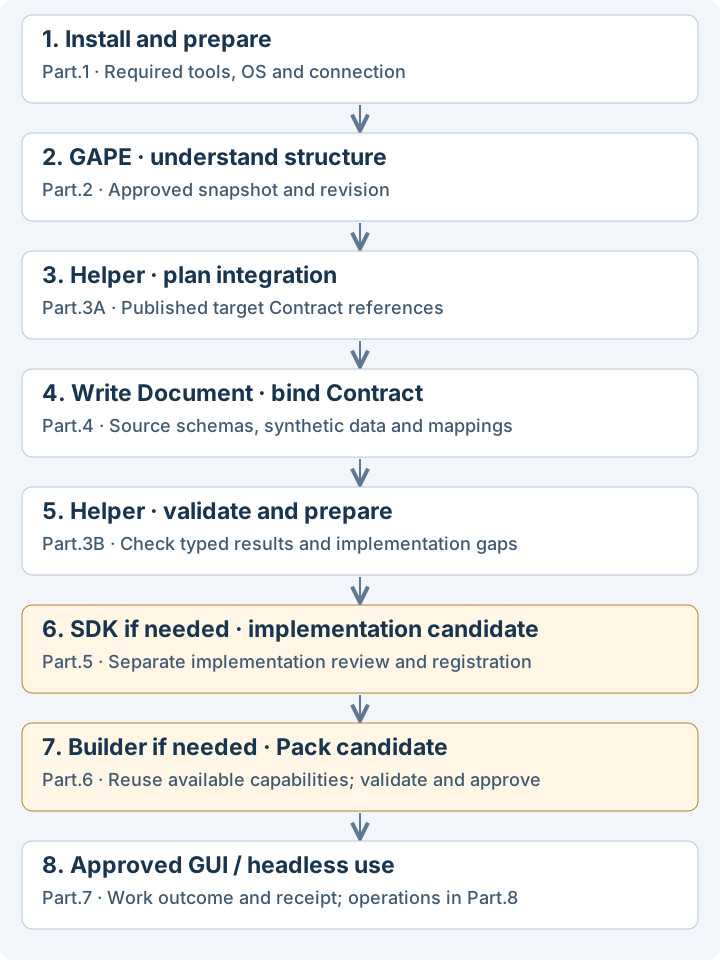
You do not have to run every tool after installation. The recommended path below is for a new integration and a new Pack. Part numbers now follow the normal authoring and usage flow. Return from Part.4 declarations to Part.3B validation; skip SDK or Builder authoring when it is unnecessary.
r2-plan-architecture requires that release's complete planning input and existing Contract, registry, owner and authority references. This differs from the later r2-discover request. Do not pass this manual's Custom API exercise JSON to the planning command.adapter.rs, libadapter.rlib, README.md and manifest.json. This candidate uses synthetic data and does not prove live API transport implementation, authentication or a production connection. Complete any required implementation/review and hand over through the release's separate registration path, checking its actual result. Skip this step for an existing implemented integration..rlib into Builder. Skip Pack authoring when an existing approved Pack meets the need.First it helps plan what connects where; later it validates the completed declaration, target and mapping. This does not mean every Helper command can run without a source declaration. Obtain published target Contract references before planning, then refine the source Document and mapping using Helper results. SDK and Builder cannot substitute for missing declarations.
| Situation | Path | Handover |
|---|---|---|
| Use an existing approved Pack | Install/connect → GUI/headless → current authority/preconditions → check Work outcome | Exact Pack, installation and Work references; receipt |
| Compose a new Pack from registered capabilities | Install → verify existing capability/target → Builder → candidate validation, approval and use | Capability revision, Pack candidate, validation and approval records |
| Add a Custom API integration and a new Pack | Install → GAPE → Helper planning → Document/target → Helper validation → SDK if needed → separate implementation review/registration → Builder → approved use | Inputs, revisions, typed decisions, candidates and unresolved items for each stage |
| What you have or where you are blocked | Next action |
|---|---|
| A GAPE viewer without source access | Read the approved supplied viewer's scope. Do not collect source for an unauthorized scan. |
| No published target Contract or planning input | Obtain supplied references. Do not match targets by display name. A source Document draft can proceed independently. |
| Helper refuses mappings, required fields or target revision | Correct the affected declaration in Part.4 and return to the affected Helper stage. |
| Helper scaffold says REQUIRES_IMPLEMENTATION | Check Part.5's supported scope and identify the implementation owner. Scaffold generation/SDK build does not prove a live connection. |
| An SDK candidate without registration | Hand the candidate and validation scope to the separate registration owner. Do not automatically promote it to Builder/Work use. |
| A validated Builder candidate awaiting approval/entitlement | Preserve it and obtain actual results for the exact approval and installation scope. Record validation and use separately. |
Online and offline environments can follow the same workflow. The optional SDK Rust set chooses a build environment; it is not the whole product's default operating mode.
Local documentation edition. Company connection, approval and enrollment require actual supplied material. Educational scenarios are not customer execution evidence. Apple signing/notarization and customer activation/delivery remain held.
Choose a purpose in a Guide, then use the relevant Part for exact tool steps. The same sequence, vocabulary and artifact roles apply in both.
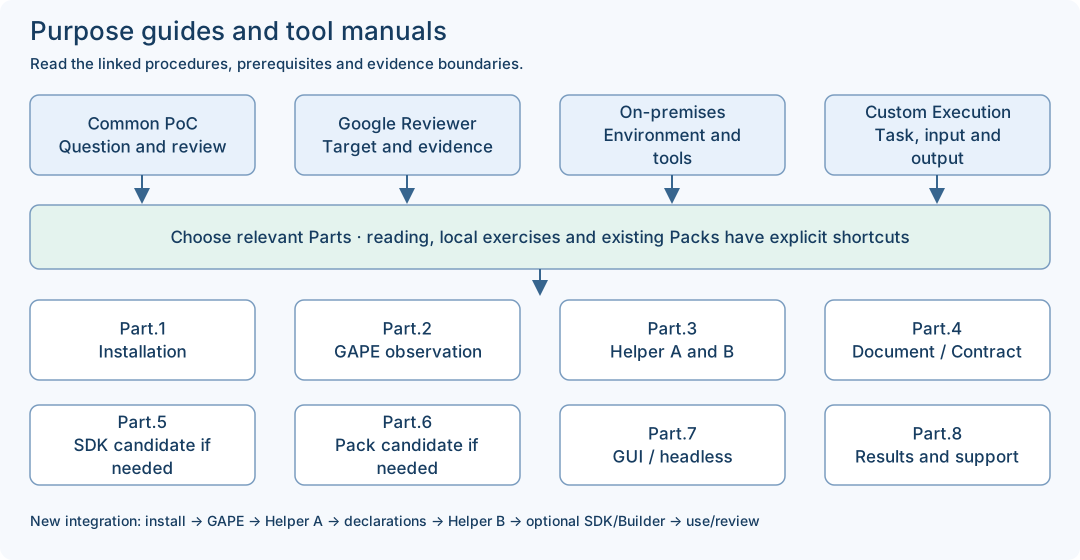
Choose a question, collect scoped observations and review the result. A retained-reading route needs no new installation.
Bind the exact review delivery and criterion evidence. Cloud access, document coverage and actual Google approval remain separate.
Prepare the exact OS, package, network choice and toolchain. Use the local SDK shortcut only after its prerequisites are supplied.
Choose a supported task. Keep source-document preparation, full SDK candidates and actual Work/report inspection as distinct routes.
Helper B checks the completed declarations before you decide whether implementation or a new Pack is needed. After an implementation or declaration change, repeat only the affected supported checks and finish the separate implementation/registration/Pack approval path before operation. A generated candidate grants no operating authority.
Select only the route needed for your goal. Retained PoC reading can begin without installation. A supplied local SDK exercise uses Part.1 → Part.5 and does not require a new GAPE scan or appliance account. An existing approved Pack can use Part.1 → Part.7 → Part.8 after its current prerequisites are checked. New integration/Pack authoring follows the full conditional sequence.
| Part | Role and expected boundary |
|---|---|
| Part.1 · Installation and first connection | OS preparation, supplied packages and first connection. Installation is not an executed Work. |
| Part.2 · GAPE observation, comparison and sharing | Revision-bound architecture observation. A worksheet is not the approved GAPE input manifest. |
| Part.3 · Integration Helper operation | A plans before the Document; B checks the completed full request. Each stage reads its typed status/reason. |
| Part.4 · Contract and Document authoring | Author the source Document and mappings; use the supplied target Contract/revision. JSON syntax alone does not establish semantic compatibility. |
| Part.5 · SDK Engine practice and candidates | Generate a local SDK implementation candidate. Reuse an implemented, registered, release-compatible integration when it already meets the need. |
| Part.6 · Builder and Additional Packs | Prepare a Pack candidate when a new Pack is needed. Reuse an existing approved Pack that meets the goal and installation scope. |
| Part.7 · PackrGUI and headless operation | Use the supplied GUI/headless route under its current authority and preconditions. Inspect the returned Work identity and result. |
| Part.8 · Operations, troubleshooting and support | Compare same-Work artifacts, receipt and closure; keep human acceptance pending until actually recorded. |
The status.read source-only example and the read_quality SDK exercise are different examples. Use a matching complete request; do not pass the status source file directly as the quality SDK request. Expected mapping values below are teaching expectations, not a newly captured run.
| File / role | Input | Output / check |
|---|---|---|
status-document.jsonSource-only CUSTOM_API declaration for status.read. Use it inside the complete supplied preparation request. | service: string | Declared service: string and healthy: boolean. This is a schema, not an observed service response. |
read-only-custom-api.json / custom-api-01.jsonThe complete maintained SDK base request; the guide copy is byte-equivalent JSON. | fixture.response.component = "fixture-component"; score = "97" (string) | STRING_TO_INTEGER maps score to expected integer quality_score 97. The documented SDK result is a local candidate. |
custom-api-02.jsonA complete second SDK request changing only the two fixture response values. | component = "my-test-component"; score = "88" (string) | Expected mapped component is "my-test-component" and quality_score is integer 88. Inspect actual manifest/stages; identical mapping source is possible. |
custom-api-score-number.jsonIntentional negative input, not a successful base example. | fixture.response.score = 88 (JSON number) against a declared string schema | Keep the actual typed failure result. Do not convert the example into a claimed successful candidate. |
Worksheet / SDK artifacts / Work reportsThree different artifact classes: human notes, local compiled candidate, actual Work/report/receipt records. | Use the matching tool and current target; never submit a worksheet or previous result as the next full request. | Bind outputs to the actual input, version, candidate or Work identity. File presence and exit 0 alone are insufficient. |
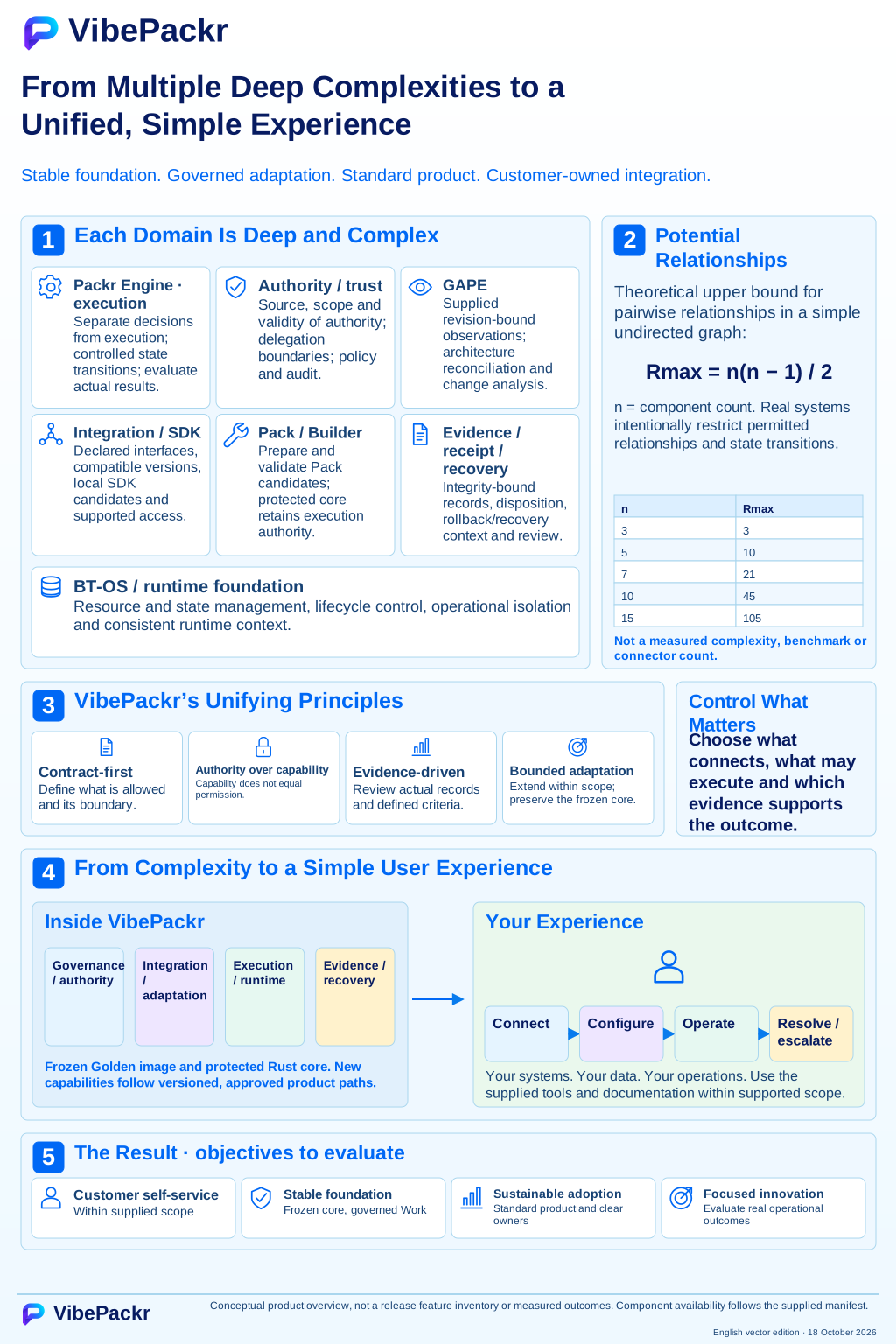
User-provided conceptual illustration. The n(n−1)/2 table is a theoretical upper bound for a simple undirected graph, not a measured integration count or benchmark. Listed components/features remain release-specific; this is not evidence of reviewer access or customer execution. The displayed edition is an English SVG with current documentation updates; the earlier raster original remains preserved.
The download contains the same Parts, images and synthetic exercise inputs. Extract the entire ZIP, then open index.html. No server or internet connection is needed to read the manual; product installation and SDK toolchains have their own prerequisites.
Technical references complement Parts 1–8. Their dated examples keep their stated scope.
Each retained reference states its own date, environment and limits. Reading a reference does not install, activate, register or execute a product.