01 · Choose the correct administrative surface
This guide uses VibePackr Admin for appliance administration. In the desktop application, the actual window title is Packr Administrative Console; its About page identifies VibePackr Administrative Console R0. VM Appliance Admin/VMAdmin refers to the appliance administration capability, not a separate sign-in method or a cloud-provider console.
| Surface | Use it for |
|---|---|
Headless / packrctl | Work and service readiness observations. |
| Packr Administrative Console | Bound appliance state and typed administrative requests. |
packr-appliance-admin | Provisioned appliance-local administration with an existing credential and exact request. |
| Packtory Admin | Asset administration in its separate dialog; its local sandbox initialization does not establish appliance administrator authority. |
| Cloud/OS maintenance | Host infrastructure; host privilege alone does not grant product administration. |
The CLI behavior below is checked against r232. Desktop labels describe the inspected Administrative Console R0 source; a delivered desktop build must be matched separately. They do not prove that this GUI is included in the r232 appliance.
Where to perform each procedure
Open the native desktop application’s Packr → Administrative Console menu (Mac shortcut Cmd+Shift+A) for the Console workflows. It can connect to a supplied Remote Admin profile. Run the file-based administration commands only in the provisioned appliance-local environment supplied by the operator; do not paste those paths into the desktop connection form.
| Goal | Complete procedure | Completion evidence |
|---|---|---|
| Observe before changing | Collect handoff → Connect/baseline → Interpret state and authority | Intended target and fresh observations, including any unavailable values. |
| Make one approved change | Restart walkthrough or Logging-change walkthrough → Audit/support | Action result, applicable revision, audit reference and effect/readiness observation. |
| Plan a lifecycle operation | Separate update, rollback, backup, restore or retirement checklist → Stale/uncertain outcome handling | Exact inputs and supported execution handoff; stop at the documented boundary if either is missing. |
The workflow hub separates these appliance tasks from asset library browsing and Packtory Administration.
02 · Check provisioning before connecting
- Confirm the exact appliance and installation for the organization you administer.
- Confirm an established administrator identity, current grant and authorized operation scope.
- For remote Console access, obtain the approved Remote Admin client configuration reference with its endpoint and mTLS configuration.
- For local CLI access, confirm the established admin state root, protected credential file and supported request file for the intended operation.
- Confirm the intended maintenance window and platform privileges for service changes.
Fresh r232 installation: supported initial customer administrator establishment is missing and the customer path is blocked at C7. An appliance that boots or performs Headless Work has not thereby provisioned Admin. Stop the Admin setup path if these prerequisites are absent. Do not initialize through a test seeder, shared credential or Packtory sandbox control.
The procedures below describe operations after correct setup. They preserve useful existing administration behavior without presenting the missing first-administrator setup as solved.
Request a complete administration handoff
| Responsible contact | Required handoff | Before using it |
|---|---|---|
| Delivery owner | Release and target identities; supported initial administrator establishment | If absent at C7, return the missing supported setup path to delivery. Do not use validation-only setup material. |
| Organization access administrator | Named Administrator identity, Grant reference and exact Grant revision; permitted lifecycle actions | Verify these refer to you and the intended organization/appliance/installation. A profile name is only a local label. |
| Appliance operator | Remote Admin client configuration reference with provisioned trust, or approved local state/request/credential file references | Check that the reference belongs to this installation. Exchange references through the approved channel; do not paste private contents into the manual or tickets. |
| Change/retention owner | Approved action, maintenance window, workload disposition and recovery/retention plan | Resolve pending Work and stop conditions before availability-changing or destructive lifecycle actions. |
The delivery owner should identify the person covering each responsibility. Missing inputs are actionable handoff gaps; they are not a request for the customer to construct a private request envelope.
03 · Observed connected workflow — 4 October 2026
An isolated task-local repaired candidate completed the connected sequence below on 4 October 2026: Connect at revision 0, one approved configuration update to revision 1, diagnostics, four audit entries, and a saved support package with PASS and 10 categories. These are actual native observations using disposable test provisioning, not Golden, a customer release or production proof.
The earlier disconnected observation used an absent historical profile. This later run used separately prepared task-local inputs; it does not make that old profile valid or establish the customer first-administrator setup. Follow the recorded connected steps and the eight-field handoff. The August example remains separately dated below.
04 · Walkthrough: connect, change, verify and save support
Purpose: connect to an intended managed target, make one approved configuration change, verify its revision and audit trail, and save a support handoff. Bring the current client configuration reference and the seven other fields in the connection checklist. The installation operator supplies the managed references; typing an identity or grant does not create authority. This example used a separately authorized disposable local test target.
1. Open the Console and confirm the target
- In PackrGUI choose Packr → Administrative Console.
- Check all eight profile fields against the supplied handoff, then select Connect once.
- Read Overview. Confirm the returned organization, appliance and installation before continuing.
Observed: the connection succeeded at revision 0. A saved form alone is not a connection. If connection fails or the target differs, stop before submitting a change and resolve the profile with its supplier.
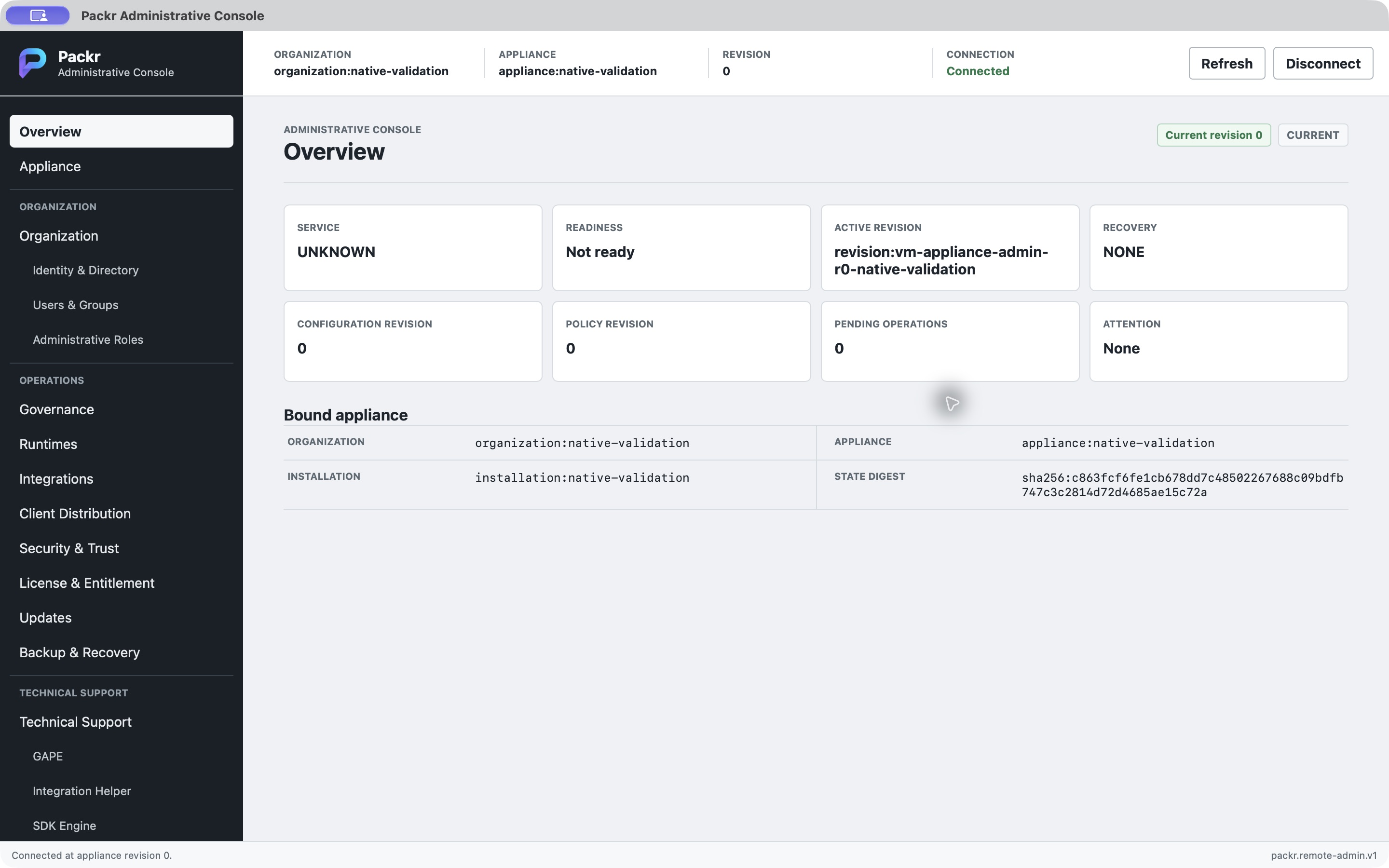
4 October 2026 · Isolated task-local repaired candidate. Connected Overview at revision 0. Original capture; synthetic test context, not Golden or customer-release proof.
2. Inspect Appliance before changing it
Open Appliance and read the current state and revision. Keep the baseline so you can distinguish a new result from an old screen. This test began at revision 0; service/readiness fields are separate from the success of an Admin connection.
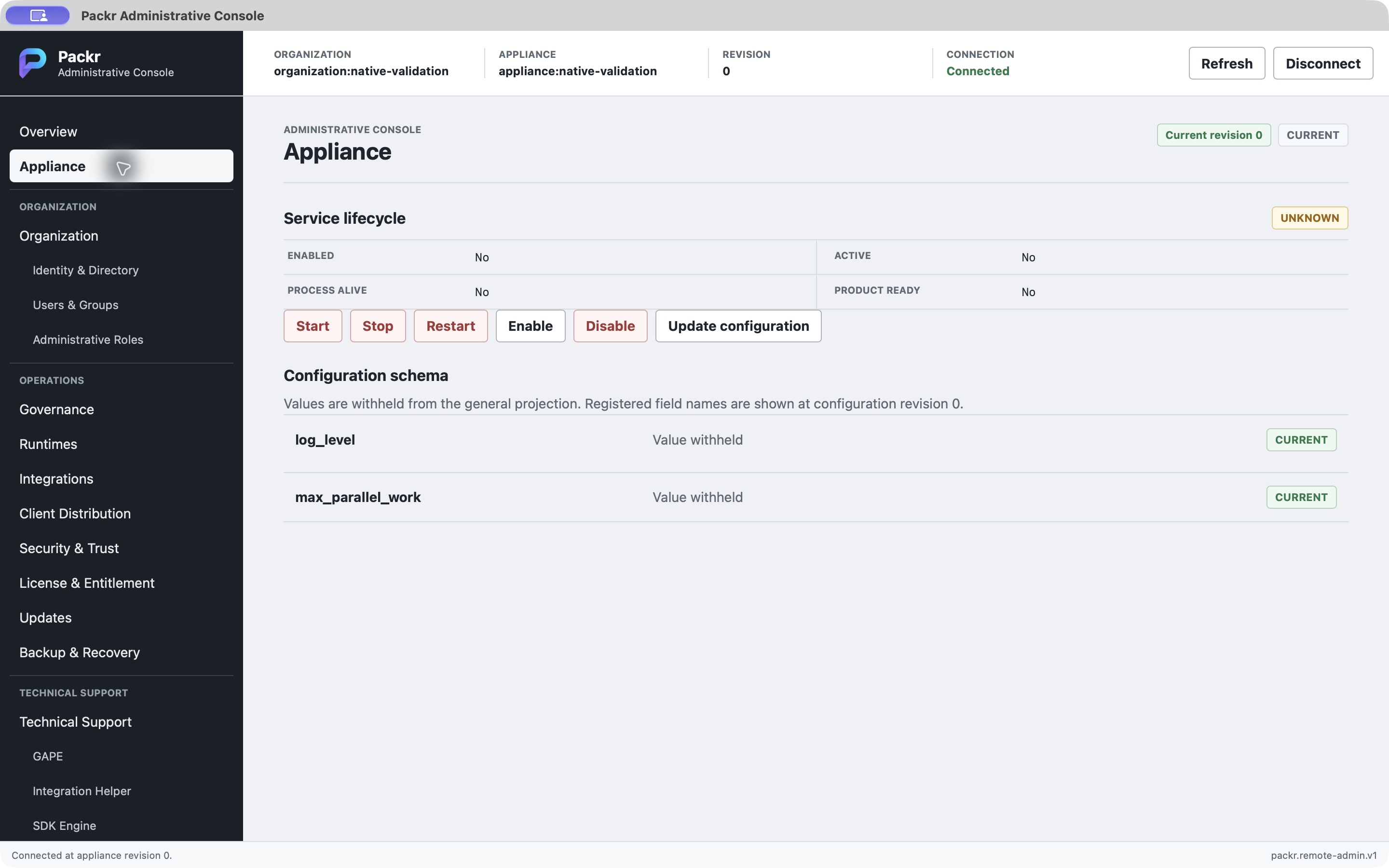
4 October 2026 · Isolated task-local repaired candidate. Appliance before the approved change. Original capture; synthetic test context, not Golden or customer-release proof.
3. Submit one approved configuration change
- Use Update configuration in Appliance. Confirm the approved configuration and expected current revision.
- Review the request before submission. The request dialog shows WARN. After application, the general result projection withholds configuration values; the canonical fixture receipt separately confirms the stored WARN value.
- Submit once, then read the returned action status and new revision. If the result is uncertain, inspect current state and audit before another submission.
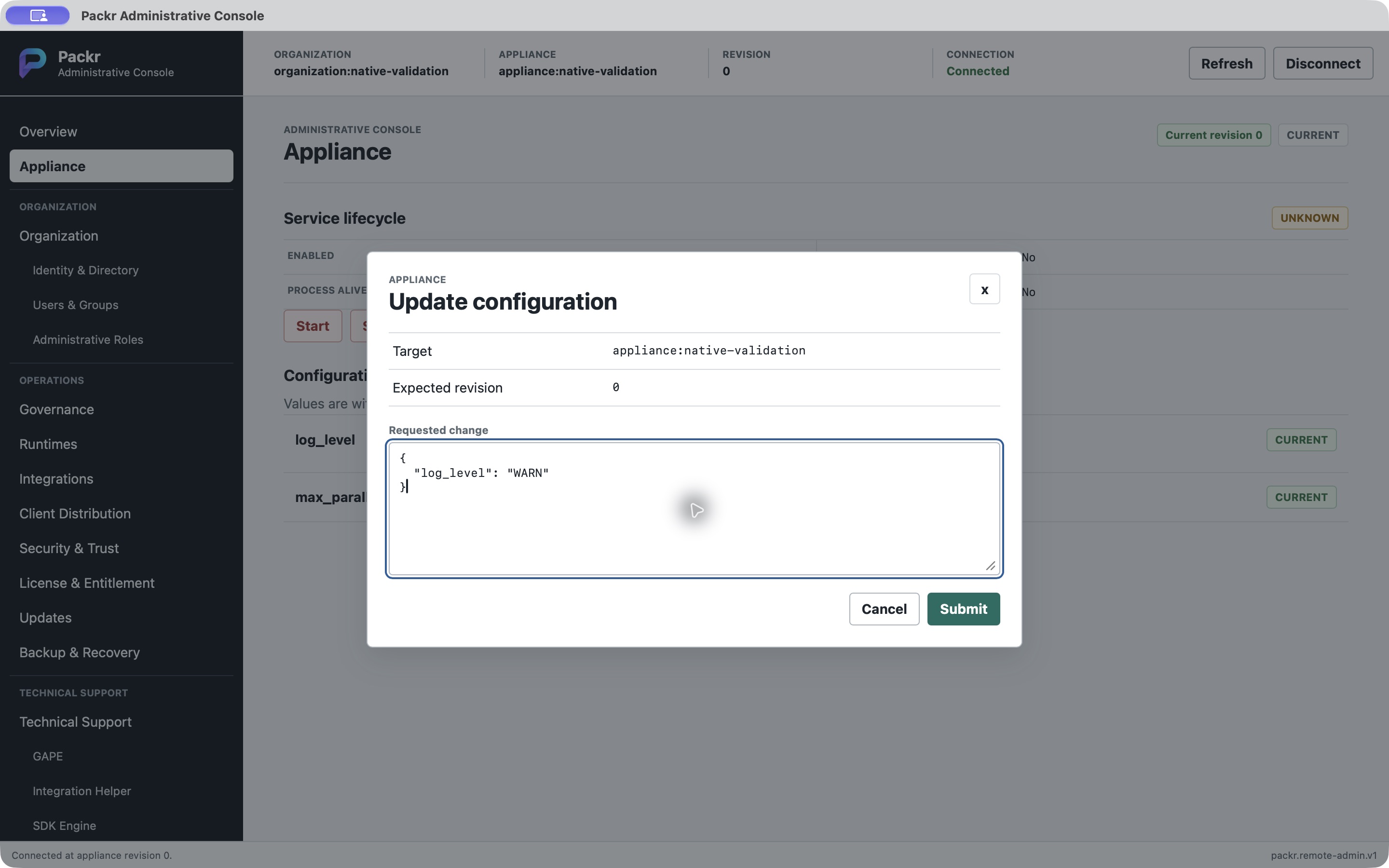
4 October 2026 · Isolated task-local repaired candidate. One configuration request before submission. Original capture; synthetic test context, not Golden or customer-release proof.
Observed: APPLIED, revision 1 and an audit reference ending in 0002. Completion here means this one approved change was recorded; it does not authorize further configuration or service actions.
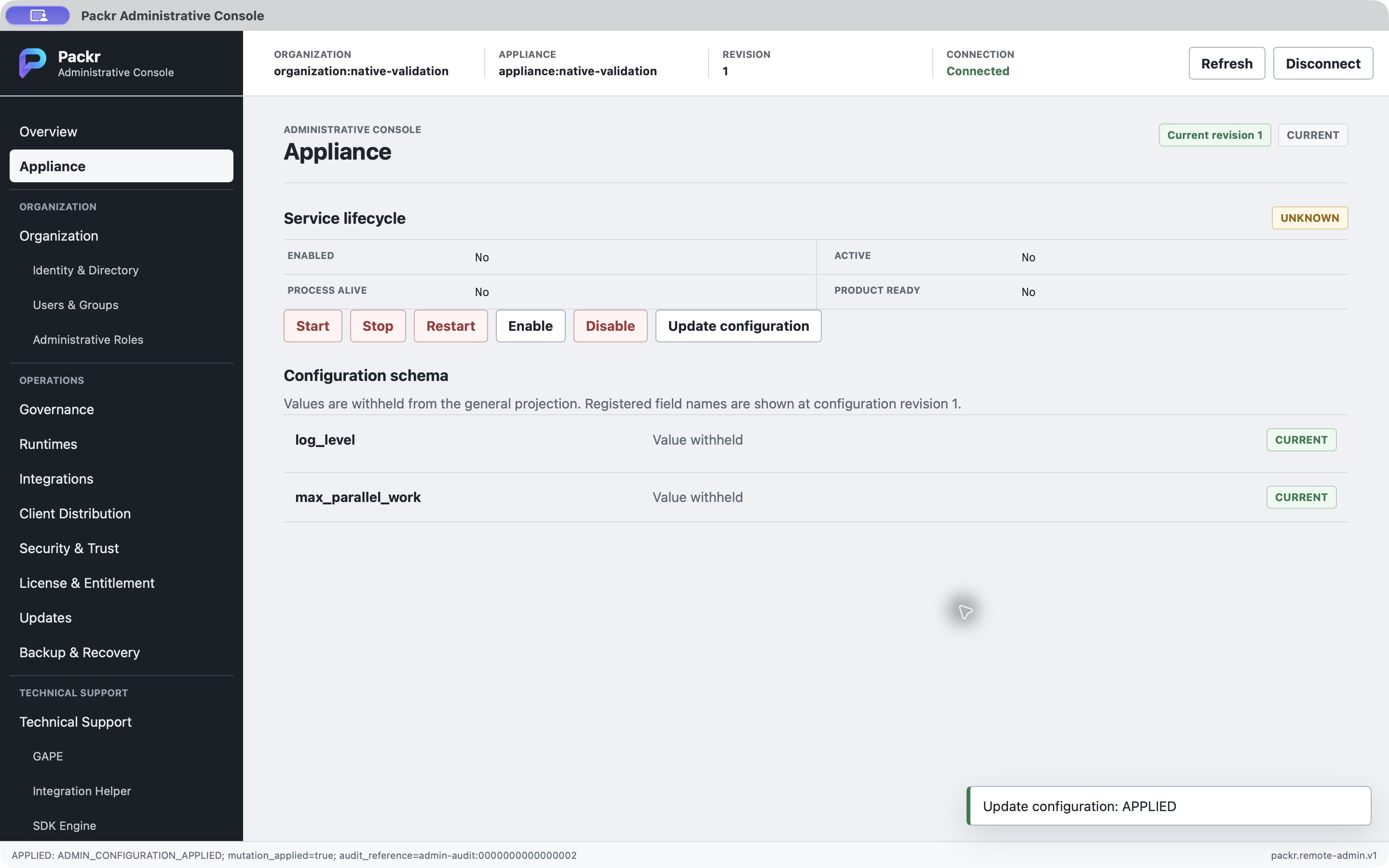
4 October 2026 · Isolated task-local repaired candidate. Configuration applied at revision 1. Original capture; synthetic test context, not Golden or customer-release proof.
4. Run diagnostics and interpret readiness separately
Open Diagnostics and select Run diagnostics. Read the returned result alongside service and readiness fields. The query succeeded in this run, while service was UNKNOWN and readiness was No. Successful diagnostics is not proof that a production service is healthy or ready. If readiness is required for your next operation, hand these actual states to the appliance operator.
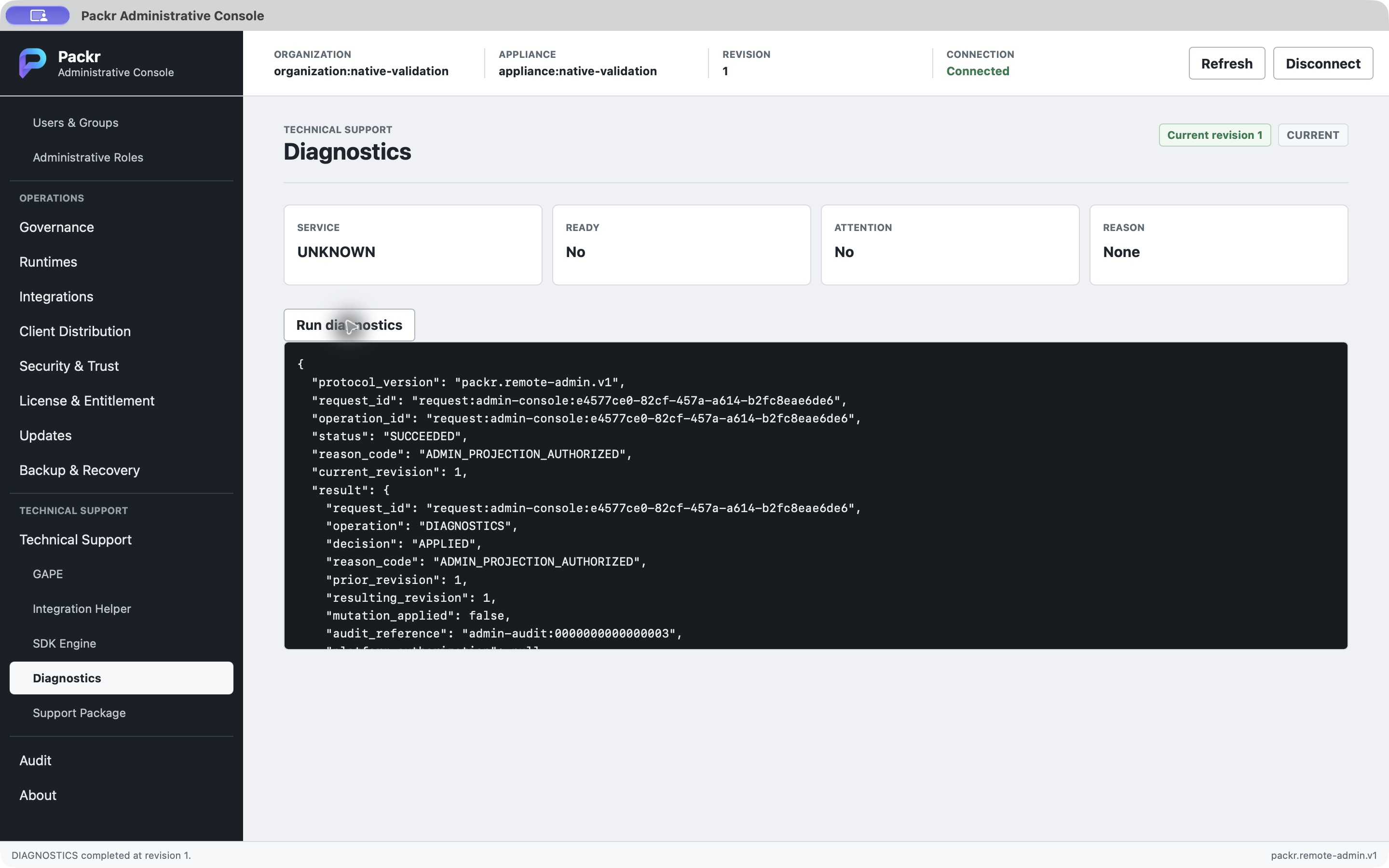
4 October 2026 · Isolated task-local repaired candidate. Diagnostics result and readiness limits. Original capture; synthetic test context, not Golden or customer-release proof. Only part of the returned JSON is visible; this image is not the complete response.
5. Read the audit trail
Open Audit and select Read audit. Compare returned entries with the connection and action sequence; retain the operation/revision references needed for review. This run returned four entries. That count describes this test target at this point, not every action available in the product. If the expected action is missing, reconcile its result and target before repeating the change.
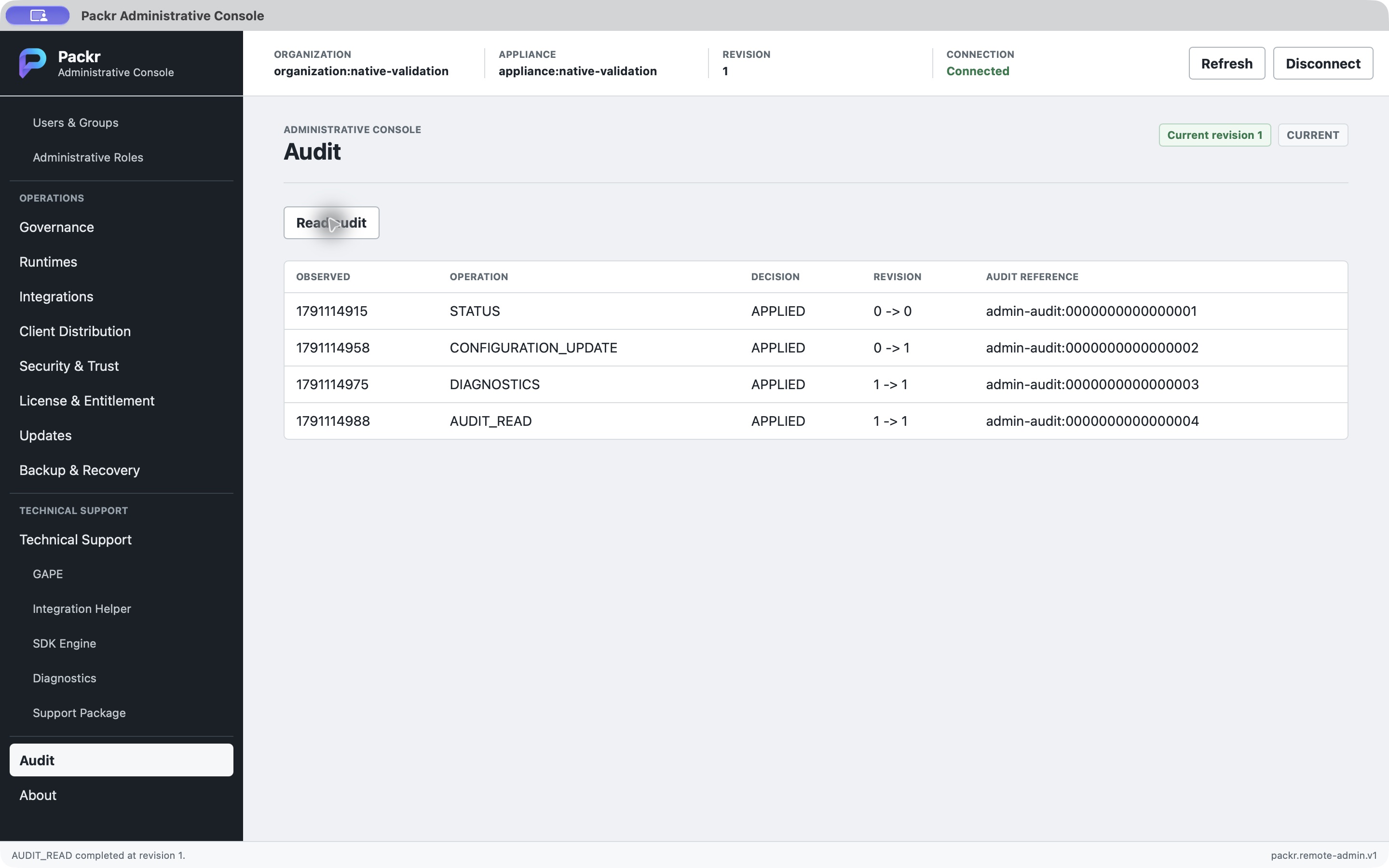
4 October 2026 · Isolated task-local repaired candidate. Four returned audit entries. Original capture; synthetic test context, not Golden or customer-release proof.
6. Save the support package locally
- Open Support Package and select Generate support package.
- In the native Save dialog, choose a new local destination for the JSON package and save it. Avoid replacing an existing handoff.
- After saving, review PASS and the displayed package identity/digest, and keep them with your support record. Generation and saving are separate completion checks.
Observed: the native save completed and the Console showed PASS with 10 categories. The package contains identifiers; review its contents and the approved sharing destination before handing it to support. No upload was performed. A cancelled or failed save is not a delivered file: resolve the destination and verify saving before claiming delivery.
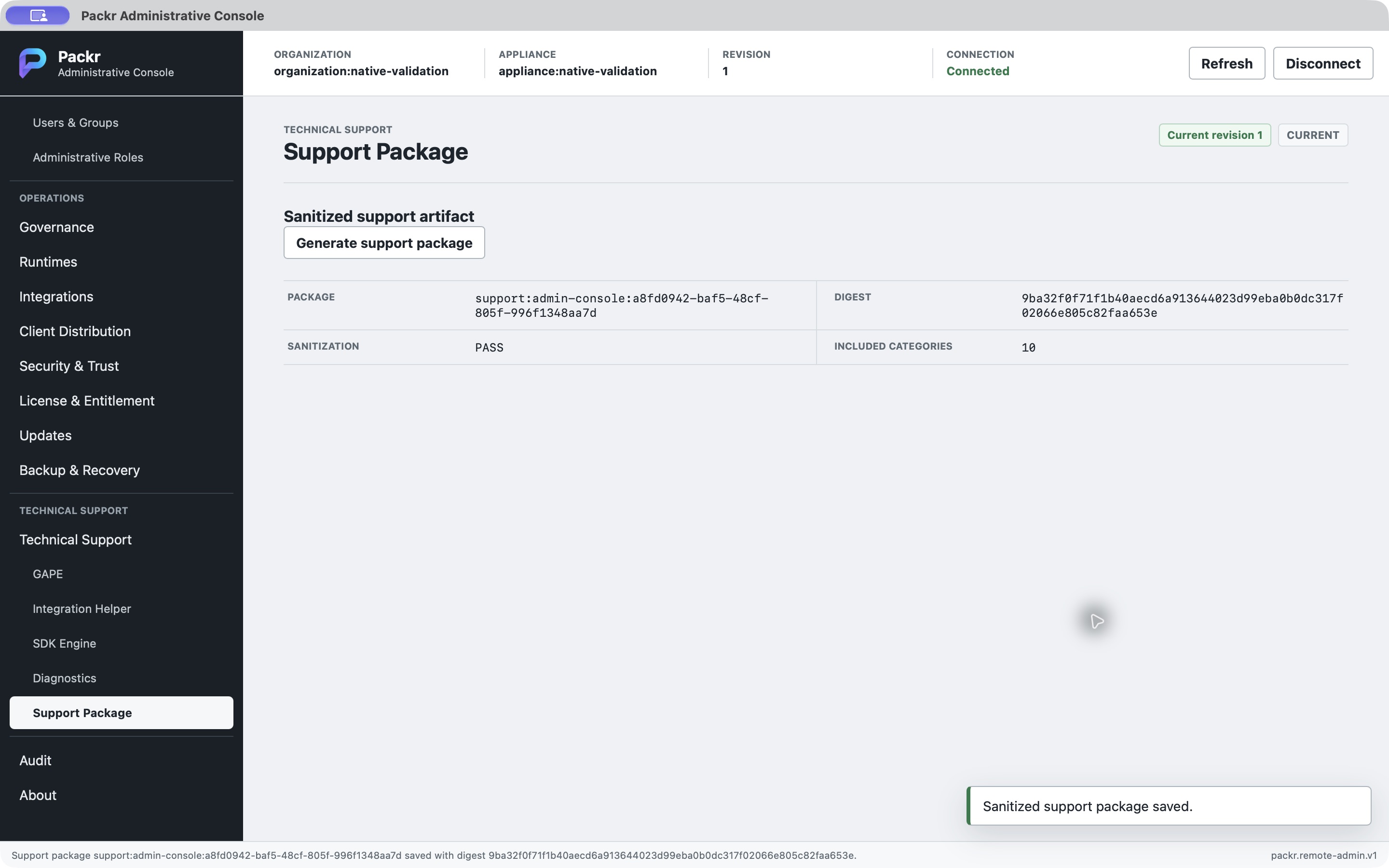
4 October 2026 · Isolated task-local repaired candidate. Support package saved with PASS and 10 categories. Original capture; synthetic test context, not Golden or customer-release proof.
7. Disconnect and finish
Select Disconnect. In this run the profile fields remained available while the canonical snapshot was removed. Retained fields must not be read as current appliance state. After the app and task-owned gateway were stopped, the disposable trial keys were removed. This cleanup belongs to the controlled demonstration; do not delete an organization's managed profile or keys as a routine disconnect step.
Completion record: one connection, one approved configuration update, successful diagnostics, four audit entries, one local support save and disconnect. Service lifecycle changes, a customer deployment, release validation and production readiness were not demonstrated by this sequence.
05 · Recorded example: native validation on 31 August 2026
Historical native validation against a separately prepared Debian test target. This example explains recorded configuration, audit and support results. It is not the separately recorded 4 October connected run, a customer deployment, or permission to repeat the operations. The two attempts below used different binaries and separate approvals; they are not one uninterrupted live flow.
Attempt 002: connect, inspect and change one setting
The retained receipt records one Connect, CONNECTED at appliance revision 0 and a census of 22 routes. These entry/census facts are receipt-backed; this guide does not present a connected revision-0 image or images of every route. Visiting a route does not prove every operation on it was effective.
The actual configuration result image shows Connected, revision 1 and Update configuration: APPLIED. The receipt records the log level changed to WARN and state/configuration revisions moved from 0 to 1. Configuration values are withheld on the screen, so WARN is established by the receipt rather than visible in the image. Service readiness remains unknown; this result does not establish a healthy running service.
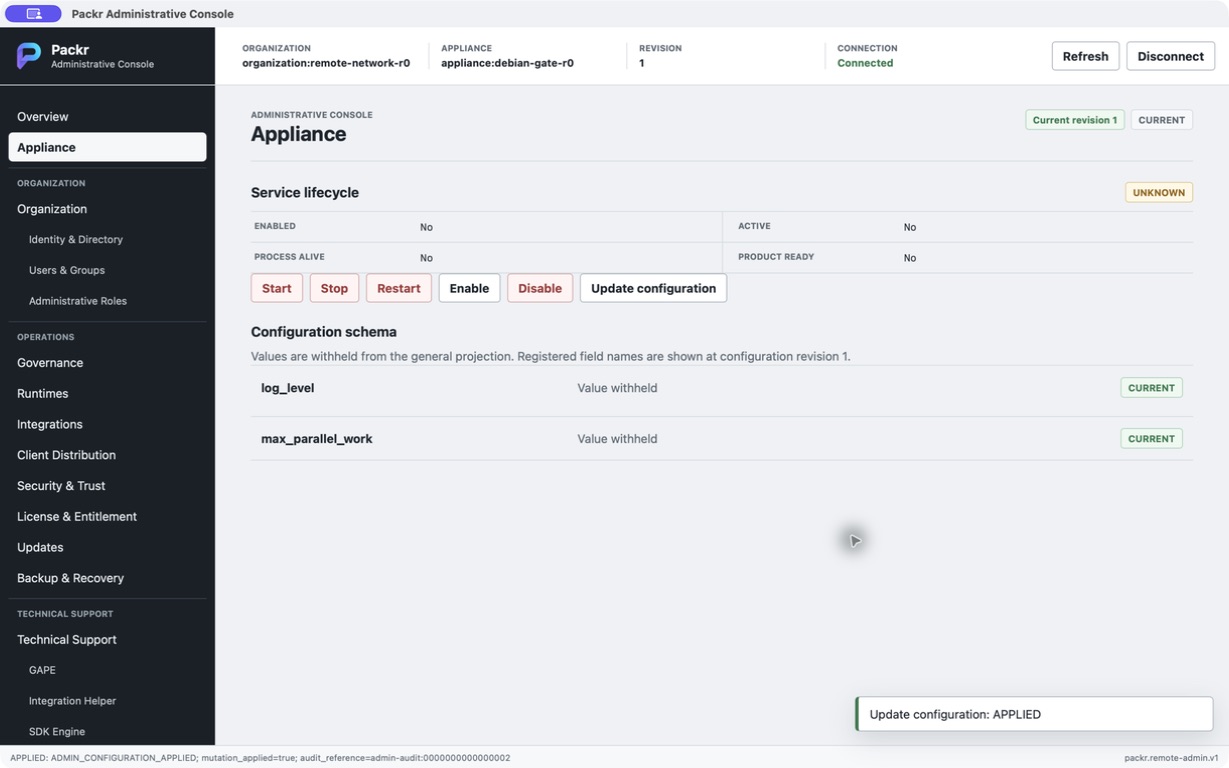
31 August 2026 native validation on a separately prepared test target. Update configuration returned APPLIED and revision 1. Values remain withheld; this screenshot does not display WARN or prove service readiness.
The audit image then shows three APPLIED rows: STATUS 0→0, CONFIGURATION_UPDATE 0→1 and AUDIT_READ 1→1. Read them as the historical request chain. They are not new requests made for today’s guide.
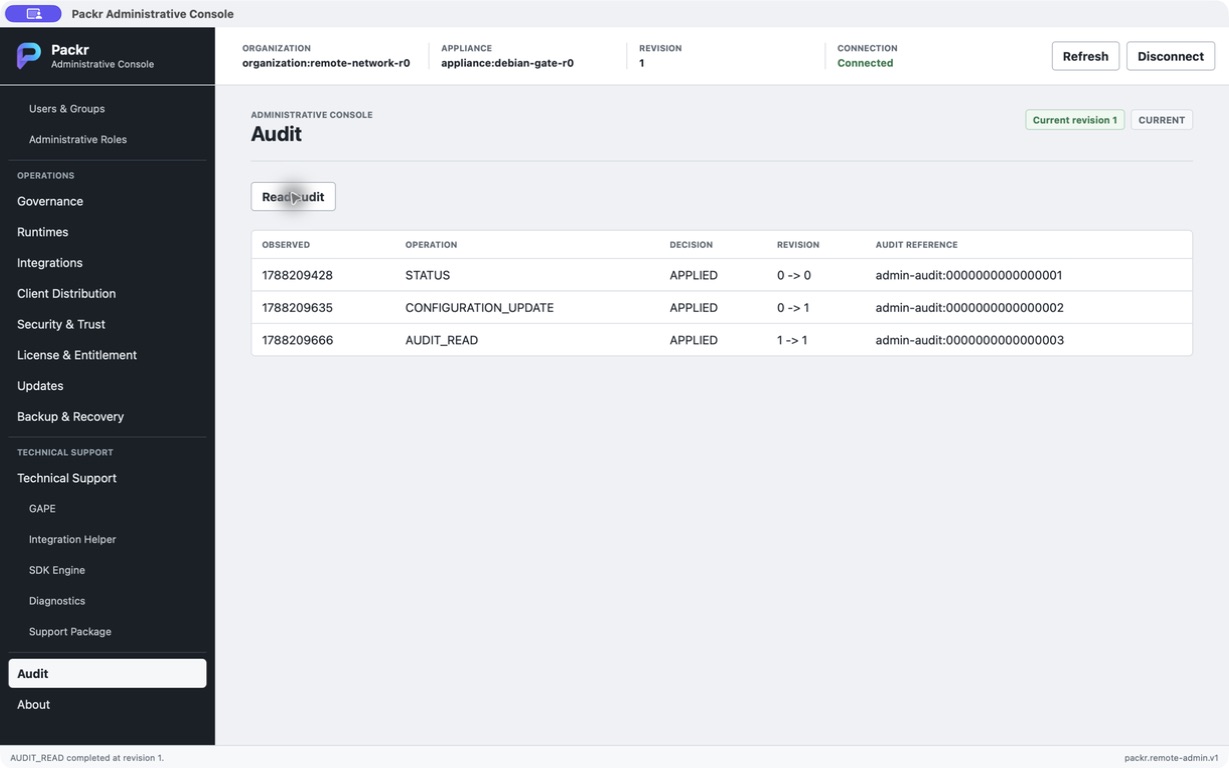
The same historical attempt displays STATUS 0→0, CONFIGURATION_UPDATE 0→1 and AUDIT_READ 1→1. This is retained test evidence, not a fresh query of the current installation.
Attempt 002 ended PARTIAL_FAIL: local support-package generation rejected the canonical digest format. The successful configuration and audit observations remain valid, while support generation did not complete in that attempt. A disconnect was recorded.
Attempt 003: separately approved support-only follow-up
After the digest repair, a different binary was approved for the support-only attempt. Its receipt records one Connect, local generation/save and disconnect, with no configuration change, route census or audit read. The original image shows sanitized support artifact PASS, 10 categories and saved confirmation. This completes that historical support step; it does not retroactively make attempt 002 an uninterrupted success or establish customer delivery.
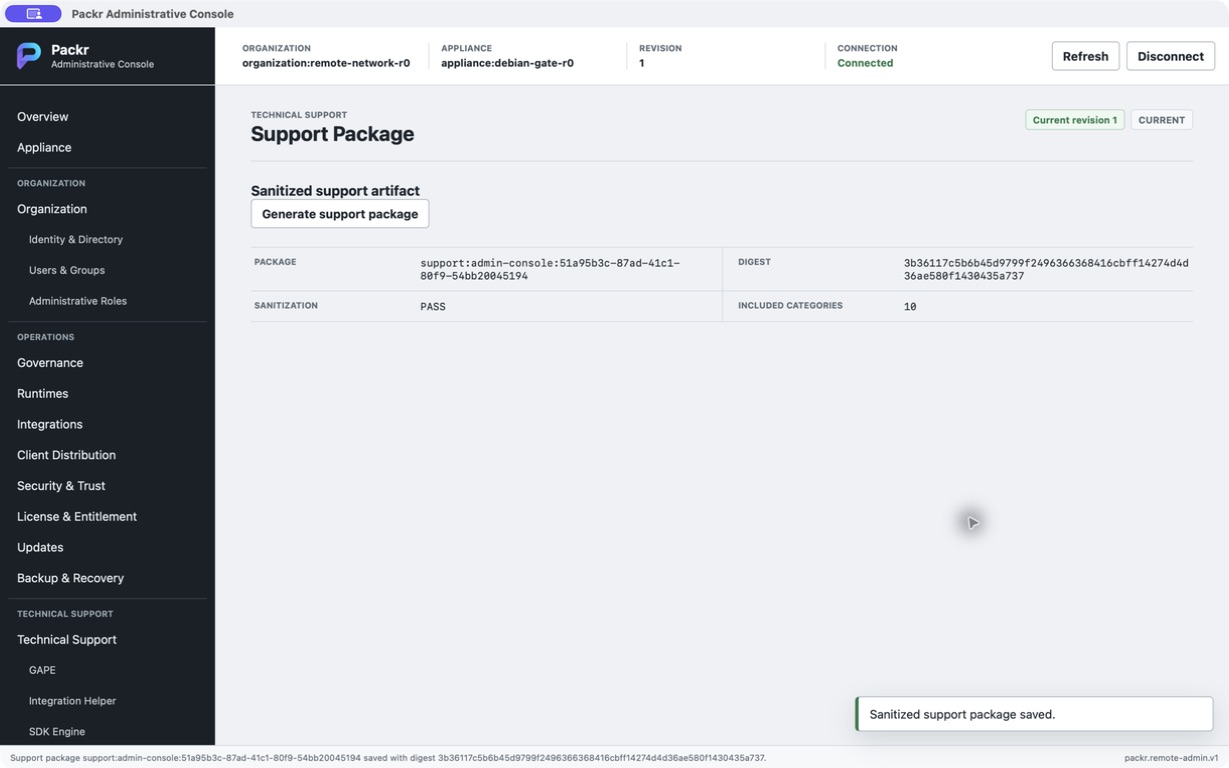
A separately approved successor binary completed support generation and save, displaying Sanitization PASS and 10 categories. Attempt 002 had failed this step; these are separate executions. Saving is not an upload or a support response.
Use this example to distinguish action receipt, visible state, audit evidence and saved support result. Current execution still requires the operator’s current profile and matching identity inputs. Historical target cleanup and the absent current profile file mean this record must not be used as a live reconnection recipe.
06 · Open and connect the Console
Your first session: prepare the eight fields
Ask the installation operator for one matching connection handoff. Confirm its intended appliance and administrator assignment before replacing any restored values. A saved profile is convenient form data; each opened Console starts disconnected.
| Field | Meaning and check |
|---|---|
| Profile name | Your recognizable local label. It does not identify or authorize the server. |
| Remote Admin client configuration reference | The absolute path to the supplied native client configuration file. Ask the operator to confirm its endpoint, trust material and client identity; do not paste private keys into the form. |
| Administrator identity | The assigned actor for this connection, supplied by the access administrator. |
| Grant reference | The existing permission assignment for that actor and target; a typed label does not create it. |
| Grant revision | The exact current revision of that assignment, not the appliance or configuration revision. |
| Organization reference | The organization the returned appliance must belong to. |
| Appliance reference | The exact appliance you intend to inspect. |
| Installation reference | The intended installed instance of that appliance; compare it separately from the appliance identity. |
Keep the handoff as: intended target and purpose; who supplied the profile; whether its current validity was confirmed; the assigned identity/grant revision; and the latest connection result/time. Keep private references in your approved local record, not in public screenshots. If the profile is historical or its validity is unknown, ask its owner to confirm those same inputs before connecting. The connected Work service and Packtory Administration authentication do not establish this separate connection.
- In native PackrGUI, choose Packr → Administrative Console, or use Cmd/Ctrl + Shift + A.
- Enter a Profile name and the supplied Remote Admin client configuration reference.
- Enter the supplied Administrator identity, Grant reference, Grant revision, Organization reference, Appliance reference and Installation reference.
- Select Connect. Verify the bound organization, appliance and installation before any change.
- On Overview, record the active product revision and state context. Use Refresh to obtain current state.
These are configuration references and identity fields, not a place to invent grants or paste private keys. A saved profile does not grant authority. If the target does not match, stop and correct the profile/target assignment rather than accepting another appliance.
Task 1 — Connect and establish a trustworthy baseline
Goal: observe the intended appliance before changing it. Obtain the handoff above. The following values are fictional examples of fields, not usable credentials or proof of a provisioned customer. Replace every value with the delivered reference; the configuration path is a placeholder.
| Connection field | Illustrative value |
|---|---|
| Profile name | Acme rehearsal |
| Remote Admin client configuration reference | /ABSOLUTE/APPROVED_CLIENT_CONFIG.json |
| Administrator identity | admin:acme-operator |
| Grant reference | grant:acme-operations |
| Grant revision | 3 |
| Organization reference | org:acme |
| Appliance reference | appliance:acme-test-01 |
| Installation reference | installation:acme-test-01 |
- Open Administrative Console and enter the eight fields. Select Connect.
- Compare the returned Organization, Appliance and Installation to the approved handoff. If any differs, disconnect and ask the access administrator to correct the profile binding.
- Select Refresh, then Appliance. Record Enabled, Active, Process alive and Product ready plus the current revision. Enabled true with Active false describes startup configuration and current state separately.
- Open Diagnostics → Run diagnostics, then Audit → Read audit. Retain the current result/reason and relevant references.
- Completion: the exact target is verified and current observations are recorded. A disabled action with disconnected, pending or stale context calls for resolving that context, not repeatedly clicking Submit. An authentication failure goes to the access administrator; a missing configuration reference goes to the delivery/operator contact.
07 · Read state and make one reviewed change
Finish a read-only baseline first
After a successful connection, use Refresh for a fresh STATUS result before reading Overview and Appliance. Record the target, result/reason, appliance revision and observation time. Route changes alone reuse the current displayed state. If a query fails and older values remain, label them as the previous observation. Configuration that is withheld or unavailable is not an empty configuration and is not permission to fill it with an example.
STATUS is a read of business state, but the service records administrative audit evidence and replay information for the request. Allow for those documented observation records when comparing before/after state; do not report that every file must be unchanged. The current recorded walkthrough includes one configuration update. Service lifecycle actions described below require their own approved task and were not performed in that run.
Overview shows Service, Readiness, Active revision, Recovery, Configuration revision, Policy revision, Pending operations and Attention. Appliance separates Enabled, Active, Process alive and Product ready. Enabled controls startup configuration; active/process alive do not establish product readiness.
- Refresh, verify the target and choose the intended action.
- Review the dialog’s target, revision and requested change. High-impact actions show an availability/durable-state warning.
- Submit once and wait for the response.
- Read
decision,reason_code,mutation_applied,resulting_revisionandaudit_reference. Refresh and check the intended effect.
| Decision | Interpretation |
|---|---|
AUTHORIZED | The request is authorized for a subsequent platform/authority handoff; the effect is not established. |
APPLIED | Read the mutation flag and refreshed state to establish the exact effect. |
DENIED / FAILED | Preserve the reason and effect information; resolve the exact cause. |
REPLAYED | An earlier request result is returned; do not count another execution. |
A top-level status: OK can accompany an authorized request. It is not enough to claim the service restarted or a backup completed.
08 · Local status and diagnostics commands
The following are verified command templates, not complete ready-to-run requests. Replace every path using the provisioned installation’s supported files. The STATUS request and DIAGNOSTICS request are different files with different operations; renaming a file does not change its operation. Full private request envelopes and credentials are deliberately not distributed in this manual.
packr-appliance-admin request --state-root /ABSOLUTE/ADMIN_STATE --request-file /ABSOLUTE/APPROVED_STATUS_REQUEST.json --credential-file /ABSOLUTE/PRIVATE_CREDENTIAL
packr-appliance-admin diagnostics --state-root /ABSOLUTE/ADMIN_STATE --request-file /ABSOLUTE/APPROVED_DIAGNOSTICS_REQUEST.json --credential-file /ABSOLUTE/PRIVATE_CREDENTIAL
All three options are required and their paths must be absolute. Read result and state, not just the command exit. On Linux, diagnostics adds bounded platform observations: service_state, service_enabled, socket_present, installation_identity_present and release/binary digests. A missing observation is not a healthy value.
Console equivalent: Diagnostics → Run diagnostics. Preserve the result for comparison, then recheck product readiness through Headless health. Diagnostics does not establish initial administrator credentials.
09 · Start, stop and restart with verification
In Appliance, the controls are Start, Stop, Restart, Enable and Disable. Enable/Disable change service startup configuration; do not treat them as Start/Stop. Remote requests may return authorization for a platform handoff; verify actual state separately.
The Linux local adapter can carry out the bounded service action after product authorization and with the required platform privilege:
packr-appliance-admin service --state-root /ABSOLUTE/ADMIN_STATE --request-file /ABSOLUTE/APPROVED_SERVICE_REQUEST.json --credential-file /ABSOLUTE/PRIVATE_CREDENTIALThis incomplete template requires a supported request for exactly one of SERVICE_START, SERVICE_STOP, SERVICE_RESTART, SERVICE_ENABLE or SERVICE_DISABLE. There is no additional action argument. The adapter targets the VibePackr control-plane service only.
Restart scenario: record the current target/readiness and pending Work; obtain the approved restart request for current state; submit once; inspect the result and audit reference; then verify Active, Process alive and Product ready. If the platform action succeeded but product readiness is false, collect its reason and diagnostics. Do not loop restarts.
Task 2 — Carry out one approved restart
- Input: the change owner supplies the restart approval, maintenance window and pending-Work disposition. Complete the connection baseline and confirm that you may interrupt this appliance.
- In Appliance, select Restart. In the review dialog, compare Target and Expected revision with the baseline. The service action’s Requested change is an empty object; do not add a service name or shell command.
- Select Submit once. Record decision, reason,
mutation_appliedandaudit_reference. If the result only authorizes platform execution, the designated appliance operator must complete the supported local adapter handoff; the Console response alone does not satisfy this step. - Use Refresh and diagnostics to inspect Active, Process alive and Product ready. After a transient disconnect, re-establish the authorized connection before checking; do not submit another restart just because the response was lost.
- Completion: retain the action/audit result and fresh service/product readiness. If authorization is denied, the access administrator resolves the exact reason. If the service is active but product readiness is false, the operator investigates the readiness reason. A timeout follows the exact-request reconciliation branch below.
Use the same review sequence for the other service actions
| Action | Approved goal / expected after observation | Exception and owner |
|---|---|---|
| Start | Start the intended service; check Active, Process alive and Product ready after the supported platform action. | If already active, record the current state and returned decision; do not assume a second process was launched. Operator investigates not-ready reason. |
| Stop | Stop the intended service within the approved interruption window; verify inactive/process state through the supported observation. | A lost connection alone is not stop proof. Operator confirms service state without submitting a replacement action. |
| Enable | Permit configured startup; inspect Enabled after the action. | Enabled does not mean currently running. Request a separate approved Start only if running is the intended task. |
| Disable | Disable configured startup; inspect Enabled after the action. | Disabled does not mean the current process stopped. Change owner decides whether a separate Stop is required. |
Use the restart walkthrough’s target/revision review and action receipt for each action. No service action repairs initial administrator setup or grants missing product authority.
10 · Change registered configuration
Use Appliance → Update configuration. The registered keys are log_level (ERROR, WARN, INFO) and max_parallel_work (integer 1–64, further limited by policy). These changes do not require a restart under this contract. The general projection withholds configuration values and shows field names/revision.
Mini scenario — change logging to WARN: Refresh; open Update configuration; review the supplied log_level change; submit once; check decision, mutation flag, resulting revision and Audit. A newer configuration revision alone does not prove that an unrelated Work used the setting.
Governance → Update policy addresses the registered maximum_parallel_work policy. A larger number in configuration does not override the policy maximum or create authority. If rejected, inspect the permitted range and policy rather than repeatedly lowering/raising values without review.
SSO/Directory and general Users/Groups administration are deferred in Console R0. Do not interpret those navigation entries as working identity-provider setup.
Task 3 — Review and apply the registered logging change
Input: the change owner approves moving this installation’s logging to WARN. This minimal example is the visible Requested change payload, not a complete private request.
Minimal visible configuration-change example. This is not a complete private request or authorization to apply it.
{
  "log_level": "WARN"
}- Refresh the exact target, record both appliance state revision and configuration revision, and open Appliance → Update configuration.
- Compare Target and Expected revision to the appliance state revision, not to configuration revision. Review the Requested change above; select Cancel if it does not match the approved change, otherwise select Submit once.
- Record the returned decision/reason, mutation flag and audit reference. Refresh and compare configuration revision, then Audit → Read audit for the matching action.
- The general Configuration schema view withholds values. Do not call that view proof of the effective WARN value: ask the operator for the installation’s supported effective-value observation when that proof is required.
- Completion: an applied result and corresponding audit/revision are recorded. No restart is required by this configuration contract. For stale revision, refresh and review anew; for invalid configuration, check key/range/policy with the administrator before resubmission.
11 · Updates, backup, recovery and retirement
Update/Rollback exposes Stage update, Apply staged update and Roll back. Stage must precede apply; the product, architecture, revision and artifact identity must match the authorized target. Replace every placeholder in a reviewed request. Possession of an artifact is not permission to apply it, and a request returning AUTHORIZED is not a completed update.
Backup/Recovery exposes Create backup, Verify backup, Validate restore, Apply restore and Reconcile recovery. Use the exact approved backup and manifest identity, original customer/source identity and current target identity. Verify before restore, validate the target before apply, and reconcile partial effects. Never substitute “latest,” restore another customer’s state or overwrite Work history to make versions appear consistent.
The current r232 production connection and fresh-target restore path have separate unproven/unconnected limits. These controls describe existing request and authority-handling capability; they do not constitute an end-to-end production recovery runbook.
Retirement is an authorized, history-preserving appliance action through local packr-appliance-admin retire using the same three required file options. It is not an uninstall or data-deletion shortcut, and Console R0 exposes no retirement button. Arrange retirement as an explicit lifecycle operation after reviewing pending Work and retention.
Use a separate checklist for each lifecycle task
These are request/review checkpoints for an already authorized, provisioned installation. The delivery/operator team must supply the supported execution and artifact handoff for that target. Where that handoff is unproven, complete observation and preparation, then stop before mutation. At every Submit, retain the decision, reason, mutation flag, revision and audit reference as the action receipt; correlate it with Audit and the resulting state.
| Task | Inputs and sequence | Stop point / completion checkpoint |
|---|---|---|
| Update | Release owner supplies the exact approved product, target revision, architecture and artifact digest. Refresh → Update/Rollback → Stage update. Replace all template values in Requested change, compare Target/Expected revision, Submit once. Only after the exact stage is confirmed, review Apply staged update against the same identity. | Stop for placeholder/empty digest, mismatch or missing platform handoff. Completion needs stage/apply receipts, resulting active revision and readiness, not AUTHORIZED alone. |
| Rollback | Change owner supplies the exact previously approved rollback identity and retained artifact plus the reason for rollback. Record current revision and pending Work; Refresh → Update/Rollback → Roll back; review the exact target/artifact and Submit once. | Stop if the rollback artifact is unavailable or the history/compatibility decision is unresolved. Retain rollback receipt, restored active revision and post-action readiness. Do not guess “previous.” |
| Backup | Retention owner supplies backup identity, scope and recovery authority reference. Refresh → Backup/Recovery → Create backup; review customer/source identities and object inventory. Keep the returned backup and manifest identities; use Verify backup for that exact pair. | Stop if the artifact/manifest handoff is missing or verification fails. Completion needs create and verify receipts plus an obtainable retained backup, not merely a displayed digest. |
| Restore | Recovery owner supplies the verified backup/manifest, original customer/source identities, exact current target identities and authorized restore scope. Review Validate restore first. Inspect its result before separately reviewing Apply restore; reconcile partial effects through Reconcile recovery. | Stop before apply for failed validation, target mismatch or missing supported target execution. Completion needs validation/apply/reconciliation receipts as applicable, intended state and readiness. A fresh-target path is not established by these controls alone. |
| Retire | Lifecycle owner supplies explicit retirement authority, pending-Work disposition, preservation obligations and the approved local retirement request/credential references. Operator records baseline, invokes the supported local retire command using the three required file options, and inspects the returned result/state. | No Console retirement control. Stop if retention/authority is unresolved. Keep retirement decision/audit and the preserved-history checkpoint; retirement does not authorize deleting the VM, disk or backups. |
12 · Resolve stale, uncertain and denied requests
| Symptom | Inspect and act | Recovery check |
|---|---|---|
STALE_REVISION | Refresh the current state and review the change again. Do not overwrite the expected revision blindly. | Target and revision match the newly reviewed request. |
REMOTE_ADMIN_OPERATION_TIMEOUT_UNCERTAIN | Preserve the pending request; open Backup/Recovery → Reconcile exact request for that pending request before another submission. | Read reconciled result and state; no duplicate submission. |
SESSION_INVALID | Stop mutation and re-establish authorized connection after resolving the reported reason. | Fresh session and current target/grant binding. |
| Target mismatch or authentication rejection | Check assigned profile and organization/appliance/installation/grant references. Do not disable trust verification. | Exact intended target is returned. |
PLATFORM_PRIVILEGE_REQUIRED / SYSTEMD_OPERATION_FAILED | Inspect the platform failure with the appliance operator. Product authorization and OS privilege are separate. | Recorded action result plus service and product readiness. |
INVALID_CONFIGURATION | Check registered keys, value range and policy maximum. | Reviewed change is applied and audited. |
CLI error spelling can differ from the typed result reason. Preserve the literal returned error.code and result.reason_code. Local CLI exit 2 identifies arguments; 4 covers authority failures; 5 covers the listed contract/operation failures; other failures use 3. Interpret the structured result as well.
Keep the failed change attached to its original request
| Branch | Continue only after | Sanitized handoff |
|---|---|---|
| Stale revision | Refresh, compare the new appliance state to the original approved intent, and re-review the action. If the target or intended change no longer matches, Cancel and return to the change owner. | Original action, expected and observed appliance revisions, reason and audit reference. Configuration revision is a separate field. |
| Uncertain timeout | Use the existing pending request’s Reconcile exact request control. Inspect the reconciled decision and fresh state before deciding whether any further action is needed. | Pending request reference, action, target, timeout time and literal reason. Ask the administrator/operator to reconcile, not issue a duplicate request. |
| Denied or session invalid | Resolve the literal reason with the access administrator and re-establish the legitimate connection. Recheck target and current revision before a newly reviewed action. | Administrator/grant reference and revision, target references, reason and time. Exclude credential files and secrets. |
| Backup/update approved but no artifact or execution handoff | Return to the corresponding lifecycle checklist. The delivery/recovery owner supplies exact artifact/manifest identity and the target’s supported execution/acquisition procedure. | Stage/verification result, artifact references, missing handoff item and required effect. An AUTHORIZED result stays authorization-only. |
13 · Audit and support handoff
- Open Audit → Read audit. Correlate operation, decision, revision transition and audit reference with the request you submitted.
- Open Diagnostics → Run diagnostics to collect bounded state observations.
- Use Support Package → Generate support package where available. Review the displayed Package, Digest, Sanitization and Included categories.
- Share through your approved support channel only after checking the package’s scope and sanitization. Generating a package does not upload it or establish support entitlement.
Include release, target context, time, expected action, actual decision/reason and sanitized request/audit references. Exclude credentials, private keys, raw confidential payloads and unrestricted logs. Keep the original records internally and redact the copy shared for support.
Return to Headless operations to verify Work readiness, Packtory Admin for asset administration, or Troubleshooting for a cross-surface diagnosis.
Complete Diagnostics and Audit as two observations
- With a current connection, open Diagnostics and select Run diagnostics. Save the returned result/reason, target and revision. A disabled button while disconnected means the query has not run.
- Open Audit and select Read audit. This requires the assigned audit-read permission; a successful STATUS does not guarantee it. Read the returned current records or explicit unavailable/denied result.
- Finish by distinguishing diagnostic observations from audit records, and identifying any unanswered question for the installation or access administrator. Do not generate a support package merely to finish this read-only task.
- Disconnect when finished, close the Console and confirm the original Work remains selected. Record the final connection state and any unresolved step.
For a precise resumption handoff, provide the last completed step, visible state/reason, whether the data was fresh or retained, client version, observation time and responsible contact for the missing input. Share permitted target references privately. Do not claim Diagnostics or Audit completion from a restored profile or an enabled navigation tab.