01 · Bring an existing Work into Engineering
These menu observations and captures are retained from R9/R10. The R11 change concerns the global Audit Report surface; its implemented route and observed local native display are described in the final report guide. It does not establish new outcomes for these workspace tools.
Purpose: inspect the recorded engineering context of one Work. First retain the Business Work ID and result. Choose Engineering Workspace in the workspace selector, then IDE. Check Active Work before reading any lifecycle panel.
The observed local audit Work appeared in Engineering Work Control. This navigation did not modify source or run a build/test. The top-level controls include IDE, Runtime, Audit, Reports, Memory, Packs and Operations; lifecycle tabs inside IDE are a separate navigation layer.
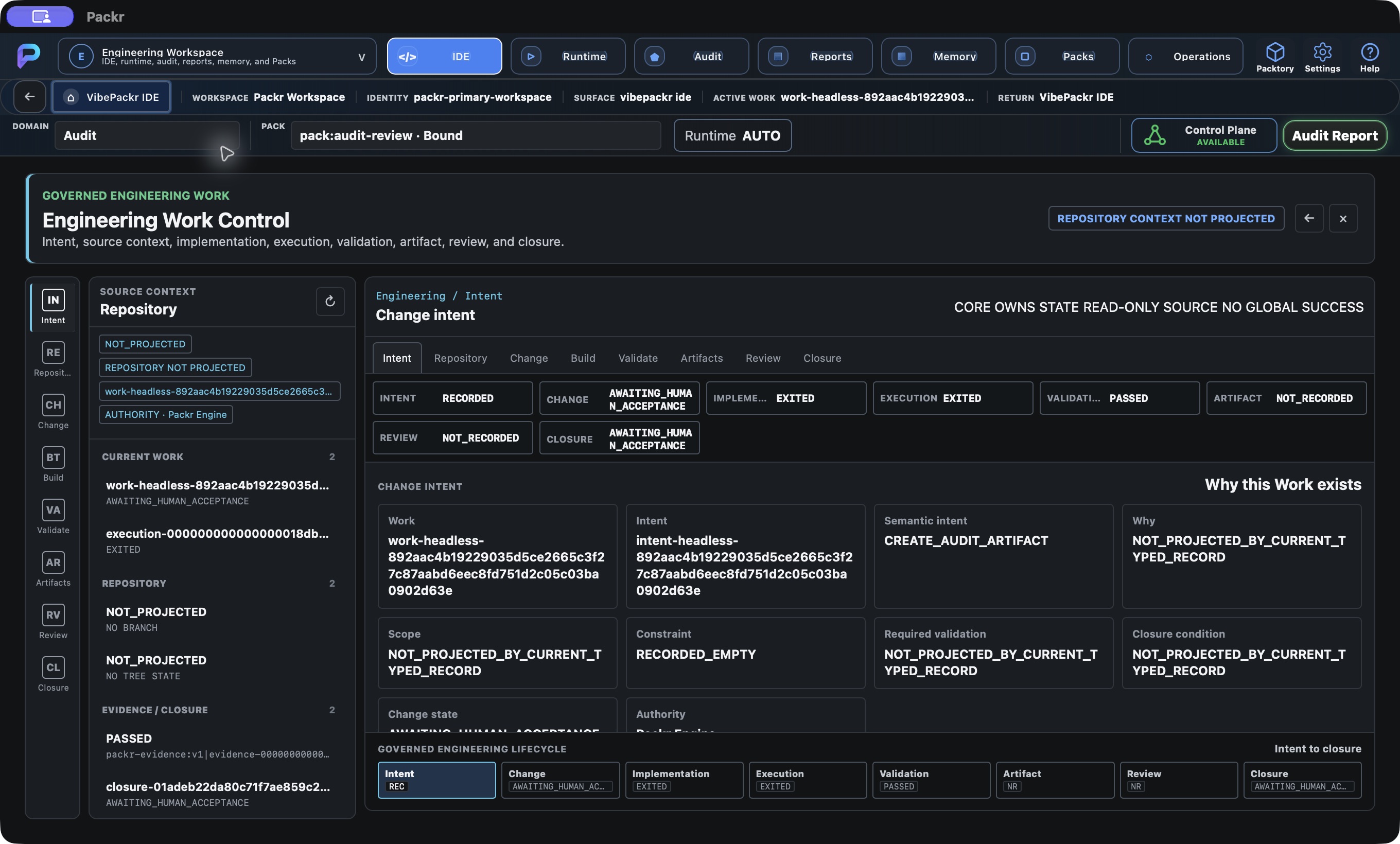
Engineering workspace preserves the same Work; local audit intent recorded and repository context not projected. Local R234 candidate, 4 October 2026; not customer r232 delivery.
02 · Choose the engineering question first
Obtain the Work ID, intended change, repository identity/revision where relevant, expected validation and reviewer from the engineering owner. Inside IDE, follow Intent → Repository → Change → Build → Validate → Artifacts → Review → Closure to inspect those questions. The toolbar Runtime, Audit, Reports, Memory and Packs opens separate tools; Operations switches workspace.
This candidate’s inspected engineering path reads existing records. Its source editor is read-only. The Business local audit run supplies a real Work for observation but does not demonstrate a code-edit/build/test workflow. Where a required record is missing, identify the missing record and owner rather than treating the stage as completed.
03 · Intent: establish why this Work exists
Choose Intent / Change intent. Match Work and Intent with the request supplied by its owner. Read the recorded purpose, constraints, required validation and closure condition where present. A field that is not projected remains unresolved; do not fill it from the Work title.
This is a reading step, not a new request editor. For an existing Work, preserve its identity and continue to Repository. If no Work is selected, recover the intended context through Business/My Work or the supported operator query. If a new task is required, obtain its supported submission route; the demonstrated Business route only covers the bounded local audit operation.
04 · Read intent and repository limits
Start with Intent (Change intent), then inspect the Repository context. Match the Work before interpreting its purpose. The actual screen reported NOT_PROJECTED, REPOSITORY NOT PROJECTED, NO BRANCH and NO TREE STATE.
For this audit Work, those fields provide no repository branch, diff or working-tree evidence. Do not interpret the Implementation EXITED badge as code changed. If your task needs repository review, ask the engineering owner for that Work’s supported source-context projection. Keep the missing context recorded; this tutorial does not connect or repair a repository.
Observed: The Repository stage showed identity, branch, revision and other repository fields as NOT_PROJECTED.
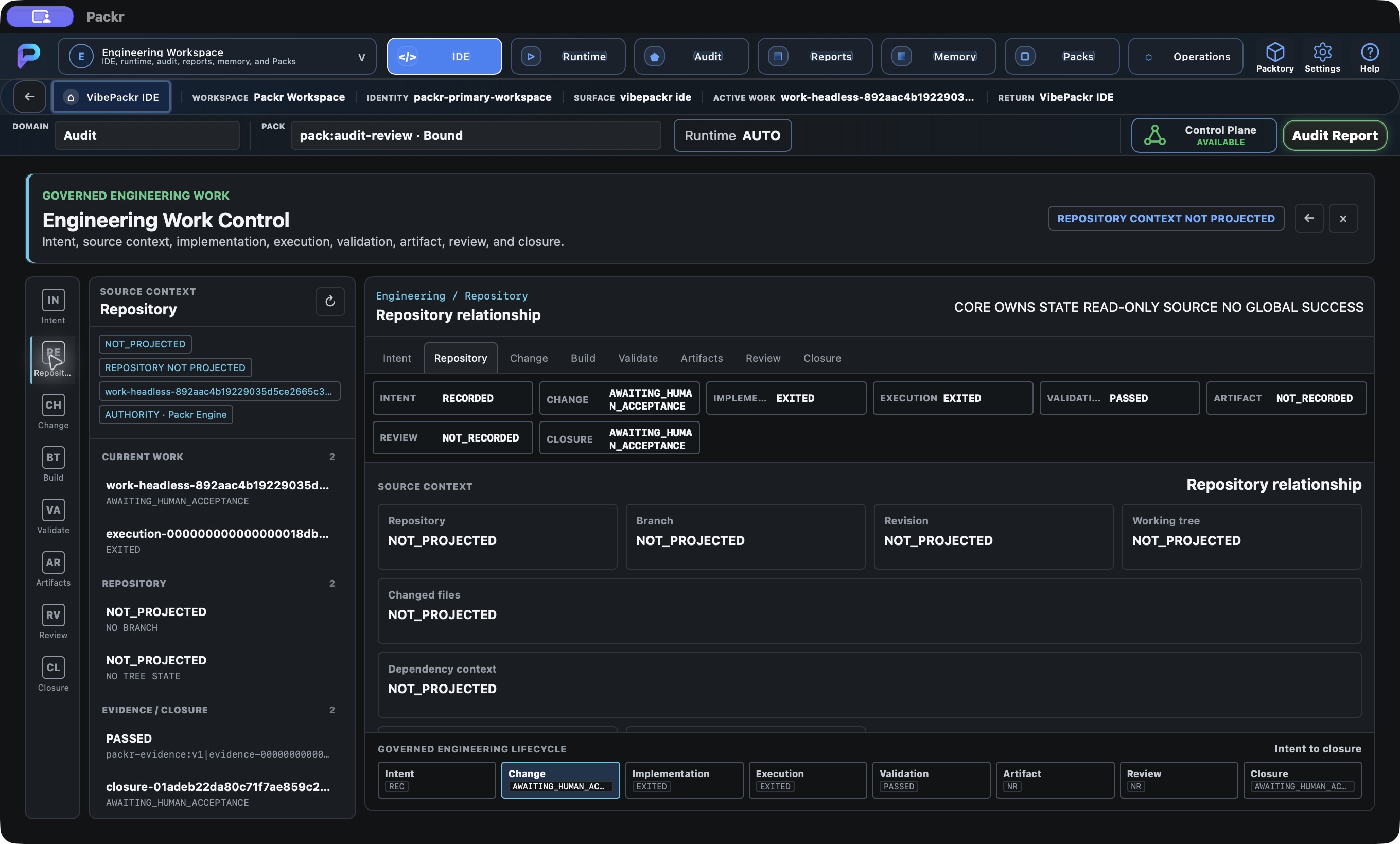
Engineering Repository: no repository context projected for this Work Local R234 candidate, 4 October 2026; no new Work submitted.
05 · Change: inspect source and recorded scope
- Choose Change / Implementation and change surface after checking Repository identity, branch and revision.
- Read Current source, Source context, Related Work, Changed scope and Before/after. Compare the related Work with the retained ID.
- If the supported repository projection supplies changed files, select a file for read-only source inspection. This conditional path is source-defined; populated source inspection is not established by the audit example.
- If NOT_PROJECTED or no changed source is shown, keep that exact state and ask the repository owner for the required source context. Continue to Build only to read its existing records.
An EXITED implementation badge reflects the selected execution state; it does not prove source modification. Do not type replacement code into this read-only surface or infer a patch from its menu name.
Observed: Change showed the selected Work while source context and changed scope remained NOT_PROJECTED. No source edit was performed.
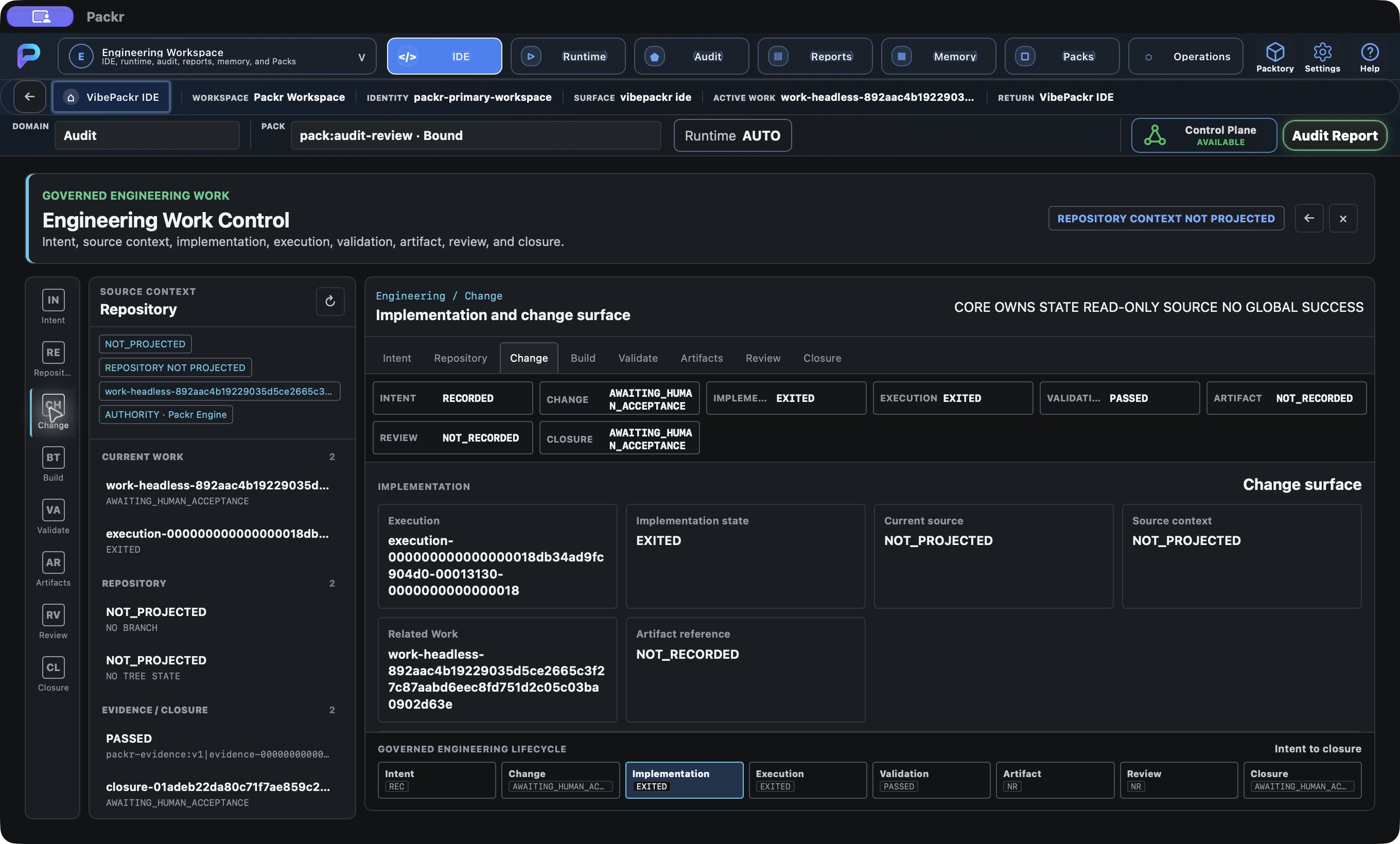
Engineering Change: read-only source/diff surface and no changed file content projected Local R234 candidate, 4 October 2026; no new Work submitted.
06 · Build: read the build/test execution evidence
Choose Build / Build and test loop. Read Execution ID, execution mode, runtime binding, process ID, executable digest, exit code, stdout/stderr digests and evidence references. Compare the execution with the Work being reviewed.
For a genuine build/test review, obtain the expected target and validation criteria from the engineering owner, then check whether the displayed record actually concerns that target. NOT_RECORDED is not zero or success. The retained audit Work cannot prove a compiler or test runner ran. This surface projects execution records; no new build/test action is demonstrated here. If required output or logs are missing, request the approved evidence handoff rather than constructing logs or rerunning Work. Continue to Validate once the record and its limits are clear.
Observed: Build showed the existing audit execution in NATIVE_HOOK mode and a runtime-binding reference. Process, executable digest and exit code were NOT_RECORDED. This was record inspection, not a new build/test run.
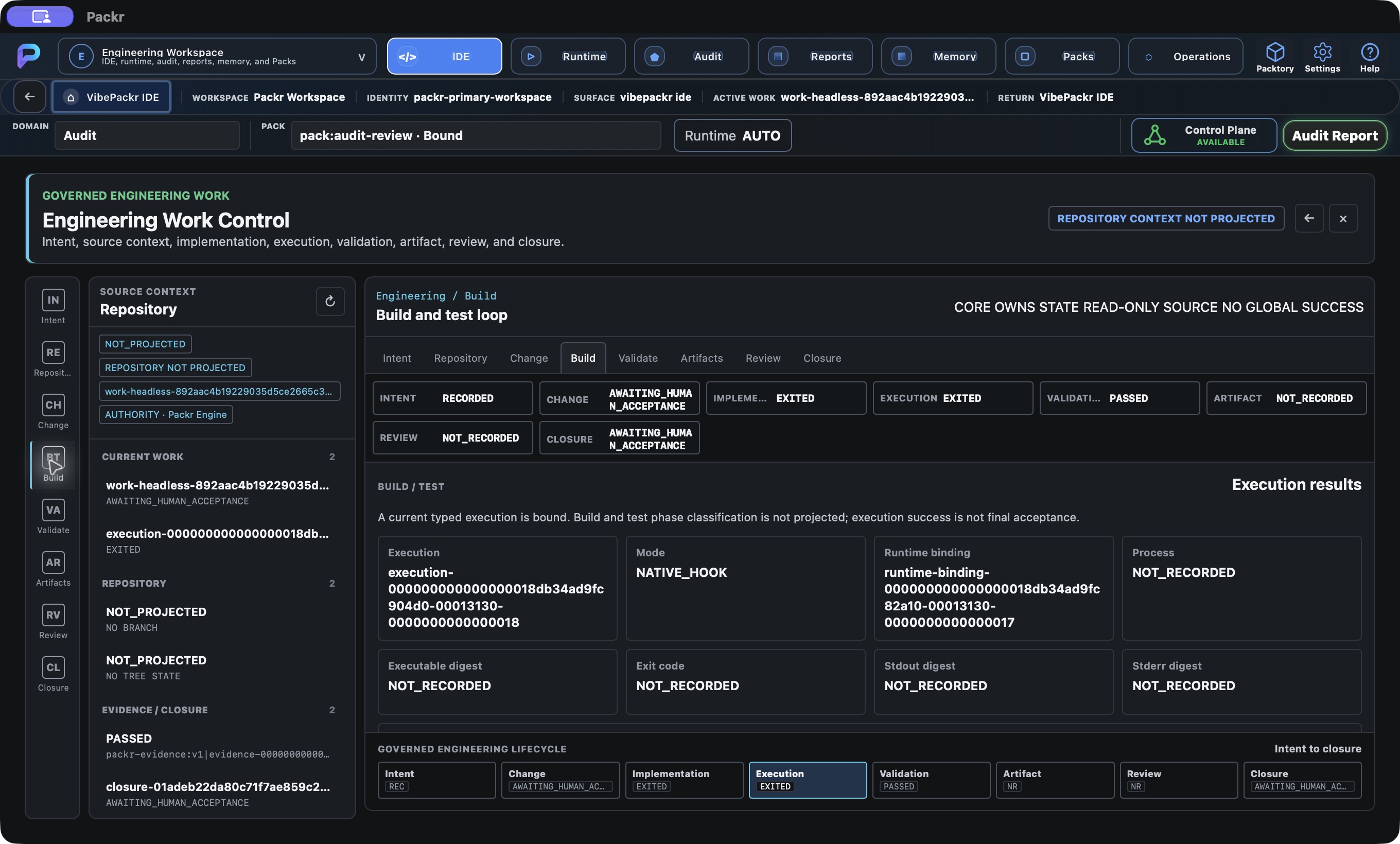
Engineering Build: existing execution state, no build or test started by selecting this stage Local R234 candidate, 4 October 2026; no new Work submitted.
07 · Inspect Validate for this execution
Choose Validate / Validation record. Compare the execution reference with the intended Work. The observed panel displayed Validation PASSED, Execution state EXITED, Exit code NOT_RECORDED and Review disposition NOT_RECORDED. The Required field was NOT_PROJECTED_BY_CURRENT_TYPED_RECORD.
These values support the recorded audit validation only. They do not prove a compiler ran, tests passed or an exit code of zero. Use Build or Change only to inspect whatever that Work actually projects; this exercise did not demonstrate code modification, a build or a test run. If required validation is missing, retain its literal state and ask the Work owner for the corresponding record.
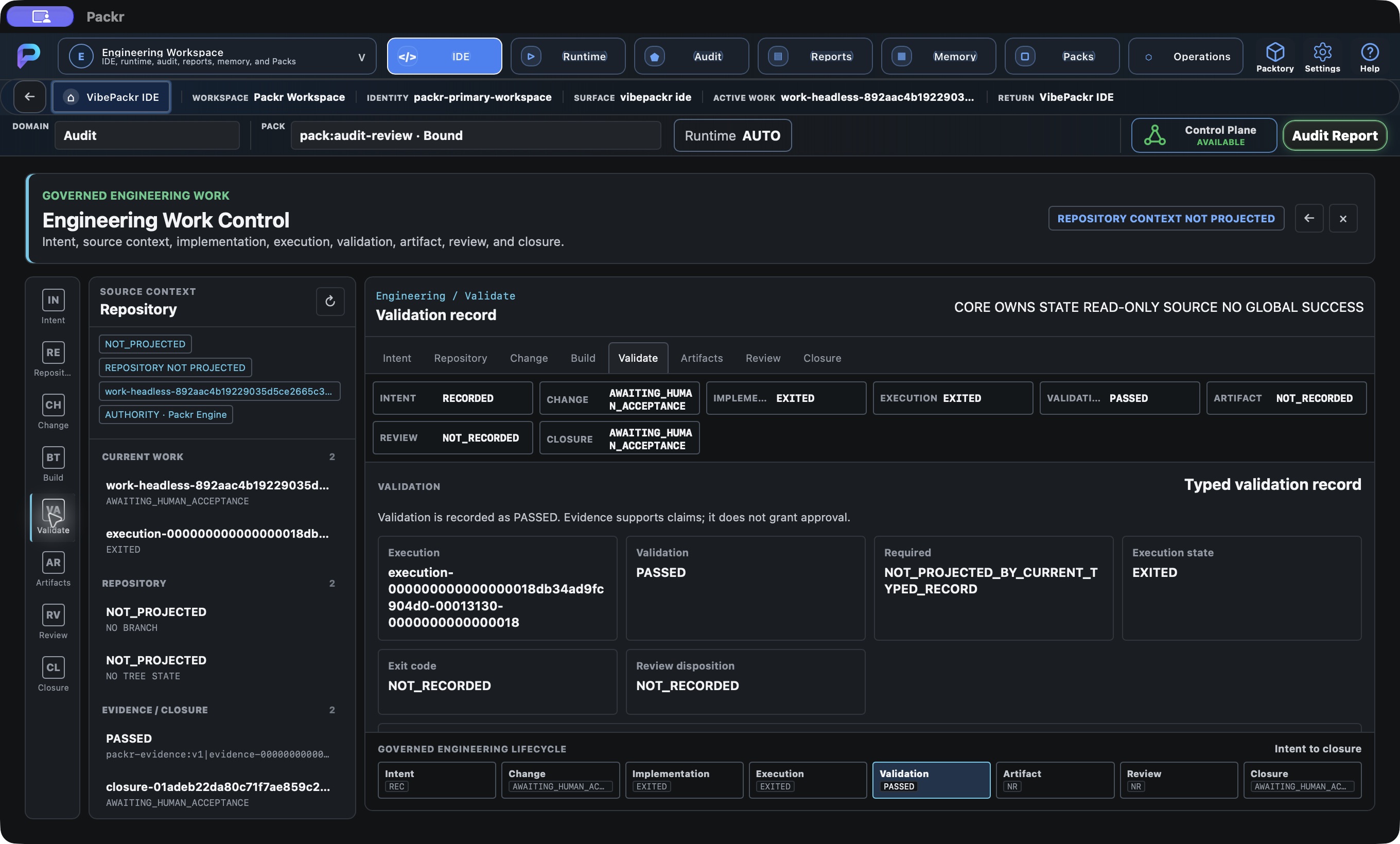
Engineering Validate: typed validation PASSED for same execution; exit code and review not recorded. Local R234 candidate, 4 October 2026; not customer r232 delivery.
08 · Artifacts: distinguish an asset from its report
Choose Artifacts / Artifact lifecycle. Read asset ID, revision, Packtory state, validation disposition, artifact digest, operation receipt, Work receipt and Work closure references. Confirm the same Work and the specific asset revision before handing anything onward.
If fields are NOT_RECORDED, the view supplies no such asset record. It does not establish that the Work report JSON/PDF is absent. Use the final report route for report files and the approved asset handoff for a real asset. A digest, generated file or lifecycle label does not grant promotion, acceptance or distribution rights. Complete this step with a matched asset record or an explicit missing-record request to the asset/Work owner.
Observed: The asset lifecycle fields were NOT_RECORDED for this Work. Its separately verified report files remain distinct.
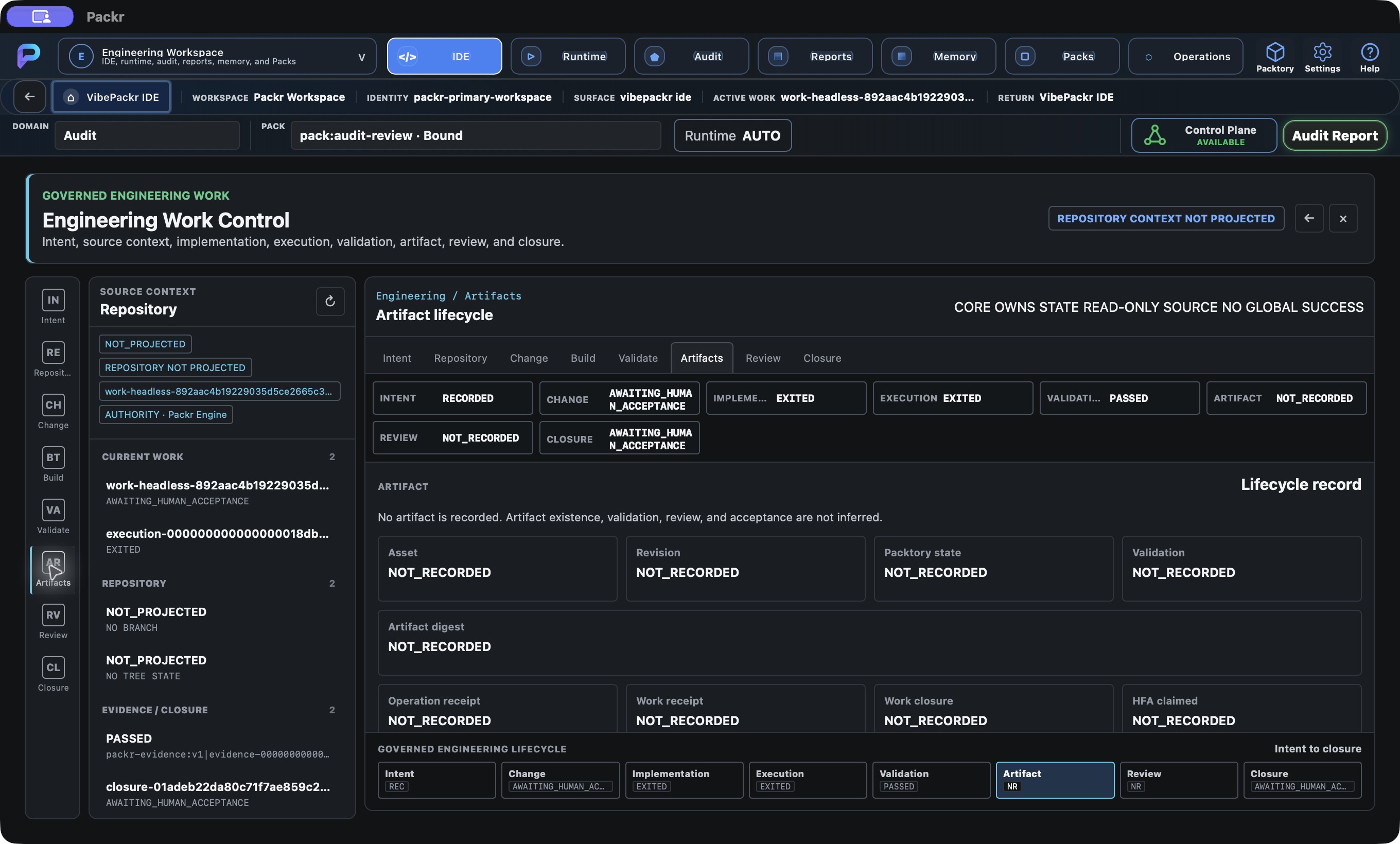
Engineering Artifacts: lifecycle fields are not recorded; separate from the Work report PDF. Local R234 candidate, 4 October 2026; no new Work submitted.
09 · Review: separate review, approval and acceptance
Choose Review / Review and approval. Compare the recorded review disposition, approval state and approval ID with this Work. These may be NOT_RECORDED even when Validate says PASSED.
This view reads existing decisions; opening it does not submit a review or approve anything. If a decision is outstanding, give the designated reviewer the exact Work, execution and final report, and obtain the supported decision procedure from the responsible owner. Then read Closure to see what remains required. Do not infer acceptance from an ALLOW admission or an empty approval list.
Observed: Review, approval state and approval ID were NOT_RECORDED; closure still awaited human acceptance.
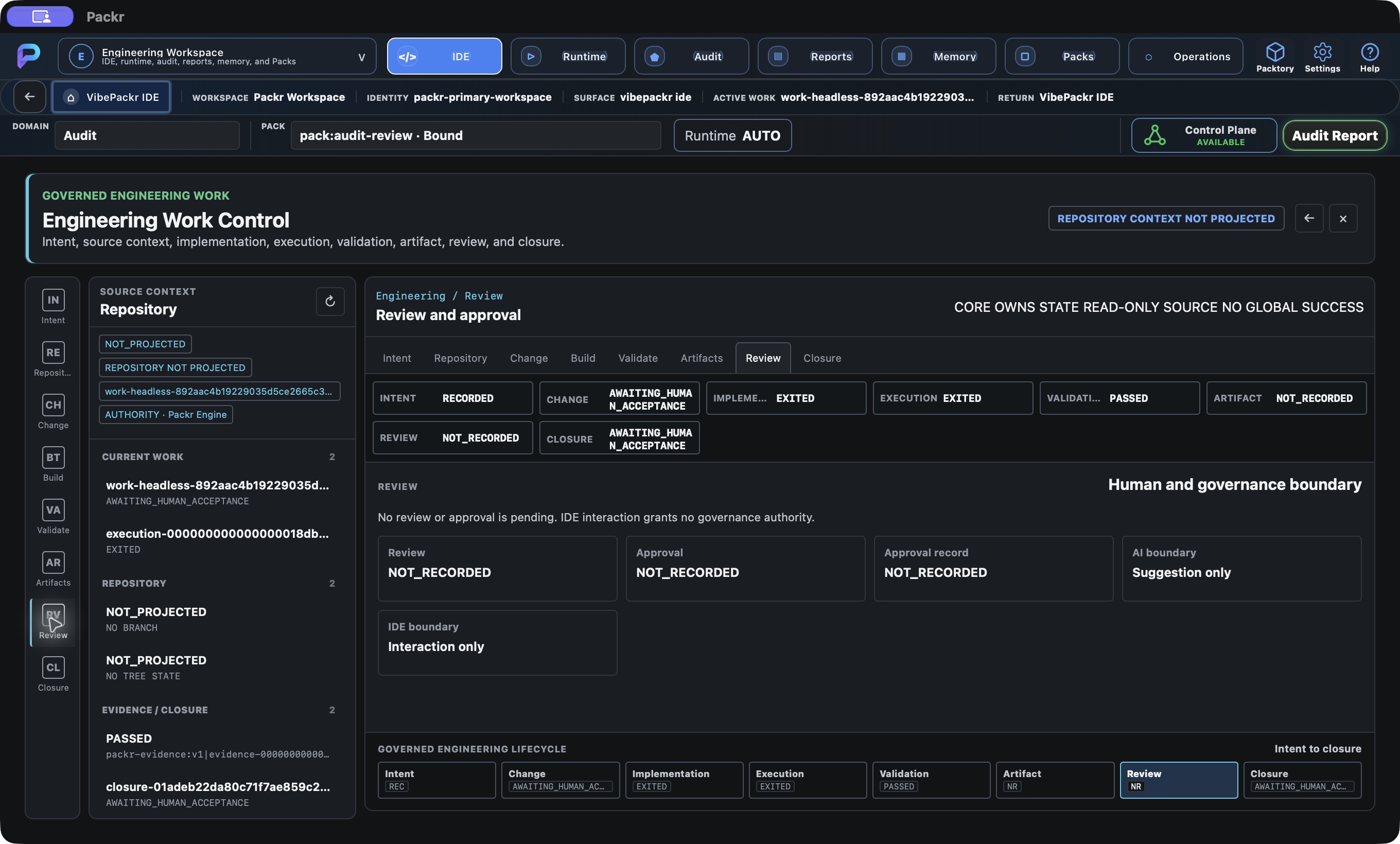
Engineering Review: human review and approval records are not recorded in this view. Local R234 candidate, 4 October 2026; no new Work submitted.
10 · Check Closure and the next reviewer
Choose Closure / Engineering closure. The observed Work remained AWAITING_HUMAN_ACCEPTANCE; Review and Artifact dimensions were NOT_RECORDED. Keep these dimensions separate from Validation PASSED.
A report file can exist while this engineering artifact dimension is not recorded; use the final report guide for the actual report, not the badge as a file inventory. Name the reviewer who must examine the result. Merely opening Review or Closure does not record acceptance. Return to Business Results with the same Work for the report handoff.
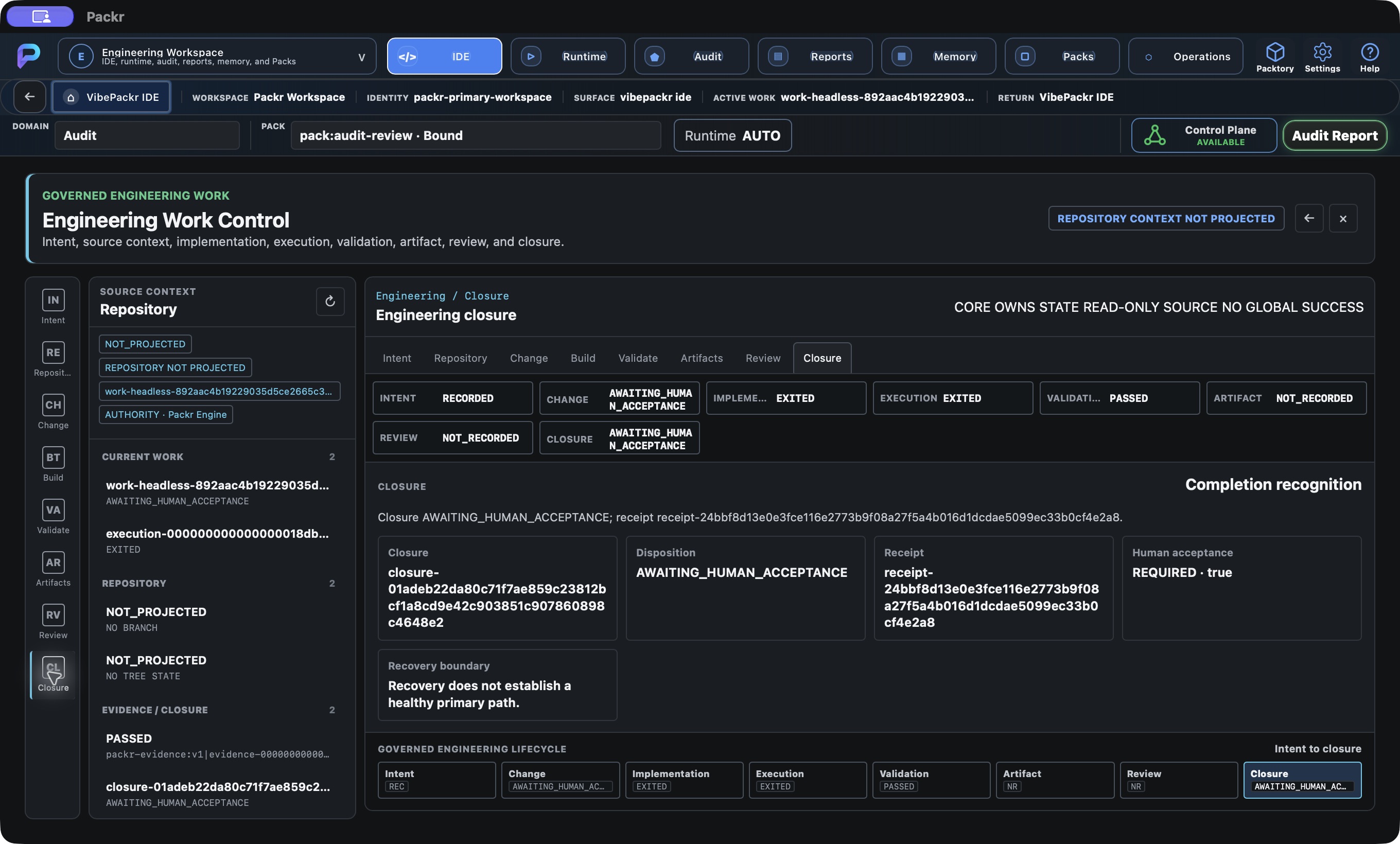
Engineering Closure matches same receipt and pending human acceptance. Local R234 candidate, 4 October 2026; not customer r232 delivery.
11 · Preserve the Runtime observation as shown
Open the top-level Runtime control. The captured view showed NO_RUNTIME_BINDING, UNAVAILABLE and PORTABLE_BINDING_STORE_INVALID, with no governed runtime candidate projected. Record the displayed reason together with Active Work.
AUTO is a preference, not a measured binding. This unavailable runtime projection does not erase the separate EXITED/PASSED Work records and does not prove their runtime provenance by itself. Give the installation/runtime operator the Work ID and literal reason for reconciliation. No root cause, configuration fix or new runtime selection was established in this walkthrough.
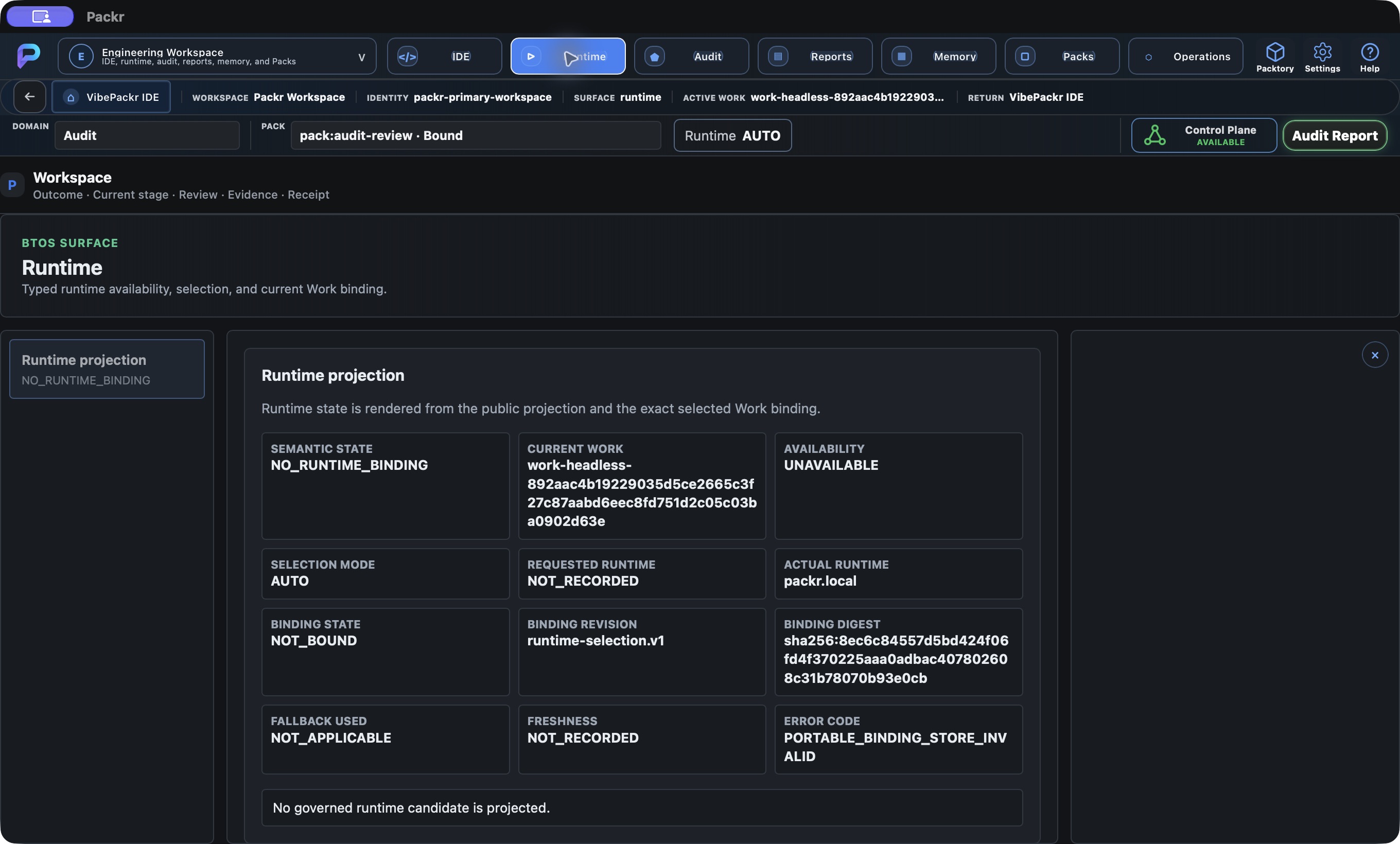
Runtime surface records NO_RUNTIME_BINDING / PORTABLE_BINDING_STORE_INVALID. This route is not evidence of provider readiness; no correction or retry attempted. Local R234 candidate, 4 October 2026; not customer r232 delivery.
12 · Audit tool: correlate governance records
Use the top-level Audit control when you need to trace the selected Work’s admission, execution, approval, receipt and closure together. Read identity references before interpreting decisions. The implementation also projects Pack/domain resolution and composition context when those records exist; a recommended Pack and execution authority are separate facts.
Do not confuse this surface with IDE Review, Operations Audit or the predecessor’s global Audit Report registry browser. Missing related records remain missing; send the exact Work and disputed reference to the responsible reviewer. Continue to the final Work report for its consolidated outcome. Visiting Audit is not an audit execution or a new authority decision.
Observed: The selected Work’s recorded validation PASSED and pending closure were visible, while the Approval record remained NOT_RECORDED.
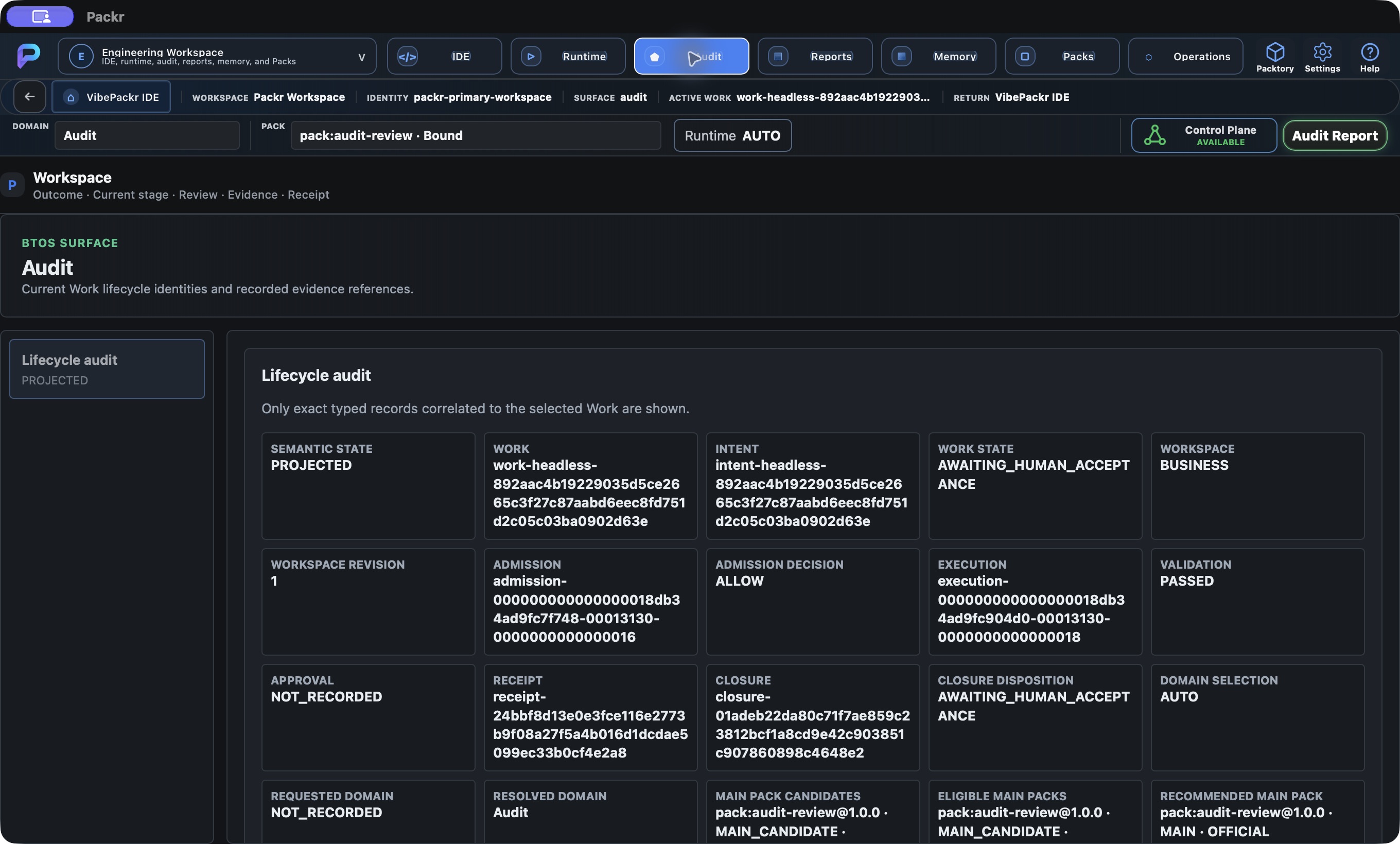
Engineering Audit: selected Work and exact authority, evidence, receipt and closure records Local R234 candidate, 4 October 2026; no new Work submitted.
13 · Reports tool: establish which document is available
The toolbar Reports route requests a report collection for the current context and then a selected document. The observed Reports surface had a disabled search field, “Enterprise Runtime is unavailable.” and “No report selected”. A populated collection and document selection were not demonstrated. When available, select the intended report and verify its identity and scope before reading it.
If unavailable or no report is selected, keep that exact state. For this recorded audit Work, the proven PDF path is Business Results → Control Plane → the matching Work/revision → Open PDF. Use the final report guide. Reports, the global Audit Report browser and Work-specific PDF/JSON buttons are separate routes; one empty route does not invalidate another route’s actual file.
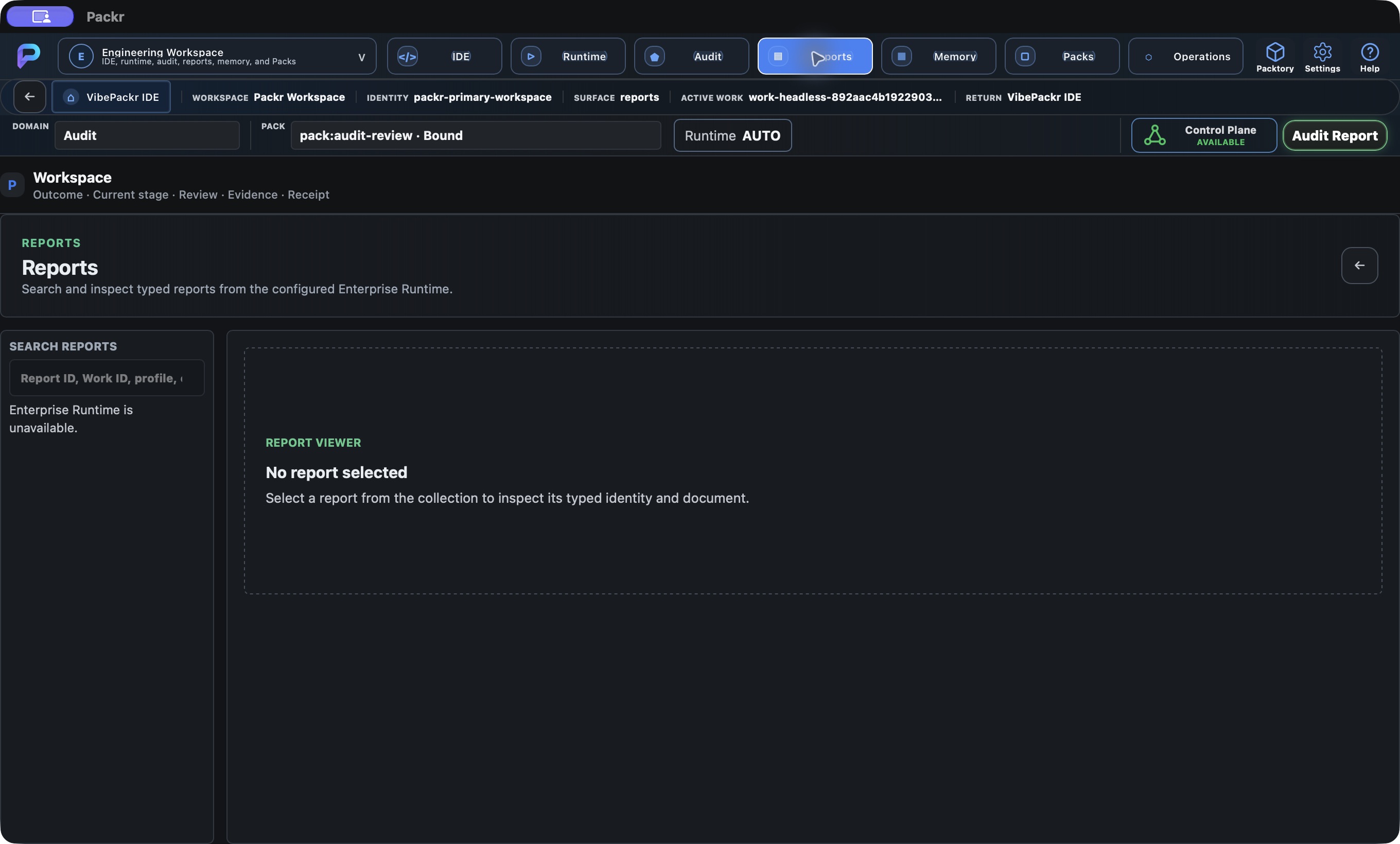
Engineering Reports: report collection unavailable, separate from canonical Work PDF Local R234 candidate, 4 October 2026; no new Work submitted.
14 · Memory tool: recognize the unavailable projection
Open Memory to inspect whether this renderer has a supported typed Memory projection. The active source declares a Memory boundary with no approved typed projection, NOT_ESTABLISHED canonical object and DEFERRED_WITH_CAUSE implementation.
This is a boundary-reading route, not a memory search, edit or save procedure. Record the displayed state and ask the installation/feature owner for the supported route if your task depends on memory. Do not fabricate entries or infer the absence of all underlying memory capability from this renderer limitation.
Observed: Memory displayed NOT_ESTABLISHED and DEFERRED_WITH_CAUSE with MEMORY_TYPED_PROJECTION_CONTRACT_NOT_ESTABLISHED.
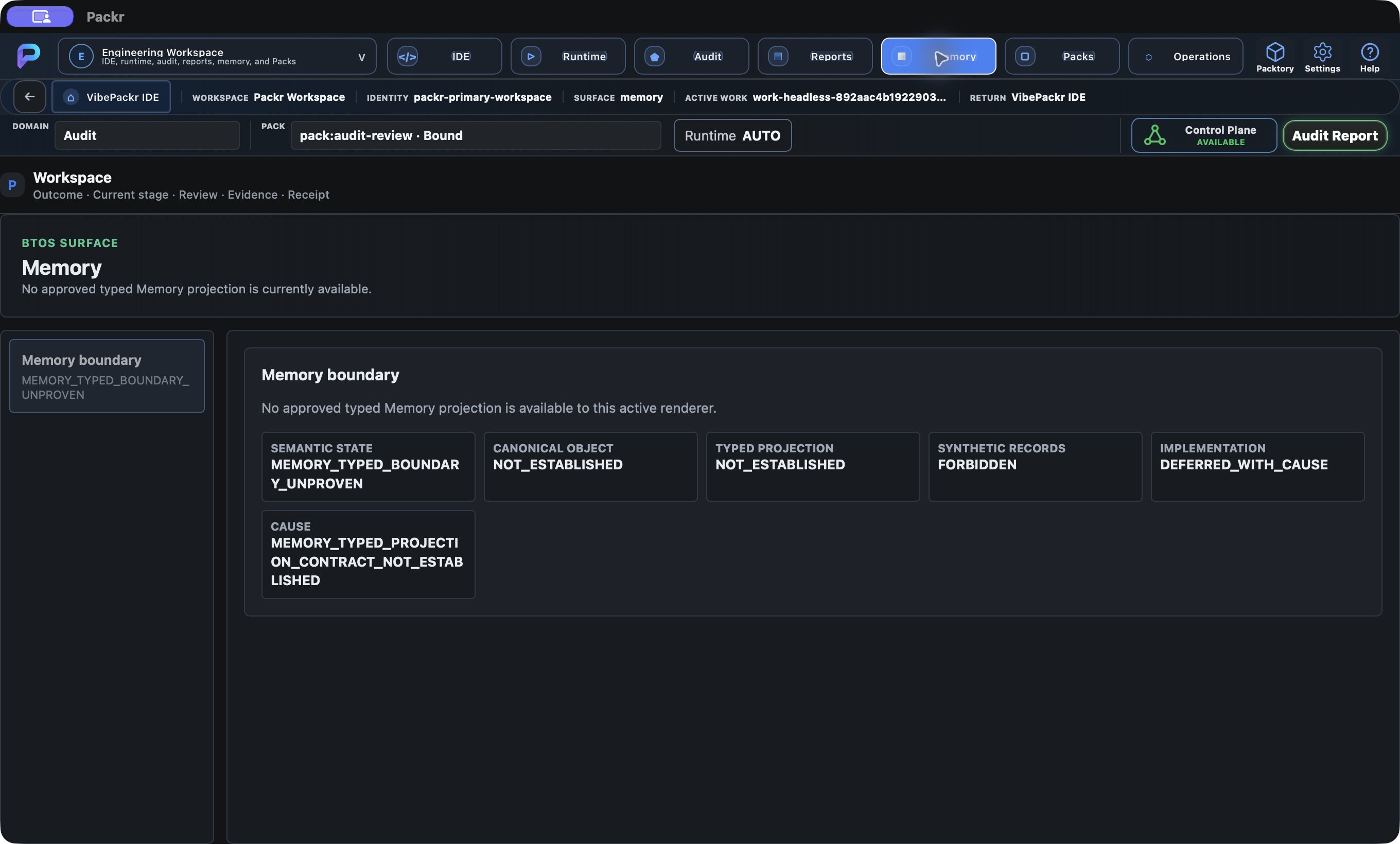
Engineering Memory: typed projection not established, no fabricated memory records Local R234 candidate, 4 October 2026; no new Work submitted.
15 · Packs tool and return to Operations
Open Packs to inspect identity, lifecycle, selection and lineage projections. Compare Current Work, Selection mode, Requested Pack, fallback and workspace/repository scope. Read selectable/executable/unavailable aggregates separately from projected user Pack records.
A domain-bound audit Pack is not automatically a user-selected Pack or a visible user-Pack inventory item. If the projection is unavailable or no governed user Pack is shown, retain that state and ask the Pack owner for the exact identity/revision needed. This inspection does not install, promote or execute a Pack. Use the Packtory library guide for its separate browsing route.
Choose Operations to inspect operational records, then verify the same Active Work in the Operations walkthrough. Use the workspace selector or return control to resume Engineering. A workspace switch does not start or approve an operation.
Observed: NO_PACK_SELECTED; Selectable 15, Executable 1, Unavailable 14; projected Pack records 0 and index records 0; Selection mode NOT_SELECTED. These aggregate categories are not installed-record totals. The view offered no populated list actions. The Audit domain’s bound context remains separate from explicit user Pack selection.
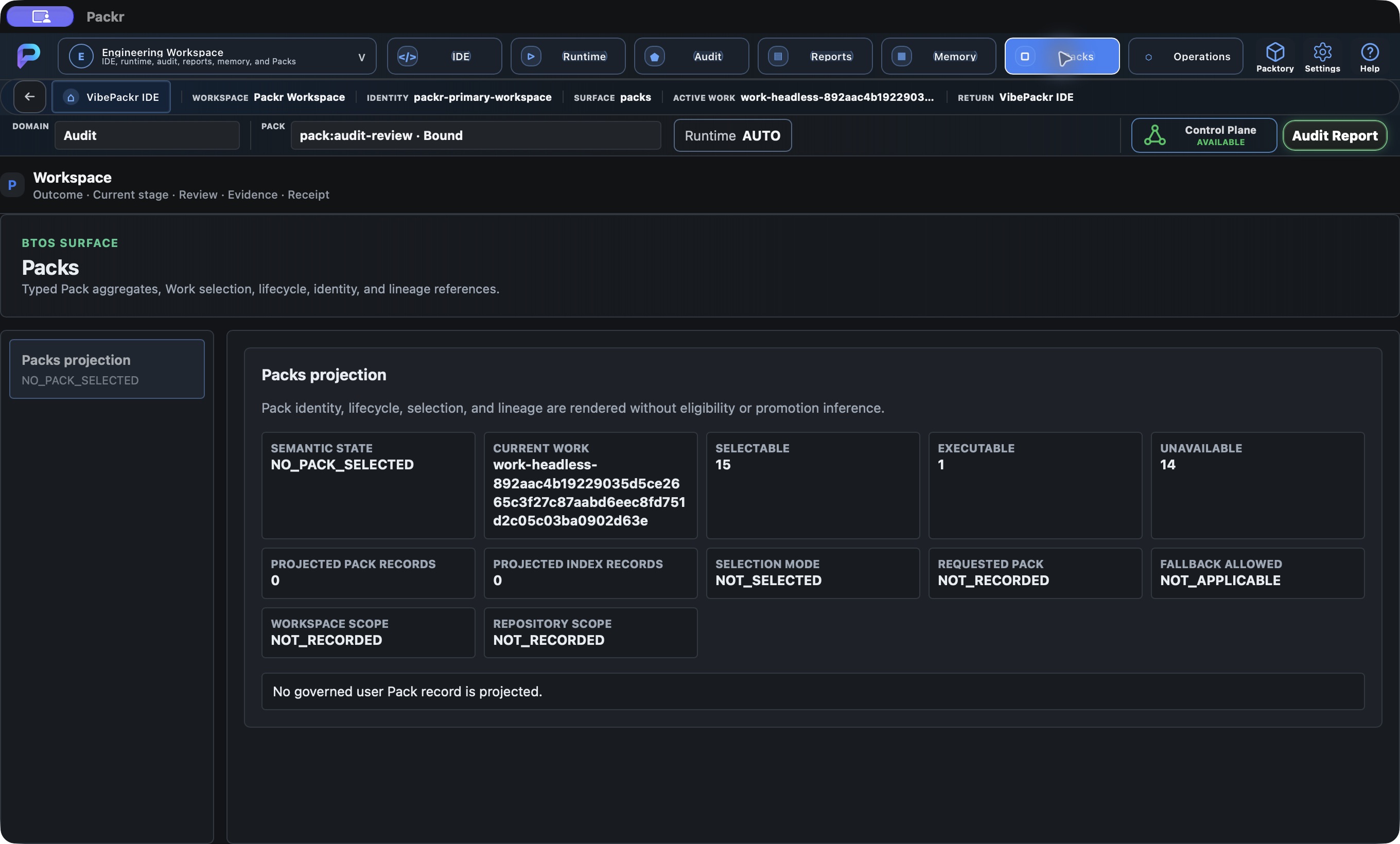
Packs shows the retained read-only catalog projection for this local installation. Local R234 candidate, 4 October 2026; no new Work submitted.
16 · Continue with the same Work
Continue to the final report walkthrough for outcome, receipt, human acceptance and PDF/JSON opening. Return to the PackrGUI overview to choose another surface. Retain the original Work identity through every transition; do not submit a replacement to repair a missing view.