VibePackr Enterprise · Part.2
Part.2 · GAPE observation, comparison and sharing
Guide connections, workflow and input/output map
First-use checkpoint and return points
- Start here
- Begin with W1 when a viewer is supplied. Use W2 only if you have the executable, approved manifest and its readable source revisions.
- Have ready
- The observation worksheet is not a manifest. Keep viewer and required adjacent data files together; preserve the supplied directory layout.
- Expected exercise result
- For viewer review: one recorded node/edge/revision and limits. For a new scan: the tool-created output set and a successful snapshot validation result. Neither proves live runtime connectivity.
Exercise and next steps
Open the relevant failure case
How to read numbers and file names
Part.1–8 identifies the current tool manuals. W1–W4 and codes such as GUI-01 identify exercises inside a Part. Use Case 1–5 is a separate retained procedure sequence, not the Part numbering. Case A–J and codes such as SDK-1 or IH-1 identify troubleshooting scenarios. Older filenames and pN section IDs remain valid bookmarks; read the page heading for the current Part number.
Exercise files: check the role before saving
Distinguish source-only JSON, complete requests and intentional errors. TXT files are human worksheets, not profiles, API inputs or GAPE manifests. If a file opens in the browser, save it with the correct extension and UTF-8.
Before starting: file roles, paths and shell
Save the exercise files at the beginning of this manual into a fresh workspace and check their roles. TXT worksheets are human notes, not client profiles, API requests or GAPE manifests. Distinguish source-only JSON, complete requests and intentional type-error examples too.
Use bash for macOS/Linux and PowerShell for Windows. Do not copy prompts. Replace /absolute/path, C:\absolute\path and bracketed values with actual supplied values first; retain quotes. Commands using variables need the setup shell. In a new shell restore paths only, without overwriting old outputs/logs. Long code and tables scroll horizontally.
Company connection/enrollment, approval, supported Packs, published targets and approved manifests require actual supplied material at their relevant steps. Do not invent IDs, screen names or addresses. Read each W section's success and failure/return criteria, then perform one step at a time.
W1 · GAPE-01: begin by reading a supplied viewer
Reviewers without source access or manifests can begin with a supplied viewer/snapshot. gape-observation-worksheet.txt is a note, not a manifest.
- Open the inventory's viewer HTML through the browser's open-file action. Compare the local file and supplied version.
- Read snapshot ID, source revision and disclosure class. Use browser Find or the viewer's supplied selection feature for a node name.
- Record one node, relationship direction and observation source. Static relationships are separate from runtime connectivity.
- Record out-of-scope, filter and unresolved limitations too. Missing search results do not establish capability absence.
Human output example: Selected node=[actual display] / relationship=[actual direction] / revision=[displayed value] / runtime validation=not performed. For missing files request the exact missing viewer/data path from delivery support; redact private paths in external support.
W2 · GAPE-02: create a snapshot from an approved manifest
This procedure is for an owner supplied with all three: executable, approved manifest and readable referenced source. The eight example files do not include an approved GAPE manifest. A source Document/worksheet is not a substitute.
Replace paths and prepare only the output parent. The tool creates final gape-observation-first-01 itself.
gape_exe="/absolute/path/packr-gape"
gape_manifest="/absolute/path/approved-manifest.json"
gape_output="$HOME/gape-observation-first-01"
test -x "$gape_exe" && test -f "$gape_manifest" || exit 1
test ! -e "$gape_output" || exit 1
"$gape_exe" snapshot "$gape_manifest" "$gape_output" || exit 1
"$gape_exe" validate-snapshot "$gape_output/gape-architecture-snapshot.json" || exit 1
ls -la "$gape_output"$gapeExe = 'C:\absolute\path\packr-gape.exe'
$gapeManifest = 'C:\absolute\path\approved-manifest.json'
$gapeOutput = Join-Path $env:USERPROFILE 'gape-observation-first-01'
if (!(Test-Path -LiteralPath $gapeExe -PathType Leaf) -or !(Test-Path -LiteralPath $gapeManifest -PathType Leaf)) { throw 'Executable or manifest missing' }
if (Test-Path -LiteralPath $gapeOutput) { throw 'Choose a fresh output path' }
& $gapeExe snapshot $gapeManifest $gapeOutput
if ($LASTEXITCODE -ne 0) { throw 'Snapshot failed' }
& $gapeExe validate-snapshot (Join-Path $gapeOutput 'gape-architecture-snapshot.json')
if ($LASTEXITCODE -ne 0) { throw 'Validation failed' }
Get-ChildItem -LiteralPath $gapeOutputSnapshot stdout reports ID, node/edge/finding counts and execution_authority: NONE. Successful validate-snapshot stdout is the snapshot ID, not necessarily a PASS word. Retain both exit code and original output.
gape-observation-first-01/
  gape-input-manifest.json
  gape-architecture-snapshot.json
  gape-projection-snapshot.json
  gape-projection-authority.json
  gape-projection-drift.json
  gape-architecture-drift.json
  gape-architecture-viewer.html
  gape-public-safe-viewer.html
  gape-public-safe-data.json
This is the referenced CLI's base output set; supplied navigation extensions may add files. After failure, partial output is not validated output. Preserve original error and failed stage.
W3 · GAPE-03: compare before/after through the same procedure
Keep W2's executable variables in the same shell, or restore actual gape_exe/$gapeExe in a new shell. Bind before/after to actual snapshot JSON files.
gape_before="/absolute/path/before/gape-architecture-snapshot.json"
gape_after="/absolute/path/after/gape-architecture-snapshot.json"
"$gape_exe" validate-snapshot "$gape_before" || exit 1
"$gape_exe" validate-snapshot "$gape_after" || exit 1
"$gape_exe" compare "$gape_before" "$gape_after" || exit 1$gapeBefore = 'C:\absolute\path\before\gape-architecture-snapshot.json'
$gapeAfter = 'C:\absolute\path\after\gape-architecture-snapshot.json'
& $gapeExe validate-snapshot $gapeBefore
if ($LASTEXITCODE -ne 0) { throw 'Before snapshot invalid' }
& $gapeExe validate-snapshot $gapeAfter
if ($LASTEXITCODE -ne 0) { throw 'After snapshot invalid' }
& $gapeExe compare $gapeBefore $gapeAfter
if ($LASTEXITCODE -ne 0) { throw 'Comparison failed' }Check sequence: both snapshot IDs/revisions/scopes → individual structural validation → reported changes/unknowns → separately established runtime impact. An omitted node under a different scope is not a removed capability. Do not compare after either validation fails. Resume once both inputs and comparison scope are confirmed.
W4 · GAPE-04: separate sharing files from originals
| File kind | Retain/use | Before sharing |
|---|---|---|
| Input manifest, full snapshot, engineering viewer | Approved engineering environment | May include internal source/paths |
| PUBLIC_SAFE viewer/data | Release-approved sharing scope | Confirm classification, recipient and purpose |
| Worksheet | Minimal observation note | Remove sensitive paths/identifiers |
A PUBLIC_SAFE filename does not grant new publication authority. Hold sharing for unconfirmed classification. Check that the shareable copy retains matching snapshot/revision/limits, and do not use it as execution/approval evidence.
More exercises and checklists
Reading sequence
Check inputs → choose a task → use the detailed first exercise/commands below → inspect results → modify/repeat → follow the relevant failure case. Part numbers are not a mandatory installation sequence; choose only needed tools.
Prerequisites and input
Approved snapshot/viewer, or GAPE executable/approved manifest/readable source revision.
Both online and offline environments remain available. The optional SDK Rust set provisions SDK builds in closed on-premises environments; it is not a product default. Use actual supplied company endpoints, approval and enrollment material where an exercise needs them.
Find an exercise or case
| Exercise | Task |
|---|---|
| GAPE-01 | Read one relationship in a supplied snapshot |
| GAPE-02 | Create an observation from approved input |
| GAPE-03 | Compare observations at two revisions |
| GAPE-04 | Hand over an approved sharing projection |
Exercise GAPE-01 · Read one relationship in a supplied snapshot
A design reviewer received an approved viewer rather than source code. Practice reading observation scope without product execution.
Actions:
- Check viewer/snapshot version and disclosure class, then open it in a browser.
- Select one node and read name, relationship direction and observation source.
- Note snapshot ID, source revision and static/dynamic observation limits.
- Separate the observation from questions requiring the Contract or its owner.
Read the result: You can describe the observed relationship, revision and unconfirmed scope.
Failure and next branch: Use GAPE-2 for nodes hidden by filters; do not conclude capability absence.
Retain: Snapshot/revision/node/relationship/limits/follow-up question.
Your exercise record: fill in time, version, input reference, actual actions, observed result and next owner. Do not copy expected outcomes into an execution success record.
Exercise GAPE-02 · Create an observation from approved input
An owner with read access and an approved manifest creates a snapshot of a specified committed revision.
Actions:
- Bind executable, manifest and fresh output paths using the first exercise below.
- Check referenced source/revision availability, then run snapshot.
- Run validate-snapshot on the generated JSON and retain stdout/finding count/validation.
- Open the generated viewer/snapshot and match ID/revision.
Read the result: A scoped observation and structural validation record, not runtime validation.
Failure and next branch: Choose a new name for existing output; hand missing approved source to its owner.
Retain: Manifest digest, revision, command/output path, snapshot/validation.
Your exercise record: fill in time, version, input reference, actual actions, observed result and next owner. Do not copy expected outcomes into an execution success record.
Exercise GAPE-03 · Compare observations at two revisions
Review whether relationships changed after an integration. Comparing an old picture with new source names is insufficient.
Actions:
- Preserve both snapshots, manifests, revisions and scopes.
- Validate each snapshot using the supplied check and record scope differences.
- Use the supported compare command or both viewers to separate changed relationships from out-of-scope items.
- Retain STALE/UNRESOLVED and hand runtime-impact questions to the relevant owner.
Read the result: A review of observed differences and comparison limits across two revisions.
Failure and next branch: Do not treat scope-related omissions as removed capability or edit diagrams to match.
Retain: Both snapshot IDs/revisions/scopes, changes, unknowns and owner.
Your exercise record: fill in time, version, input reference, actual actions, observed result and next owner. Do not copy expected outcomes into an execution success record.
Exercise GAPE-04 · Hand over an approved sharing projection
Explain relationship structure to a partner. An engineering viewer may contain private source paths.
Actions:
- Identify recipient/purpose and the release-approved disclosure class.
- Check whether an approved PUBLIC_SAFE projection is supplied; do not send internal originals.
- Check retained snapshot/revision/limits in the shareable copy and explain node meaning.
- Bind it only to the review question, without asserting execution/registration/approval.
Read the result: An approved-scope observation explanation with source reference.
Failure and next branch: Hold sharing if classification is unconfirmed; deleting a few paths does not create an approved projection.
Retain: Recipient scope, purpose, projection class, snapshot and limits.
Your exercise record: fill in time, version, input reference, actual actions, observed result and next owner. Do not copy expected outcomes into an execution success record.
Repeat, modify and resume after failure
Preserve earlier input/version/validation/results and distinguish a new input or revision. Use fresh output paths for SDK/GAPE; retain product-returned candidate revisions for Builder. Helper commands take the same complete request rather than the preceding result. Query an existing ID first when Work is running or uncertain.
After closing a terminal, restore absolute paths and the selected environment. Recheck affected stages and hand over pending company authority, registration or approval as pending. Support records use minimal messages/shareable references, without bulk private keys, raw prompts, customer responses or full logs.
Detailed commands, inputs and troubleshooting sources
The following detailed guides share the same maintained documentation source. Use their first exercises, complete JSON, OS-specific commands, file inspection and symptom cases. Cross-Part references lead to the appropriate manual.
Full workflow and skip conditions
GAPE: inspect a revision-bound architecture observation
GAPE: inspect a revision-bound architecture observation
Detailed section contents
First observation exercise: prepare, run and open results
Inspect what you received first. If you received only an approved snapshot and viewer, open the supplied HTML viewer in a browser, read snapshot ID/source revision/disclosure class and select one node. You do not need new source or a new manifest. An owner with an executable and approved manifest can run the local exercise below. A source Document or SDK input.json is not a GAPE manifest.
Select the executable and a fresh output path
Replace gape_exe/$gapeExe and gape_manifest/$gapeManifest with the actual executable and approved manifest's absolute paths. The manifest's source paths and revision must exist too. Prepare only the output parent, leaving gape-observation-01 absent. Do not expand the source scope by guessing paths.
gape_exe="/absolute/path/packr-gape"
gape_manifest="/absolute/path/approved-manifest.json"
gape_output="$HOME/gape-observation-01"
test -f "$gape_exe" && test -f "$gape_manifest" || exit 1
test ! -e "$gape_output" || exit 1
"$gape_exe" snapshot "$gape_manifest" "$gape_output" || exit 1
"$gape_exe" validate-snapshot "$gape_output/gape-architecture-snapshot.json" || exit 1
ls -la "$gape_output"$gapeExe = 'C:\absolute\path\packr-gape.exe'
$gapeManifest = 'C:\absolute\path\approved-manifest.json'
$gapeOutput = Join-Path $env:USERPROFILE 'gape-observation-01'
if (!(Test-Path -LiteralPath $gapeExe -PathType Leaf) -or !(Test-Path -LiteralPath $gapeManifest -PathType Leaf)) { throw 'Executable or approved manifest missing' }
if (Test-Path -LiteralPath $gapeOutput) { throw 'Choose a fresh output path' }
& $gapeExe snapshot $gapeManifest $gapeOutput
if ($LASTEXITCODE -ne 0) { throw 'Snapshot failed' }
& $gapeExe validate-snapshot (Join-Path $gapeOutput 'gape-architecture-snapshot.json')
if ($LASTEXITCODE -ne 0) { throw 'Snapshot validation failed' }
Get-ChildItem -LiteralPath $gapeOutputWhat to read: snapshot stdout contains snapshot ID, node/edge/finding counts and execution_authority: NONE. Do not assume zero findings. Preserve validation and actual generated files. Open the included viewer if supplied; otherwise read snapshot JSON in an editor. Do not guess an HTML filename.
Short exercise: record one node's name, source revision, relationship and observation limits. To compare snapshots preserve both originals and check whether the release supports compare before.json after.json. Do not infer behavior outside observation. Keep engineering snapshots internal and use an approved PUBLIC_SAFE projection for external sharing.
If blocked: missing executable → installation preparation; missing source path/revision → approved-input preparation; failed snapshot validation → observation validation. Continue with GAPE-1/2 below; do not invent a manifest to expand scope.
When to use it
Use GAPE when an integration owner needs to understand which component and interface a proposed operation depends on. Check that the exact release provides the GAPE tool and an approved input manifest. A general source folder, screenshot, or architecture infographic is not a manifest.
Prepare the observation
- Record the approved source revision, folders to inspect, exclusions, expected rules, and sharing level. GAPE observes the selected saved revision; unsaved edits and live runtime behavior may be outside that result.
- If your component list includes
packr-gapeand an approved manifest, runpackr-gape snapshot manifest.json new-output-folderwith a new output folder. Otherwise ask for the supported observation procedure. - Validate the generated snapshot with
packr-gape validate-snapshot gape-architecture-snapshot.jsonwhen that command is supplied. Validation checks the snapshot's structure and provenance, not actual runtime behavior. - Open the approved offline viewer. Start with one node and relationship, note its source revision and observation limitation, then compare it with the independent expected Contract or owner rule. Keep
UNRESOLVEDorSTALEas findings; do not promote them to consistent by editing the viewer. - Share only the PUBLIC_SAFE projection where allowed. Keep engineering input, internal paths, source ranges, and finding explanations inside the approved engineering environment.
Command example for a release that actually supplies GAPE
Use the commands below only when your installation includes packr-gape and an approved manifest for a source tree you are allowed to inspect. The output directory must be new. validate-snapshot checks the snapshot, not the running appliance.
packr-gape snapshot approved-manifest.json new-observation-folder
packr-gape validate-snapshot new-observation-folder/gape-architecture-snapshot.json
Use the filename actually emitted by your release if it differs from this example; record the manifest digest, source revisions, snapshot ID, validation result, and execution_authority: NONE. If the binary or approved manifest is absent, stop this path and record not supplied for this release.
Worked example: a diagram appears to prove an adapter
An operator sees a relationship between PackrGUI and an integration adapter in a GAPE snapshot. The relationship is STATIC_SOURCE; the current customer runtime may use another feature configuration, and a dynamic call may be outside the saved source observation. Record the exact source version shown in the snapshot and ask the integration owner for the supplied Contract and connection evidence. Do not write “connected” or “authorized” in a deployment record.
Worked example: observation and expectation disagree
The snapshot contains an interface association but the expected owner rule is missing or bound to a different revision. GAPE reports UNRESOLVED or STALE. Preserve the manifest identity, snapshot digest, finding, and exact revision. The responsible owner reconciles the Contract and source separately; refreshing a graphic is not a repair.
Completion evidence
The observation is complete when the manifest, snapshot validation result, selected projection, revision, disclosure class, limitations, and any unresolved findings are recorded. Integration registration or Work remains a separate path. Continue with Integration Helper or the Contract & Document guide.
A practical operational use case
Before a new integration, an owner may need to understand which components handle data. Pin the stored revision in the approved manifest and trace one node and its relations. Record provenance and unobserved dynamic paths; when comparing another document, retain both revisions. The diagram alone does not establish a runtime incident cause.
Symptom-specific checks and return to operation
| Symptom or situation | Facts to check separately | Action and result to recheck |
|---|---|---|
| The source changed but the old snapshot is open | Snapshot time, source revision and manifest digest | Observe approved new inputs into a fresh location and distinguish the earlier snapshot. |
| A node is not visible | Manifest scope, exclusions, supported language and viewer filters | Check scope and record out-of-scope or unconfirmed; do not infer capability absence. |
| A proposed share contains private paths | Projection classification and approved export | Stop sharing and check for an approved PUBLIC_SAFE projection; retain detailed engineering output internally. |
Minimum handover to the next owner
Handover: source revision, manifest and snapshot digests, observation scope, disclosure class, selected nodes/relations, unresolved items and next owner. Keep snapshot validation separate from runtime evidence.
Read the tool-specific troubleshooting examples
These teaching examples use documented input, command and authority boundaries. Read them alongside actual product states/reasons; do not treat illustrative outcomes as execution history. Distinguish checks shared by online/offline environments from checks specific to the optional dependency route.
Worked scenario GAPE-1: Reviewing an old snapshot after source changes
Situation: A diagram reported as inconsistent belongs to an earlier stored revision. First distinguish current source, approved manifest and observation revisions.
Read these observations separately.
- Diagram: has a specific snapshot ID/source revision.
- Current source: unsaved changes may be outside observation.
- Validation: snapshot structure checks are not runtime validation.
Check and action sequence:
- Compare manifest digest, snapshot creation time and exact stored revision.
- For a new observation, use approved inputs/supplied commands and fresh output.
- Retain both observations and identify changed relations/limits.
Condition for resuming: Continue scoped observation review when the intended revision matches a validated snapshot.
If still unresolved: With an unconfirmed manifest/revision, retain unconfirmed observation rather than editing the diagram to match.
Worked scenario GAPE-2: A node is hidden by filters or outside observation scope
Situation: A search finds no component and a user assumes absence. Filters, manifest exclusions and supported language can limit visibility/observation.
Read these observations separately.
- No search result: an outcome for the selected view scope.
- Manifest: defines observed folders and exclusions.
- Implementation absence: not established by this view alone.
Check and action sequence:
- Check search/filter settings and the original observation’s scope/revision/exclusions.
- Request an authorized observation for another scope; do not add private data to a public view.
- Distinguish out-of-scope, view filtering and unconfirmed state, then hand source questions to the owner.
Condition for resuming: Cite only relations confirmed for that revision/scope.
If still unresolved: Do not label it unimplemented/absent without source support.
Local documentation edition. Company connection, approval and enrollment require actual supplied material. Educational scenarios are not customer execution evidence. Apple signing/notarization and customer activation/delivery remain held.
Connect the Guides and Parts 1–8
Choose a purpose in a Guide, then use the relevant Part for exact tool steps. The same sequence, vocabulary and artifact roles apply in both.
Purpose guides
- Common PoC Guide
Choose a question, collect scoped observations and review the result. A retained-reading route needs no new installation.
- Google Reviewer Guide
Bind the exact review delivery and criterion evidence. Cloud access, document coverage and actual Google approval remain separate.
- On-premises Guide
Prepare the exact OS, package, network choice and toolchain. Use the local SDK shortcut only after its prerequisites are supplied.
- Custom Execution Guide
Choose a supported task. Keep source-document preparation, full SDK candidates and actual Work/report inspection as distinct routes.
- Guide links open the public website and require network access; this offline manual and its local examples remain readable without it.
Recommended integration order and shortcuts
- Part.1 · Install and prepare
- Part.2 · Observe structure with GAPE
- Part.3A · Plan with Integration Helper
- Part.4 · Write the source Document and bind the published target Contract
- Part.3B · Check the complete request and identify implementation needs
- Part.5 if needed · SDK candidate, implementation review and separate registration
- Part.6 if needed · Builder Pack candidate and its approval path
- Part.7 · Permitted GUI or headless operation
- Part.8 · Results, troubleshooting and human review
Helper B checks the completed declarations before you decide whether implementation or a new Pack is needed. After an implementation or declaration change, repeat only the affected supported checks and finish the separate implementation/registration/Pack approval path before operation. A generated candidate grants no operating authority.
Select only the route needed for your goal. Retained PoC reading can begin without installation. A supplied local SDK exercise uses Part.1 → Part.5 and does not require a new GAPE scan or appliance account. An existing approved Pack can use Part.1 → Part.7 → Part.8 after its current prerequisites are checked. New integration/Pack authoring follows the full conditional sequence.
Part map and tool responsibilities
| Part | Role and expected boundary |
|---|---|
| Part.1 · Installation and first connection | OS preparation, supplied packages and first connection. Installation is not an executed Work. |
| Part.2 · GAPE observation, comparison and sharing | Revision-bound architecture observation. A worksheet is not the approved GAPE input manifest. |
| Part.3 · Integration Helper operation | A plans before the Document; B checks the completed full request. Each stage reads its typed status/reason. |
| Part.4 · Contract and Document authoring | Author the source Document and mappings; use the supplied target Contract/revision. JSON syntax alone does not establish semantic compatibility. |
| Part.5 · SDK Engine practice and candidates | Generate a local SDK implementation candidate. Reuse an implemented, registered, release-compatible integration when it already meets the need. |
| Part.6 · Builder and Additional Packs | Prepare a Pack candidate when a new Pack is needed. Reuse an existing approved Pack that meets the goal and installation scope. |
| Part.7 · PackrGUI and headless operation | Use the supplied GUI/headless route under its current authority and preconditions. Inspect the returned Work identity and result. |
| Part.8 · Operations, troubleshooting and support | Compare same-Work artifacts, receipt and closure; keep human acceptance pending until actually recorded. |
Shared vocabulary
- Guide / Part
- A Guide is a purpose/role route; a Part is a tool reference. They complement each other and are not two competing numbered workflows.
- Contract / source Document
- The published target Contract defines the supported target and revision. The source Document declares your source shapes. A source declaration does not authorize execution.
- Complete request / source-only file
- A complete SDK request includes request_id, correlation_id and draft with definition/source/mapping/fixture. The source-only status Document is one component, not that complete request.
- Fixture / actual observation
- A fixture supplies synthetic values for a declared local exercise. Its declared fields do not prove a real provider call, current connectivity or a customer result.
- SDK candidate / Pack candidate
- The SDK candidate has README.md, adapter.rs, libadapter.rlib and manifest.json. A Builder Pack candidate is a separate product-returned candidate with its own validation/approval path. Neither automatically becomes an approved Pack.
- Worksheet / receipt / acceptance
- A worksheet records a human note. A receipt is a product execution record. PASSED validation and automation completion can coexist with human acceptance pending; record each field at its actual scope.
- Online / Offline
- These are setup choices. Offline product development requires the exact declared dependency set and native tools; an offline manual ZIP only supports document reading.
Match each input to the right output
The status.read source-only example and the read_quality SDK exercise are different examples. Use a matching complete request; do not pass the status source file directly as the quality SDK request. Expected mapping values below are teaching expectations, not a newly captured run.
| File / role | Input | Output / check |
|---|---|---|
status-document.jsonSource-only CUSTOM_API declaration for status.read. Use it inside the complete supplied preparation request. | service: string | Declared service: string and healthy: boolean. This is a schema, not an observed service response. |
read-only-custom-api.json / custom-api-01.jsonThe complete maintained SDK base request; the guide copy is byte-equivalent JSON. | fixture.response.component = "fixture-component"; score = "97" (string) | STRING_TO_INTEGER maps score to expected integer quality_score 97. The documented SDK result is a local candidate. |
custom-api-02.jsonA complete second SDK request changing only the two fixture response values. | component = "my-test-component"; score = "88" (string) | Expected mapped component is "my-test-component" and quality_score is integer 88. Inspect actual manifest/stages; identical mapping source is possible. |
custom-api-score-number.jsonIntentional negative input, not a successful base example. | fixture.response.score = 88 (JSON number) against a declared string schema | Keep the actual typed failure result. Do not convert the example into a claimed successful candidate. |
Worksheet / SDK artifacts / Work reportsThree different artifact classes: human notes, local compiled candidate, actual Work/report/receipt records. | Use the matching tool and current target; never submit a worksheet or previous result as the next full request. | Bind outputs to the actual input, version, candidate or Work identity. File presence and exit 0 alone are insufficient. |
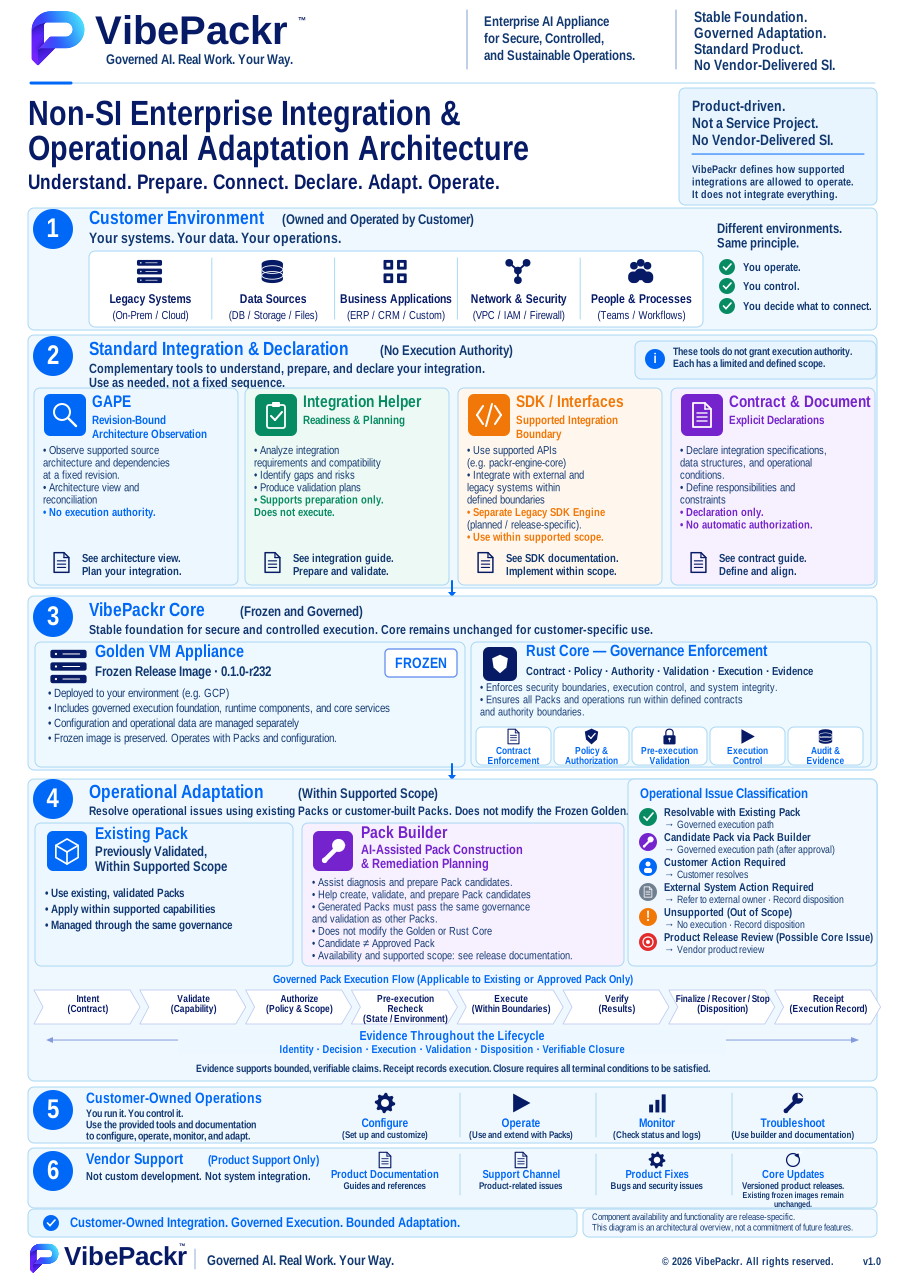
Integration roles and operating boundaries
User-provided architecture overview. Tool panels explain complementary roles rather than a mandatory execution order. The original Legacy SDK planned/release-specific wording remains in the image; use Part.5 and the exact supplied package for current SDK availability. This figure grants no authority and is not runtime proof. The displayed edition is an English SVG with current documentation updates; the earlier raster original remains preserved.