VibePackr
Website menu
VIBEPACKR / GUIDES

On-premises Guide

Start the step-by-step guide

Prepare an organization-managed installation for Online or Offline use.

First use · prepare one installation and verify one SDK exercise

Finish with an OS/network preflight record and, only when the supplied product/toolchain prerequisites are complete, one fresh SDK candidate. The public manual is not an appliance installer, activation service or universal Rust dependency archive.

Before you start

  • Exact supported delivery, OS and CPU architecture, supplied installer and manifest, installation instructions, responsible administrator, private writable directory and rollback/retention plan. Keep prior packages and results.
  • SDK work additionally requires the installed SDK, supported Rust compiler and native tools. Reuse a documented compatible Golden setup when present; otherwise obtain the matching separate dependency/toolchain package. Offline transfer must include every declared prerequisite before disconnection.

Choose Online or Offline for your actual environment. Online uses approved network access. Offline is an optional closed on-premises setup requiring the matching product, compiler/native toolchain and declared dependencies before transfer. A documentation download does not contain those packages.

Download the blank worksheet and save a private working copy in a new folder such as guide-practice-01. Open JSON in a UTF-8 text editor, preserve quotation marks and null for unobserved fields, and save as .json rather than .json.txt. These worksheets are notes, not product requests. Never submit them to the SDK or Helper.

Follow the steps in order

1 · Write the OS and connectivity preflight

Do this: Save on-premises-preflight.blank.json privately. Record the exact OS version, CPU/SDK target, product version and Online or Offline selection. Read the filled example: it intentionally leaves unverified package/toolchain fields null and is not a completed installation.

Check this result: One target is selected. MACOS_ARM64, DEBIAN_13_AMD64 and WINDOWS_AMD64 are distinct documented SDK targets, not interchangeable package labels.

If it does not match: An unlisted OS/architecture needs the matching supported package and procedure; changing the target string does not convert a binary or dependency set.

2 · Collect packages and compare manifests

Do this: For Online, record approved destinations, proxy and CA requirements. For Offline, transfer the exact product, dependency/toolchain set, manifests and manuals through the approved route. Compare SHA-256 for each delivered archive with its independently supplied manifest; the OS hash examples are in the retained section below.

Check this result: Package name, digest, source reference and target agree. A matching digest is integrity evidence relative to that manifest, not a standalone security certification.

If it does not match: A missing or mismatching manifest blocks installation of that candidate. Keep both files and request the correct approved package; do not overwrite the known package.

3 · Install and record the actual tools

Do this: Follow Part.1 for your OS and supplied delivery. Write down the actual SDK executable and dependencies directory. Check rustc --version and cargo --version and the OS-specific native prerequisite list; do not install tools from an unapproved network route in a closed environment.

Check this result: The executable exists, tool versions are recorded and the installed package matches the chosen OS/architecture. The SDK directory alone does not prove a native linker is installed.

If it does not match: Missing compiler/linker, wrong architecture or unsupported first-admin route remains an explicit prerequisite failure. Resolve it using the supplied procedure before dependent operations.

4 · Verify the exact offline dependency set if selected

Do this: Use only the command for your actual target from the examples below. Replace the installed paths with the supplied real paths and run verify-offline-dependencies. Record the exit code and returned checks. This command verifies the declared set; it does not prove an arbitrary extra crate is available.

Check this result: The documented verification completes successfully for that exact target and package. Keep its result with the manifest and tool versions.

If it does not match: If verification fails, preserve the error and stop the dependent exercise. Do not silently change Offline to Online, alter a target label or suppress a failed postcheck.

5 · Run one fresh synthetic candidate when eligible

Do this: Open the Custom Execution first-use route for exact input files and fresh folder setup. Choose either run for Online or run-offline for Offline as documented in Part.5. For macOS CLT selection, keep the documented --macos-developer-selection COMMAND_LINE_TOOLS option on the matching offline run when applicable.

Check this result: A new output directory contains the candidate artifacts and manifest checks. Record whether the exercise actually completed without an additional download on the disconnected target.

If it does not match: A copied dependency directory or successful crate extraction is not a completed build. Keep the failed candidate and investigate only its exact missing tool/dependency or validation error.

6 · Read all artifacts and complete the handoff

Do this: Read README.md and manifest.json, inspect adapter.rs, and hash source and libadapter.rlib separately using the OS commands in Part.5. Keep input digest, SDK/compiler/dependency identity, stage results and reviewer decision in the preflight/observation records.

Check this result: The record distinguishes a verified local SDK candidate from installation-wide readiness, registered integration, approved Pack or customer execution.

If it does not match: Keep missing account/activation/first-admin requirements and next owners explicit. Do not edit manifest status or authority fields to convert a candidate into approval.

Editable records, inputs and output examples

macOS ARM64 · installed dependency verification

Use this only for the matching ARM64 package. These are the Part.1 default locations; replace them with your actual installed locations. This is not a command for Intel macOS.

Shell
SDK_EXE="$HOME/VibePackr-SDK-install-01/sdk/bin/packr-sdk-engine"
SDK_DEPS="$HOME/VibePackr-SDK-install-01/dependencies"
"$SDK_EXE" verify-offline-dependencies MACOS_ARM64 "$SDK_DEPS"
# Record the exit code immediately: echo $?

Debian 13 AMD64 · installed dependency verification

Use the documented Debian target and installed native tools. Do not substitute another distribution by changing only the target argument.

Shell
SDK_EXE="$HOME/VibePackr-SDK-install-01/sdk/bin/packr-sdk-engine"
SDK_DEPS="$HOME/VibePackr-SDK-install-01/dependencies"
"$SDK_EXE" verify-offline-dependencies DEBIAN_13_AMD64 "$SDK_DEPS"
# Record the exit code immediately: echo $?

Windows AMD64 · PowerShell dependency verification

Record the return code and full result. A successful verification is limited to this supplied target/dependency set.

PowerShell
$SdkInstall = Join-Path $env:USERPROFILE 'VibePackr-SDK-install-01'
$SdkExe = Join-Path $SdkInstall 'sdk\bin\packr-sdk-engine.exe'
$SdkDeps = Join-Path $SdkInstall 'dependencies'
& $SdkExe verify-offline-dependencies WINDOWS_AMD64 $SdkDeps
$VerifyExit = $LASTEXITCODE
if ($VerifyExit -ne 0) { throw 'Preserve dependency verification error; stop here' }

Troubleshooting with evidence and next actions

Retained cases cite already-public observations for their stated release and environment. Procedure examples describe how to respond; they are not additional observed incidents. No product runs were performed to write this guide.

Compiler succeeds but private-path postcheck fails

Retained observed case

Symptom: The retained SDK case reported candidate private path disclosure libadapter.rlib after the compiler returned exit 0.

What the evidence means: Compilation and the complete package validation are separate gates. This observed failure does not permit distributing that library.

Actions

  1. Keep the failed candidate, exact error, SDK/compiler target and artifact digest.
  2. Use the supplied corrected package for that OS in a fresh directory and follow all of its required postchecks.

Completion or resume check: Claim completion only when the command and all required postchecks pass; do not hide or strip evidence manually to make the check green.

Read the source and its original scope

Identical adapter source has a different library hash

Retained observed case

Symptom: The retained SDK scenario compared identical adapter.rs with differing libadapter.rlib digests.

What the evidence means: Source identity alone does not establish all compiler inputs or matching SDK/compiler/target/dependency versions. Whole manifest bytes may also include different execution records.

Actions

  1. Compare complete input bytes and exact OS, SDK, Rust compiler, dependency set and command route before repeating.
  2. When the documented reproduction is appropriate, use a fresh result directory with those same conditions and compare source and library separately.

Completion or resume check: Record only the reproducibility actually observed for that OS/version/input; never compare cross-OS libraries as if identical bytes were required.

Read the source and its original scope

Offline execution requests an unavailable crate

Procedure example · not a newly observed incident

Symptom: Example: the tool reports a missing crate/version or attempts a registry lookup in the closed environment.

What the evidence means: The supplied dependency set has a declared scope. Adding a crate or changing lockfile/target may exceed that set; this is not evidence that every dependency is included.

Actions

  1. Save the exact missing name/version, selected target, dependency manifest and original input.
  2. Obtain the matching declared dependency/toolchain set through the approved transfer path and verify it before a new candidate.

Completion or resume check: A completed selected exercise on the actually disconnected target is needed to claim no additional downloads for that exercise.

Read the source and its original scope

Native compiler or linker is missing

Procedure example · not a newly observed incident

Symptom: Example: rustc or the native linker is not found, or the installed executable has the wrong CPU architecture.

What the evidence means: An SDK binary or crate archive does not install every OS tool. Windows, Debian and macOS native prerequisites differ.

Actions

  1. Compare the exact error with Part.1 OS prerequisites and Part.5 native-tool selection.
  2. Install or select the supplied compatible toolchain under the organization procedure; retain the earlier output and recheck versions.

Completion or resume check: Proceed only after required tools are present and the documented target/dependency verification succeeds.

Read the source and its original scope

A hash matches but installation still lacks account setup

Procedure example · not a newly observed incident

Symptom: Example: the package digest matches and the VM is reachable, but the supported administrator issuance or application activation procedure is missing.

What the evidence means: Archive integrity and host reachability do not establish product operating authority. The reference first-admin gap is version-specific and is not closed by this guide.

Actions

  1. Record the exact missing procedure and delivery owner while preserving the validated package.
  2. Continue reading and preflight preparation; stop the administrator-dependent action until the supplied supported route is available.

Completion or resume check: The necessary supported setup and actual permitted access must be observed separately from file integrity.

Read the source and its original scope

Finish and hand off

Retain package/manifest identity, tool versions, selected network mode, dependency verification, input/output digests and incomplete requirements. A local synthetic candidate does not activate or provision an appliance and does not certify the entire network or every Rust dependency.

Connect the Guides and Parts 1–8

Choose a purpose in a Guide, then use the relevant Part for exact tool steps. The same sequence, vocabulary and artifact roles apply in both.

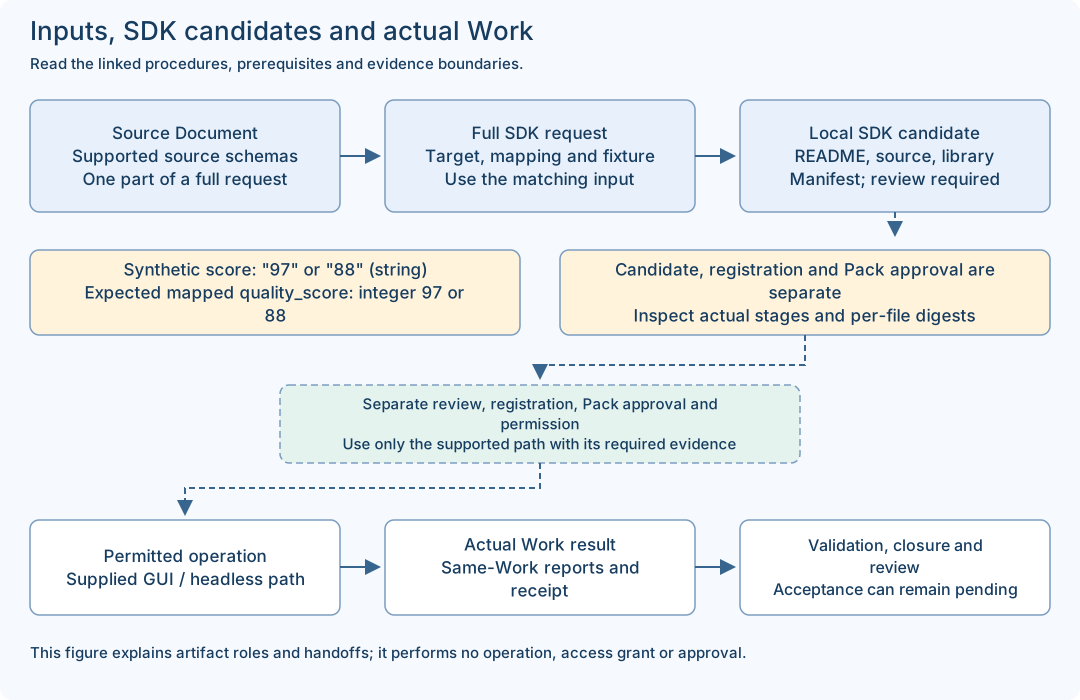
Source/request, SDK candidate and actual Work are distinct stages; the table explains each artifact.

Purpose guides

Recommended integration order and shortcuts
  1. Part.1 · Install and prepare
  2. Part.2 · Observe structure with GAPE
  3. Part.3A · Plan with Integration Helper
  4. Part.4 · Write the source Document and bind the published target Contract
  5. Part.3B · Check the complete request and identify implementation needs
  6. Part.5 if needed · SDK candidate, implementation review and separate registration
  7. Part.6 if needed · Builder Pack candidate and its approval path
  8. Part.7 · Permitted GUI or headless operation
  9. Part.8 · Results, troubleshooting and human review

Helper B checks the completed declarations before you decide whether implementation or a new Pack is needed. After an implementation or declaration change, repeat only the affected supported checks and finish the separate implementation/registration/Pack approval path before operation. A generated candidate grants no operating authority.

Select only the route needed for your goal. Retained PoC reading can begin without installation. A supplied local SDK exercise uses Part.1 → Part.5 and does not require a new GAPE scan or appliance account. An existing approved Pack can use Part.1 → Part.7 → Part.8 after its current prerequisites are checked. New integration/Pack authoring follows the full conditional sequence.

Part map and tool responsibilities
PartRole and expected boundary
Part.1 · Installation and first connectionOS preparation, supplied packages and first connection. Installation is not an executed Work.
Part.2 · GAPE observation, comparison and sharingRevision-bound architecture observation. A worksheet is not the approved GAPE input manifest.
Part.3 · Integration Helper operationA plans before the Document; B checks the completed full request. Each stage reads its typed status/reason.
Part.4 · Contract and Document authoringAuthor the source Document and mappings; use the supplied target Contract/revision. JSON syntax alone does not establish semantic compatibility.
Part.5 · SDK Engine practice and candidatesGenerate a local SDK implementation candidate. Reuse an implemented, registered, release-compatible integration when it already meets the need.
Part.6 · Builder and Additional PacksPrepare a Pack candidate when a new Pack is needed. Reuse an existing approved Pack that meets the goal and installation scope.
Part.7 · PackrGUI and headless operationUse the supplied GUI/headless route under its current authority and preconditions. Inspect the returned Work identity and result.
Part.8 · Operations, troubleshooting and supportCompare same-Work artifacts, receipt and closure; keep human acceptance pending until actually recorded.
Shared vocabulary
Guide / Part
A Guide is a purpose/role route; a Part is a tool reference. They complement each other and are not two competing numbered workflows.
Contract / source Document
The published target Contract defines the supported target and revision. The source Document declares your source shapes. A source declaration does not authorize execution.
Complete request / source-only file
A complete SDK request includes request_id, correlation_id and draft with definition/source/mapping/fixture. The source-only status Document is one component, not that complete request.
Fixture / actual observation
A fixture supplies synthetic values for a declared local exercise. Its declared fields do not prove a real provider call, current connectivity or a customer result.
SDK candidate / Pack candidate
The SDK candidate has README.md, adapter.rs, libadapter.rlib and manifest.json. A Builder Pack candidate is a separate product-returned candidate with its own validation/approval path. Neither automatically becomes an approved Pack.
Worksheet / receipt / acceptance
A worksheet records a human note. A receipt is a product execution record. PASSED validation and automation completion can coexist with human acceptance pending; record each field at its actual scope.
Online / Offline
These are setup choices. Offline product development requires the exact declared dependency set and native tools; an offline manual ZIP only supports document reading.
Match each input to the right output

The status.read source-only example and the read_quality SDK exercise are different examples. Use a matching complete request; do not pass the status source file directly as the quality SDK request. Expected mapping values below are teaching expectations, not a newly captured run.

File / roleInputOutput / check
status-document.json

Source-only CUSTOM_API declaration for status.read. Use it inside the complete supplied preparation request.

service: stringDeclared service: string and healthy: boolean. This is a schema, not an observed service response.
read-only-custom-api.json / custom-api-01.json

The complete maintained SDK base request; the guide copy is byte-equivalent JSON.

fixture.response.component = "fixture-component"; score = "97" (string)STRING_TO_INTEGER maps score to expected integer quality_score 97. The documented SDK result is a local candidate.
custom-api-02.json

A complete second SDK request changing only the two fixture response values.

component = "my-test-component"; score = "88" (string)Expected mapped component is "my-test-component" and quality_score is integer 88. Inspect actual manifest/stages; identical mapping source is possible.
custom-api-score-number.json

Intentional negative input, not a successful base example.

fixture.response.score = 88 (JSON number) against a declared string schemaKeep the actual typed failure result. Do not convert the example into a claimed successful candidate.
Worksheet / SDK artifacts / Work reports

Three different artifact classes: human notes, local compiled candidate, actual Work/report/receipt records.

Use the matching tool and current target; never submit a worksheet or previous result as the next full request.Bind outputs to the actual input, version, candidate or Work identity. File presence and exit 0 alone are insufficient.
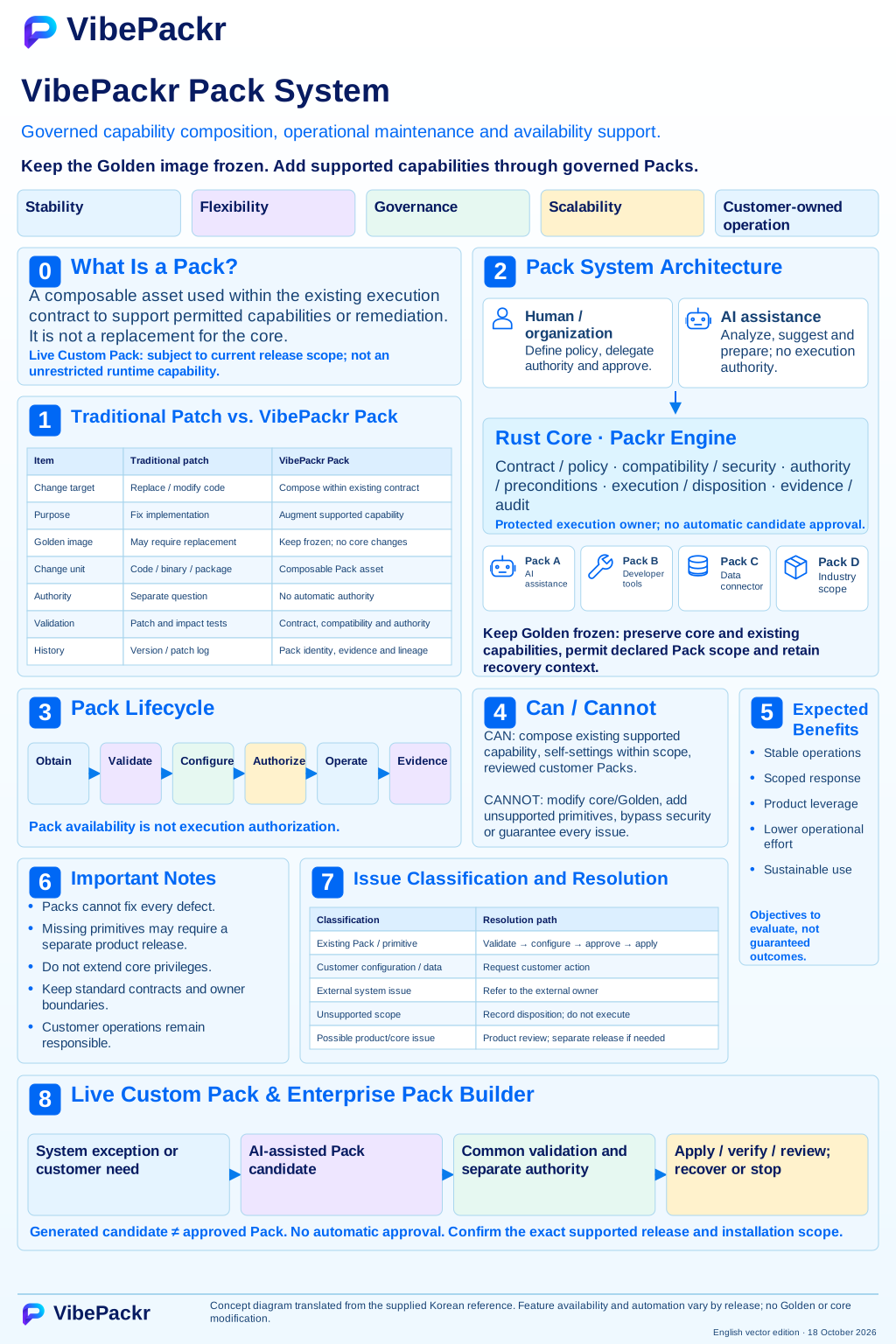
Pack system concept · English SVG edition

User-provided concept figure, dated 8 October 2026, v1.5. Customer-operated Packs stay within declared contracts and permissions; Builder prepares candidates that still require validation and approval. Pack types and self-adaptation labels are illustrative and release-specific, not a current executable feature inventory. The displayed edition is an English SVG with current documentation updates; the earlier raster original remains preserved.

Pack system concept · English SVG edition

Open the full-size SVG illustration

Current manual sequence and scope reference

On-premises preparation and first use

Use this guide for an organization-managed environment. It is a preparation and verification procedure; obtain the supported deployment instructions and packages for your exact delivery. The public manual download is documentation, not an appliance installer.

1 · Choose the network mode and collect prerequisites

Online and Offline are both supported setup choices

Online uses the network access approved for your installation. Offline is the closed on-premises option: prepare the exact OS/target toolchain and dependency set before transfer. The manual ZIP contains documents and synthetic inputs, not product binaries or Rust toolchains.

  • Record OS, architecture, delivery version, installer digest, responsible administrator, approved endpoint, data location and rollback/retention plan. Store credentials separately from worksheets.
  • For Online, record allowed destinations, proxy and certificate requirements before installation. Use the supplied supported procedure; do not disable certificate validation to make a connection work.
  • For Offline, collect the matching product packages, licenses or authorization material through the approved channel, Rust/native toolchains if needed, dependency archives, manifests and manuals before entering the closed environment. Verify OS, target and versions as a set.

2 · Check package identity before installation

Compare the digest with the manifest delivered through the approved channel. These command examples only calculate a digest; they do not establish the authenticity of an untrusted manifest. Substitute the actual supplied filename.

PowerShell
# macOS
shasum -a 256 supplied-package.zip
# Linux
sha256sum supplied-package.zip
# Windows PowerShell
Get-FileHash -Algorithm SHA256 .\supplied-package.zip

If the digest or target differs, keep the file and mismatch record separate, do not install it, and obtain the correct package. Do not overwrite the known package or its manifest.

3 · Install and follow the tool sequence

  1. Part.1 · Install and prepare
  2. Part.2 · Observe structure with GAPE
  3. Part.3A · Plan with Integration Helper
  4. Part.4 · Write the source Document and bind the published target Contract
  5. Part.3B · Check the complete request and identify implementation needs
  6. Part.5 if needed · SDK candidate, implementation review and separate registration
  7. Part.6 if needed · Builder Pack candidate and its approval path
  8. Part.7 · Permitted GUI or headless operation
  9. Part.8 · Results, troubleshooting and human review

Helper B checks the completed declarations before you decide whether implementation or a new Pack is needed. After an implementation or declaration change, repeat only the affected supported checks and finish the separate implementation/registration/Pack approval path before operation. A generated candidate grants no operating authority.

Select only the route needed for your goal. Retained PoC reading can begin without installation. A supplied local SDK exercise uses Part.1 → Part.5 and does not require a new GAPE scan or appliance account. An existing approved Pack can use Part.1 → Part.7 → Part.8 after its current prerequisites are checked. New integration/Pack authoring follows the full conditional sequence.

Skip SDK authoring only when an implemented, registered integration compatible with the installed release already meets the need. Skip Builder authoring only when an existing approved Pack meets the goal and installation scope. Keep declaration checks, integration validation and result review in either case.

4 · Validate the SDK dependency scope when needed

If the supplied Golden environment already has the compatible dependencies and tools, reuse that documented setup. Otherwise prepare the separate matching dependency package. An offline dependency set covers its declared crates and targets; it does not promise every possible Rust crate, compiler, linker or external tool.

Use a fresh output directory for the documented SDK exercise. Verify adapter.rs, manifest.json and any required compiled artifact, plus the package validation result. On a truly disconnected target, record that the selected exercise completed without an additional download; copying a cache alone is insufficient proof.

5 · Review results and close or hand off

Keep the selected input, exact versions, output location and digests, verbatim error if any, validation result and reviewer decision. Keep failed and successful candidates separate. Use the Common PoC scorecard for the evaluation and Part.8 for the support record.

Troubleshooting cases

Observed problemAction and completion check
Offline build asks for a crate or network accessKeep the exact crate/version error. Check the provided lockfile, dependency-set manifest and target configuration. Obtain the missing compatible set through the approved transfer path, then use a new output folder. Do not enable internet access silently.
Compiler or native linker is missingA crate archive does not install the compiler or linker. Compare the OS prerequisite list in Part.1 and SDK setup in Part.5 with the supplied toolchain. Complete that preparation before repeating the exercise.
A connection fails or the endpoint is unknownRecord the exact message and verify the operator-supplied endpoint, service release, approved route and proxy/certificate settings. A running process or reachable host does not prove the product is ready.
The supplied release has no supported first-admin procedureStop administrator-dependent operations and record the delivery owner and missing procedure. Reading, planning and synthetic document preparation can continue. Do not infer product authorization from OS administrator access.
SDK source matches but library hashes differCompare input bytes, SDK/compiler/target/dependency versions and execution route. Preserve both outputs and follow the reproducibility checks in Parts 1 and 5 before claiming identical builds.

Common PoC Guide · Open Parts 1–8 · Custom Execution Guide