
VibePackr Enterprise · Part.5
Part.5 · SDK Engine practice and candidates
Guide connections, workflow and input/output map
First-use checkpoint and return points
- Start here
- W1 creates a fresh practice folder, copies matching-version installed examples and analyzes the full Custom request. Then choose A (run) or B (run-offline), once for each candidate.
- Have ready
- Actual SDK path, a supported Rust/native toolchain, and the optional verified set only for route B. For Bash, the native option array must stay the same for W1–W4; Windows uses its separate commands.
- Expected exercise result
- Open each candidate’s README.md, adapter.rs and manifest.json; hash the source and library separately. Four files/five stage records and CUSTOMER_REVIEW_CANDIDATE/authority_granted=false describe a local candidate, not a running adapter or registered integration.
Exercise and next steps
- Custom: W1
- MCP: W2
- Edit string score: W3
- Repeat and compare: W4
- After separate implementation review/registration: Part.6
Open the relevant failure case
- SDK-1: missing prerequisites
- SDK-2: macOS CLT choice
- SDK-3: number versus string/full input
- SDK-4: library hash differs
How to read numbers and file names
Part.1–8 identifies the current tool manuals. W1–W4 and codes such as GUI-01 identify exercises inside a Part. Use Case 1–5 is a separate retained procedure sequence, not the Part numbering. Case A–J and codes such as SDK-1 or IH-1 identify troubleshooting scenarios. Older filenames and pN section IDs remain valid bookmarks; read the page heading for the current Part number.
Exercise files: check the role before saving
Distinguish source-only JSON, complete requests and intentional errors. TXT files are human worksheets, not profiles, API inputs or GAPE manifests. If a file opens in the browser, save it with the correct extension and UTF-8.
Before starting: file roles, paths and shell
Save the exercise files at the beginning of this manual into a fresh workspace and check their roles. TXT worksheets are human notes, not client profiles, API requests or GAPE manifests. Distinguish source-only JSON, complete requests and intentional type-error examples too.
Use bash for macOS/Linux and PowerShell for Windows. Do not copy prompts. Replace /absolute/path, C:\absolute\path and bracketed values with actual supplied values first; retain quotes. Commands using variables need the setup shell. In a new shell restore paths only, without overwriting old outputs/logs. Long code and tables scroll horizontally.
Company connection/enrollment, approval, supported Packs, published targets and approved manifests require actual supplied material at their relevant steps. Do not invent IDs, screen names or addresses. Read each W section's success and failure/return criteria, then perform one step at a time.
W1 · SDK-01: restore installation paths and create a Custom result
Use the SDK prepared in Part.1. Replace the first sdk_install/$sdkInstall value if installed elsewhere. Use fresh VibePackr-SDK-practice-01; do not precreate final candidate folders. Choose another number when it exists. Downloads above let you inspect complete inputs; the default exercise copies the installed SDK's matching-version examples.
sdk_install="$HOME/VibePackr-SDK-install-01"
sdk_exe="$sdk_install/sdk/bin/packr-sdk-engine"
sdk_deps="$sdk_install/dependencies"
sdk_native_args=()
sdk_practice="$HOME/VibePackr-SDK-practice-01"
test -x "$sdk_exe" || exit 1
test -f "$sdk_install/sdk/examples/read-only-custom-api.json" || exit 1
test -f "$sdk_install/sdk/examples/read-only-mcp-transcript.json" || exit 1
test ! -e "$sdk_practice" || exit 1
umask 077
mkdir -m 700 "$sdk_practice" || exit 1
mkdir "$sdk_practice/inputs" "$sdk_practice/runs" || exit 1
cp "$sdk_install/sdk/examples/read-only-custom-api.json" "$sdk_practice/inputs/custom.json" || exit 1
cp "$sdk_install/sdk/examples/read-only-mcp-transcript.json" "$sdk_practice/inputs/mcp.json" || exit 1
"$sdk_exe" analyze "$sdk_practice/inputs/custom.json" unused || exit 1$sdkInstall = Join-Path $env:USERPROFILE 'VibePackr-SDK-install-01'
$sdkExe = Join-Path $sdkInstall 'sdk\bin\packr-sdk-engine.exe'
$sdkDeps = Join-Path $sdkInstall 'dependencies'
$sdkPractice = Join-Path $env:USERPROFILE 'VibePackr-SDK-practice-01'
if (!(Test-Path -LiteralPath $sdkExe -PathType Leaf)) { throw 'Set the actual installed SDK path' }
if (Test-Path -LiteralPath $sdkPractice) { throw 'Choose a fresh practice path' }
New-Item -ItemType Directory -Path $sdkPractice -ErrorAction Stop | Out-Null
$sdkInputs = Join-Path $sdkPractice 'inputs'
$sdkRuns = Join-Path $sdkPractice 'runs'
New-Item -ItemType Directory -Path $sdkInputs,$sdkRuns -ErrorAction Stop | Out-Null
Copy-Item -LiteralPath (Join-Path $sdkInstall 'sdk\examples\read-only-custom-api.json') -Destination (Join-Path $sdkInputs 'custom.json') -ErrorAction Stop
Copy-Item -LiteralPath (Join-Path $sdkInstall 'sdk\examples\read-only-mcp-transcript.json') -Destination (Join-Path $sdkInputs 'mcp.json') -ErrorAction Stop
& $sdkExe analyze (Join-Path $sdkInputs 'custom.json') unused
if ($LASTEXITCODE -ne 0) { throw 'Analyze failed' }Choose exactly one route below. The installed-toolchain route needs supported Rust/native tools. The optional set also works on connected machines and is not a product default. Do not switch routes to evade a failed check.
A. Installed-toolchain run:
"$sdk_exe" run "$sdk_practice/inputs/custom.json" "$sdk_practice/runs/custom-01" || exit 1& $sdkExe run (Join-Path $sdkInputs 'custom.json') (Join-Path $sdkRuns 'custom-01')
if ($LASTEXITCODE -ne 0) { throw 'Candidate failed; preserve this attempt' }B. Supplied-set run-offline: run only your OS's verification block first.
# macOS ARM64 only
"$sdk_exe" verify-offline-dependencies MACOS_ARM64 "$sdk_deps" || exit 1# Debian 13 AMD64 only
"$sdk_exe" verify-offline-dependencies DEBIAN_13_AMD64 "$sdk_deps" || exit 1& $sdkExe verify-offline-dependencies WINDOWS_AMD64 $sdkDeps
if ($LASTEXITCODE -ne 0) { throw 'Dependency verification failed' }The Bash setup initializes sdk_native_args=() (no extra native options). Leave it empty for the default SYSTEM_ACTIVE route and on Debian. Only on macOS, if you explicitly chose the installed Command Line Tools route, set this once in the same Bash session before the first run-offline command:
# macOS CLT route only; omit this block for SYSTEM_ACTIVE or Debian
sdk_native_args=(--macos-developer-selection COMMAND_LINE_TOOLS)
Every Bash run-offline command below expands this same array, so W2–W4 retain your choice. In a new Bash session restore the path variables and this selected array; do not recreate the practice directories. These are Bash arrays, not PowerShell commands.
After actual verification passage:
"$sdk_exe" run-offline "$sdk_practice/inputs/custom.json" "$sdk_practice/runs/custom-01" "$sdk_deps" "${sdk_native_args[@]}" || exit 1& $sdkExe run-offline (Join-Path $sdkInputs 'custom.json') (Join-Path $sdkRuns 'custom-01') $sdkDeps
if ($LASTEXITCODE -ne 0) { throw 'Candidate failed; preserve this attempt' }The selected array passes the macOS option to each B execution. The default is SYSTEM_ACTIVE; it does not change system developer selection. Windows uses the PowerShell blocks without this Bash array.
| Inspect after success | Location/expected content |
|---|---|
| Final directory | runs/custom-01, distinct from private failed stages |
| Files | adapter.rs, libadapter.rlib, README.md, manifest.json |
| manifest.status/authority_granted | CUSTOMER_REVIEW_CANDIDATE/false |
| stages/stage_digests | ANALYZE_GAP, GENERATE, BUILD, VALIDATE, PACKAGE |
| files | Digests for README.md, adapter.rs, libadapter.rlib |
Open README/source/manifest in a text editor. .rlib is not an executable. Classify analyze refusals under full input/encoding, TOOLCHAIN_UNAVAILABLE under route/native prerequisites, and OUTPUT_EXISTS_OR_UNAVAILABLE under existing output/fresh writable path. Preserve a refusal and stop before the next exercise.
W2 · SDK-02: run MCP into a separate result directory
Keep W1's path variables. Setup copied inputs/mcp.json. Read tools/list, read_repository, the synthetic response and name→repository_id/sha→revision mappings, then analyze the complete input.
"$sdk_exe" analyze "$sdk_practice/inputs/mcp.json" unused || exit 1& $sdkExe analyze (Join-Path $sdkInputs 'mcp.json') unused
if ($LASTEXITCODE -ne 0) { throw 'Analyze failed; preserve the original error' }Run only the route selected in W1.
A. run:
"$sdk_exe" run "$sdk_practice/inputs/mcp.json" "$sdk_practice/runs/mcp-01" || exit 1& $sdkExe run (Join-Path $sdkInputs 'mcp.json') (Join-Path $sdkRuns 'mcp-01')
if ($LASTEXITCODE -ne 0) { throw 'Candidate failed; preserve this attempt' }B. run-offline:
"$sdk_exe" run-offline "$sdk_practice/inputs/mcp.json" "$sdk_practice/runs/mcp-01" "$sdk_deps" "${sdk_native_args[@]}" || exit 1& $sdkExe run-offline (Join-Path $sdkInputs 'mcp.json') (Join-Path $sdkRuns 'mcp-01') $sdkDeps
if ($LASTEXITCODE -ne 0) { throw 'Candidate failed; preserve this attempt' }Retain the same macOS CLT option if selected. Inspect mcp-01's four files, five stages and input digest independently. This validates local transcript mapping, not an MCP server connection or credentials. Hand over actual target/protocol refusals without switching to a live server call.
W3 · SDK-03: edit a string score and generate a fresh candidate
Create a copy first:
test ! -e "$sdk_practice/inputs/custom-02.json" || exit 1
cp "$sdk_practice/inputs/custom.json" "$sdk_practice/inputs/custom-02.json" || exit 1$sdkModified = Join-Path $sdkInputs 'custom-02.json'
if (Test-Path -LiteralPath $sdkModified) { throw 'Choose a fresh input name' }
Copy-Item -LiteralPath (Join-Path $sdkInputs 'custom.json') -Destination $sdkModified -ErrorAction StopEdit only these values in custom-02.json using a UTF-8 text editor. Do not replace the complete file with this excerpt.
draft.fixture.response.score = "88"
draft.fixture.response.component = "my-test-component"
Logical mapping expectation: component="my-test-component", integer quality_score=88. The command does not separately print this object to stdout, nor is it a live API response. Supplied custom-api-score-number.json instead makes score numeric: it is an intentional type-error example. Keep it separate from positive input and do not change declarations to force acceptance.
"$sdk_exe" analyze "$sdk_practice/inputs/custom-02.json" unused || exit 1& $sdkExe analyze (Join-Path $sdkInputs 'custom-02.json') unused
if ($LASTEXITCODE -ne 0) { throw 'Analyze failed; preserve the original error' }After actual analysis passage, use the selected route.
A. run:
"$sdk_exe" run "$sdk_practice/inputs/custom-02.json" "$sdk_practice/runs/custom-02" || exit 1& $sdkExe run (Join-Path $sdkInputs 'custom-02.json') (Join-Path $sdkRuns 'custom-02')
if ($LASTEXITCODE -ne 0) { throw 'Candidate failed; preserve this attempt' }B. run-offline:
"$sdk_exe" run-offline "$sdk_practice/inputs/custom-02.json" "$sdk_practice/runs/custom-02" "$sdk_deps" "${sdk_native_args[@]}" || exit 1& $sdkExe run-offline (Join-Path $sdkInputs 'custom-02.json') (Join-Path $sdkRuns 'custom-02') $sdkDeps
if ($LASTEXITCODE -ne 0) { throw 'Candidate failed; preserve this attempt' }Retain the same macOS CLT option when used. Compare original/edited input digests and manifests. Mapping source may remain unchanged while input/execution records differ. On failure check complete input, string type and UTF-8 first.
W4 · SDK-04: repeat the same input and compare individual files
Retain original inputs/custom.json and matching OS, SDK, compiler, dependencies and route. Use fresh final path custom-repeat-01.
A. run:
"$sdk_exe" run "$sdk_practice/inputs/custom.json" "$sdk_practice/runs/custom-repeat-01" || exit 1& $sdkExe run (Join-Path $sdkInputs 'custom.json') (Join-Path $sdkRuns 'custom-repeat-01')
if ($LASTEXITCODE -ne 0) { throw 'Candidate failed; preserve this attempt' }B. run-offline:
"$sdk_exe" run-offline "$sdk_practice/inputs/custom.json" "$sdk_practice/runs/custom-repeat-01" "$sdk_deps" "${sdk_native_args[@]}" || exit 1& $sdkExe run-offline (Join-Path $sdkInputs 'custom.json') (Join-Path $sdkRuns 'custom-repeat-01') $sdkDeps
if ($LASTEXITCODE -ne 0) { throw 'Candidate failed; preserve this attempt' }Retain the same macOS CLT option, then query file digests:
# macOS
shasum -a 256 "$sdk_practice/runs/custom-01/adapter.rs" "$sdk_practice/runs/custom-repeat-01/adapter.rs"
shasum -a 256 "$sdk_practice/runs/custom-01/libadapter.rlib" "$sdk_practice/runs/custom-repeat-01/libadapter.rlib"# Linux
sha256sum "$sdk_practice/runs/custom-01/adapter.rs" "$sdk_practice/runs/custom-repeat-01/adapter.rs"
sha256sum "$sdk_practice/runs/custom-01/libadapter.rlib" "$sdk_practice/runs/custom-repeat-01/libadapter.rlib"Get-FileHash -LiteralPath (Join-Path $sdkRuns 'custom-01\adapter.rs'),(Join-Path $sdkRuns 'custom-repeat-01\adapter.rs') -Algorithm SHA256
Get-FileHash -LiteralPath (Join-Path $sdkRuns 'custom-01\libadapter.rlib'),(Join-Path $sdkRuns 'custom-repeat-01\libadapter.rlib') -Algorithm SHA256Compare source with source and library with library. Whole-manifest hashes need not match. Check input digest, compiler, five stages and dependency before/after records too. If matching conditions produce different file hashes, preserve both inputs/results/versions and use SDK-4. In a new terminal restore only path variables; do not repeat folder-creation setup against existing work.
More exercises and checklists
Reading sequence
Check inputs → choose a task → use the detailed first exercise/commands below → inspect results → modify/repeat → follow the relevant failure case. Part numbers are not a mandatory installation sequence; choose only needed tools.
Prerequisites and input
Supported OS SDK, complete examples, installed toolchain or optional Rust set, and native OS prerequisites.
Both online and offline environments remain available. The optional SDK Rust set provisions SDK builds in closed on-premises environments; it is not a product default. Use actual supplied company endpoints, approval and enrollment material where an exercise needs them.
Find an exercise or case
| Exercise | Task |
|---|---|
| SDK-01 | Complete the five-stage Custom exercise |
| SDK-02 | Generate a separate candidate from an MCP transcript |
| SDK-03 | Change fixture values and compare candidates |
| SDK-04 | Check same-input reproducibility and retain results |
Exercise SDK-01 · Complete the five-stage Custom exercise
A first-time developer runs supplied read-only-custom-api.json after choosing installed-toolchain or supplied-set operation.
Actions:
- Prepare the OS SDK, selected toolchain and native prerequisites; compare digests.
- Extract privately and analyze the complete example; validate the full tree when using the dependency set.
- Run the OS-specific command against a nonexisting custom-01 result path; do not precreate the final directory.
- Read all four files and manifest stages/stage_digests/files; record original input and execution route.
Read the result: A local synthetic CUSTOMER_REVIEW_CANDIDATE; no live API connection.
Failure and next branch: Separate input, native/toolchain and existing-output refusals; use SDK-1–4 below.
Retain: OS, SDK/input digests, selected route, compiler, five stages and manifest.
Your exercise record: fill in time, version, input reference, actual actions, observed result and next owner. Do not copy expected outcomes into an execution success record.
Exercise SDK-02 · Generate a separate candidate from an MCP transcript
Use the supplied MCP transcript to review a legacy repository interface. Transcript analysis is separate from server connection.
Actions:
- Read tools/list, read_repository and synthetic response in the complete example.
- Inspect declared name→repository_id and sha→revision mappings and read-only scope.
- Analyze and run through the selected route into separate mcp-01; preserve Custom output.
- Inspect that MCP candidate's source/library/manifest, stages and input digest.
Read the result: A local transcript-based mapping candidate, not live MCP or credential validation.
Failure and next branch: For unsupported protocol/operation/permission, retain the actual reason and check supplied scope.
Retain: Complete MCP input digest, mapping/operation, candidate path and manifest.
Your exercise record: fill in time, version, input reference, actual actions, observed result and next owner. Do not copy expected outcomes into an execution success record.
Exercise SDK-03 · Change fixture values and compare candidates
Change score to string "88" and component to "my-test-component", retaining the same mapping.
Actions:
- Copy the complete example to fresh inputs-02/input.json and preserve the original.
- Edit only the two draft.fixture.response values as UTF-8, keeping score quoted.
- Analyze, then run into fresh custom-api-candidate-02 while retaining the original output.
- Compare source/library digests separately from manifest input/stage digests.
Read the result: Observe that fixture value changes may leave mapping source unchanged while input/execution records differ.
Failure and next branch: Do not edit generated source/manifest to match prior validation; restore the complete input if an excerpt was saved.
Retain: Original/edited digests, both candidates, expected and actual differences.
Your exercise record: fill in time, version, input reference, actual actions, observed result and next owner. Do not copy expected outcomes into an execution success record.
Exercise SDK-04 · Check same-input reproducibility and retain results
Check whether another output directory yields the same library. This is not a comparison across operating systems.
Actions:
- Fix OS, SDK, compiler, dependency set, full input digest and route.
- Run the same input into a fresh repeat path and preserve both outputs.
- Compare adapter.rs/libadapter.rlib separately, together with stages and dependency before/after records.
- Record field-level manifest differences; complete bytes may differ with execution records.
Read the result: Matching results establish reproducibility for those OS/version/input conditions, not universal determinism.
Failure and next branch: If hashes differ under matching conditions, preserve outputs and hand over the SDK-4 minimal record.
Retain: Both inputs, SDK/compiler/set identities, source/library digests and manifests.
Your exercise record: fill in time, version, input reference, actual actions, observed result and next owner. Do not copy expected outcomes into an execution success record.
Repeat, modify and resume after failure
Preserve earlier input/version/validation/results and distinguish a new input or revision. Use fresh output paths for SDK/GAPE; retain product-returned candidate revisions for Builder. Helper commands take the same complete request rather than the preceding result. Query an existing ID first when Work is running or uncertain.
After closing a terminal, restore absolute paths and the selected environment. Recheck affected stages and hand over pending company authority, registration or approval as pending. Support records use minimal messages/shareable references, without bulk private keys, raw prompts, customer responses or full logs.
Detailed commands, inputs and troubleshooting sources
The following detailed guides share the same maintained documentation source. Use their first exercises, complete JSON, OS-specific commands, file inspection and symptom cases. Cross-Part references lead to the appropriate manual.
Full workflow and skip conditions
SDK Engine: installation and candidate use online and offline
SDK Engine: installation and candidate use online and offline
Detailed section contents
What this component does
Use this tool on an integration workstation to prepare a candidate, before any live connection or Pack registration. It accepts a declared read-only Custom API operation or an MCP transcript, each with a synthetic response. The result is a locally compiled value-mapping library and its source. The tool does not call the source API or MCP server, read credentials, change the appliance, register a Pack, or execute Work.
For the supplied-set route, use the matching generation of the separate OS-native offline Rust dependency package. This set is optional when choosing the installed-toolchain online route. It supplies the compiler, standard library, Cargo and exact declared crate versions. Rust and crates need no additional download for that declared coverage. Other OSes, targets or new crates require their own verified inputs. macOS arm64 and Debian 13 amd64 bundles use Rust 1.96.0; Windows amd64 uses Rust 1.97.1.
Native prerequisites are separate: an existing Debian system C linker and libc development files; trusted Apple developer tools and SDK on macOS; or Visual Studio 2022 BuildTools MSVC 14.44.35207 and Windows SDK 10.0.26100.0. These native assets are not redistributed. Provisioning a fresh OS with all prerequisites has not been validated.
On macOS, run-offline uses the active Apple developer tools by default (SYSTEM_ACTIVE). To select an already installed Command Line Tools package for one run, append --macos-developer-selection COMMAND_LINE_TOOLS after the dependency root. This selects the registered /Library/Developer/CommandLineTools installation and retains all trust checks. It does not change the system developer selection or fall back to another installation. The option is rejected on other operating systems.
./bin/packr-sdk-engine run-offline examples/read-only-custom-api.json ./quality-candidate /absolute/path/dependencies --macos-developer-selection COMMAND_LINE_TOOLSCheck official signing/notarization and customer activation/delivery status in the package and separately trusted release inventory. Local example success does not authorize those states.
Choose the environment first: online and offline
SDK Engine can be used in both online development and offline environments. The offline dependency set is optional provisioning for closed on-premises installations where compiling an SDK adapter may otherwise require unavailable Rust assets. It does not set an offline-only product default. Its purpose is to address dependencies that can arise while building a new integration candidate with SDK Engine.
| Environment | Preparation | Command and evidence scope |
|---|---|---|
| Online development | Obtain the SDK through your approved delivery route and install or reuse a supported Rust compiler and native tools. The shared dependency set is also an option. | Use run with an existing toolchain, or run-offline with the verified dependency set. The checks and receipts differ. |
| Closed on-premises | Prepare the SDK, matching OS dependency set, native prerequisites and trusted digest inventory before transfer. | Verify the complete dependency tree, then use run-offline. The declared Rust/crate coverage requires no additional download. |
| Connected environment requiring fixed build inputs | Choose the same dependency set while the machine remains connected. | The command name run-offline does not disable the computer's network or make the whole product offline-only. |
The compatibility path below uses an installed compiler in an online development environment. Run it from the extracted SDK directory after checking the actual compiler selected by rustc --version, its supported target and native prerequisites. Choose fresh output directories. This path uses the compiler on PATH and does not provide the separate dependency set's full-tree/native-trust receipts; validate that environment separately.
rustc --version
./bin/packr-sdk-engine analyze examples/read-only-custom-api.json unused
./bin/packr-sdk-engine run examples/read-only-custom-api.json ./online-custom-candidate-01
./bin/packr-sdk-engine run examples/read-only-mcp-transcript.json ./online-mcp-candidate-01rustc --version
if ($LASTEXITCODE -ne 0) { throw 'Rust compiler unavailable' }
.\bin\packr-sdk-engine.exe analyze .\examples\read-only-custom-api.json unused
if ($LASTEXITCODE -ne 0) { throw 'Analyze failed' }
.\bin\packr-sdk-engine.exe run .\examples\read-only-custom-api.json .\online-custom-candidate-01
if ($LASTEXITCODE -ne 0) { throw 'Custom candidate failed' }
.\bin\packr-sdk-engine.exe run .\examples\read-only-mcp-transcript.json .\online-mcp-candidate-01
if ($LASTEXITCODE -ne 0) { throw 'MCP candidate failed' }run is retained as a compatibility command for an installed compiler. It does not establish the same checks as the separately verified dependency route. Do not use it to avoid a failed run-offline trust or permission check. The dependency-set procedure below can also be chosen on a connected machine. Neither command's synthetic examples contact a live API or MCP server.
Prepare the two archives in a fresh location
The SDK archive contains bin, docs, examples, licenses and notices. The optional Rust dependency set contains DEPENDENCIES.json, FILES.json, toolchain, cargo-home and notices. Extracting the SDK alone does not install the optional dependencies. Use a new generation-specific location to preserve earlier installations and results.
| Platform | SDK | Optional dependency set | Native coverage to check |
|---|---|---|---|
| macOS ARM64 | Matching .tar.gz | RUST_DEPENDENCIES_MACOS_ARM64.tar.gz | Apple Silicon, registered Apple tools and SDK |
| Debian 13 AMD64 | Matching .tar.gz | RUST_DEPENDENCIES_DEBIAN_13_AMD64.tar.gz | x86-64, system C linker and libc development files |
| Windows AMD64 | Matching .zip | RUST_DEPENDENCIES_WINDOWS_AMD64.zip | x64, registered MSVC and Windows SDK |
Check both archives with shasum -a 256 on macOS, sha256sum on Debian, or Get-FileHash -Algorithm SHA256 on Windows. Compare with a separately trusted component inventory. A digest obtained from the same untrusted location does not establish publisher identity. Stop on a mismatch even if the file name is unchanged.
On Linux or macOS, replace the archive paths below with the real files. The example stops if the install root already exists. Use an unshared directory under your private home; every ancestor must also exclude writes by other users.
sdk_archive="/absolute/path/sdk-package.tar.gz"
deps_archive="/absolute/path/RUST_DEPENDENCIES_OS.tar.gz"
install_root="$HOME/VibePackr-SDK-install-01"
test ! -e "$install_root" || exit 1
umask 077
mkdir -m 700 "$install_root" || exit 1
mkdir "$install_root/sdk" "$install_root/dependencies" "$install_root/runs" || exit 1
tar -xzf "$sdk_archive" -C "$install_root/sdk" || exit 1
tar -xzf "$deps_archive" -C "$install_root/dependencies" || exit 1
cd "$install_root/sdk" || exit 1
In Windows PowerShell 5.1, choose a fresh directory beneath an access-controlled user home. Check the organization's approved current-user directory and ACL first; avoid shared, synchronized or network locations. The example assumes that the parent permissions have already been verified. It neither overwrites an old directory nor changes system-wide ACLs.
$sdkArchive = 'C:\absolute\path\sdk-package.zip'
$depsArchive = 'C:\absolute\path\RUST_DEPENDENCIES_WINDOWS_AMD64.zip'
$installRoot = Join-Path $env:USERPROFILE 'VibePackr-SDK-install-01'
if (Test-Path -LiteralPath $installRoot) { throw 'Choose a fresh install root' }
New-Item -ItemType Directory -Path $installRoot -ErrorAction Stop | Out-Null
$sdkRoot = Join-Path $installRoot 'sdk'
$depsRoot = Join-Path $installRoot 'dependencies'
$runsRoot = Join-Path $installRoot 'runs'
New-Item -ItemType Directory -Path $sdkRoot,$depsRoot,$runsRoot -ErrorAction Stop | Out-Null
Expand-Archive -LiteralPath $sdkArchive -DestinationPath $sdkRoot -ErrorAction Stop
Expand-Archive -LiteralPath $depsArchive -DestinationPath $depsRoot -ErrorAction Stop
Set-Location -LiteralPath $sdkRoot
If full dependency verification rejects the permissions, do not use that installation; resolve it through the approved installation procedure. Do not disable checks, elevate the product, bypass execution policy or change the system trust store. Extraction of a dependency set is optional when using only an existing toolchain in an online environment.
Check and install the supplied package
- Confirm that your release inventory lists SDK Engine for your workstation OS. Compare both SDK and dependency archive SHA-256 values with a separately trusted inventory before extraction. Verify a release signature when supplied; record an absent official distribution signature and distinguish an unsigned candidate from a signed release. Do not substitute a package for another OS.
- Extract the archive into a new, access-controlled directory. Keep the directory's
bin,docs, andexamplestogether. Use the signed release's platform-specific installation instructions for any system-wide placement. - Extract dependencies into a separate fresh directory writable only by the trusted current user. All intermediate directories must exclude other users’ writes. Preserve the included
cargo-homeas verified input: do not use it as a mutable cache or merge it into a global cache. No activation script or shell session mutation is needed. Replace the absolute dependency paths below with your actual paths, verify the full tree, then check the examples.
Linux or macOS terminal:
./bin/packr-sdk-engine verify-offline-dependencies DEBIAN_13_AMD64 /absolute/path/dependencies
# On macOS arm64 replace DEBIAN_13_AMD64 with MACOS_ARM64.
test -f examples/read-only-custom-api.json
test -f examples/read-only-mcp-transcript.json
./bin/packr-sdk-engine analyze examples/read-only-custom-api.json unused
Windows PowerShell:
.\bin\packr-sdk-engine.exe verify-offline-dependencies WINDOWS_AMD64 C:\absolute\path\dependencies
Test-Path .\examples\read-only-custom-api.json
Test-Path .\examples\read-only-mcp-transcript.json
.\bin\packr-sdk-engine.exe analyze .\examples\read-only-custom-api.json unused
analyze reads the declaration without creating an output directory. A successful result reports authority_granted: false. If your release inventory lacks this component, stop and obtain the correct package through your support channel.
OS-specific examples with the optional dependency set
The commands below assume the preceding path variables remain in the same shell. Set actual absolute paths again in a new shell. The final unused argument to analyze is required by the CLI shape; it does not name a created output directory.
On macOS ARM64, this example explicitly chooses already installed Command Line Tools. The default selection is SYSTEM_ACTIVE; the option below applies only to that run.
./bin/packr-sdk-engine verify-offline-dependencies MACOS_ARM64 "$install_root/dependencies" || exit 1
./bin/packr-sdk-engine analyze examples/read-only-custom-api.json unused || exit 1
./bin/packr-sdk-engine run-offline examples/read-only-custom-api.json "$install_root/runs/custom-01" "$install_root/dependencies" --macos-developer-selection COMMAND_LINE_TOOLS || exit 1
./bin/packr-sdk-engine run-offline examples/read-only-mcp-transcript.json "$install_root/runs/mcp-01" "$install_root/dependencies" --macos-developer-selection COMMAND_LINE_TOOLS || exit 1
On Debian 13 AMD64:
./bin/packr-sdk-engine verify-offline-dependencies DEBIAN_13_AMD64 "$install_root/dependencies" || exit 1
./bin/packr-sdk-engine analyze examples/read-only-custom-api.json unused || exit 1
./bin/packr-sdk-engine run-offline examples/read-only-custom-api.json "$install_root/runs/custom-01" "$install_root/dependencies" || exit 1
./bin/packr-sdk-engine run-offline examples/read-only-mcp-transcript.json "$install_root/runs/mcp-01" "$install_root/dependencies" || exit 1
On Windows AMD64:
.\bin\packr-sdk-engine.exe verify-offline-dependencies WINDOWS_AMD64 $depsRoot
if ($LASTEXITCODE -ne 0) { throw 'Dependency verification failed' }
.\bin\packr-sdk-engine.exe analyze .\examples\read-only-custom-api.json unused
if ($LASTEXITCODE -ne 0) { throw 'Analyze failed' }
.\bin\packr-sdk-engine.exe run-offline .\examples\read-only-custom-api.json (Join-Path $runsRoot 'custom-01') $depsRoot
if ($LASTEXITCODE -ne 0) { throw 'Custom candidate failed' }
.\bin\packr-sdk-engine.exe run-offline .\examples\read-only-mcp-transcript.json (Join-Path $runsRoot 'mcp-01') $depsRoot
if ($LASTEXITCODE -ne 0) { throw 'MCP candidate failed' }
Inspect the first result and resume in a new terminal
After the OS-specific installation/run blocks create separate Custom and MCP candidates, inspect them below. SDK is not an installer that creates a desktop app icon: locate the extracted bin executable and result paths. Run commands from that SDK directory. The installed-toolchain online route does not require optional dependency variables.
If you used the installed-toolchain online run examples unchanged, results are online-custom-candidate-01 and online-mcp-candidate-01 under the SDK directory. Substitute those actual paths in the inspection commands below. runs/custom-01 and runs/mcp-01 belong to the earlier supplied-set run blocks.
Open the actual Custom result
ls -la "$install_root/runs/custom-01"
cat "$install_root/runs/custom-01/README.md"
cat "$install_root/runs/custom-01/adapter.rs"
cat "$install_root/runs/custom-01/manifest.json"$candidate01 = Join-Path $runsRoot 'custom-01'
Get-ChildItem -LiteralPath $candidate01
Get-Content -LiteralPath (Join-Path $candidate01 'README.md') -Raw -Encoding UTF8
Get-Content -LiteralPath (Join-Path $candidate01 'adapter.rs') -Raw -Encoding UTF8
Get-Content -LiteralPath (Join-Path $candidate01 'manifest.json') -Raw -Encoding UTF8| Item | First check | Meaning |
|---|---|---|
| Output directory | adapter.rs, libadapter.rlib, README.md, manifest.json | Distinct from failed temporary stages |
| adapter.rs | Component mapping and score → quality_score conversion | Synthetic value mapping, not an API client |
| manifest.json | compiler_version, 3 file digests, five stages, authority_granted=false | This execution's candidate and validation records |
| offline_execution | Dependency/native observations when using the supplied-set route | Do not assume the same receipt for online run |
| MCP output | Separate mcp-01 directory and repository mapping | Custom success is not MCP success |
libadapter.rlib is a Rust library; do not double-click or execute it as an OS program. Mapping 97 to an integer quality_score is part of synthetic validation, not a response from a live server. Read the original input values and compare mapping/stage records.
Create the editable input.json copy first
These commands copy the complete example into a fresh inputs-02 directory. Edit/analyze it here, then rerun in the later Edit input.json section. Choose a new number if that directory already exists.
test ! -e "$install_root/inputs-02" || exit 1
mkdir "$install_root/inputs-02" || exit 1
cp ./examples/read-only-custom-api.json "$install_root/inputs-02/input.json" || exit 1$inputs02 = Join-Path $installRoot 'inputs-02'
if (Test-Path -LiteralPath $inputs02) { throw 'Choose a fresh input folder' }
New-Item -ItemType Directory -Path $inputs02 -ErrorAction Stop | Out-Null
Copy-Item -LiteralPath .\examples\read-only-custom-api.json -Destination (Join-Path $inputs02 'input.json') -ErrorAction StopOpen this copy in an editor, keeping score a string "88" and setting component to "my-test-component". Changing fixture values while retaining mapping may leave adapter.rs unchanged. Preserve both the first and modified results.
After opening a new terminal
These commands restore the existing installation paths. Do not extract again or delete old results. Replace the root name if you used a different one, and select a fresh result directory for the next run.
install_root="$HOME/VibePackr-SDK-install-01"
test -f "$install_root/sdk/bin/packr-sdk-engine" || exit 1
cd "$install_root/sdk" || exit 1$installRoot = Join-Path $env:USERPROFILE 'VibePackr-SDK-install-01'
$sdkRoot = Join-Path $installRoot 'sdk'
$depsRoot = Join-Path $installRoot 'dependencies'
$runsRoot = Join-Path $installRoot 'runs'
Set-Location -LiteralPath $sdkRoot -ErrorAction Stop
if (!(Test-Path -LiteralPath '.\bin\packr-sdk-engine.exe' -PathType Leaf)) { throw 'SDK path does not match the prior installation' }Return path: executable missing → install root/nested extraction directory; analyze refusal → complete input/encoding; build refusal → selected dependencies/native prerequisites; output refusal → fresh name. Never open a failed temporary stage as a successful candidate.
Example declaration
The included file declares one synthetic read_quality operation. The source returns component and a string score; the target contract expects component and integer quality_score. This mapping is local preparation only.
{
  "definition": {
    "integration_id": "acme-quality-hub",
    "operation_id": "read_quality",
    "credential_requirements": [],
    "execution_boundary": "READ_ONLY_SYNTHETIC_SANDBOX"
  },
  "mapping": {
    "field_mappings": [
      {"source": "component", "target": "component", "transform": "IDENTITY"},
      {"source": "score", "target": "quality_score", "transform": "STRING_TO_INTEGER"}
    ]
  },
  "fixture": {
    "scope": "LOCAL_SYNTHETIC_SANDBOX",
    "response": {"component": "fixture-component", "score": "97"}
  }
}
This excerpt explains the fields; run the complete supplied JSON file, which also binds the exact registered Contract, adapter, schema digest, permissions, and evidence capabilities. Do not place a password, token, private key, or real customer response in a fixture.
Example: a legacy repository exposed through MCP
If your organization exposes a legacy repository through a supported MCP interface, start with examples/read-only-mcp-transcript.json. Its synthetic transcript declares tools/list and a read-only read_repository tool. The mapping copies name to repository_id and sha to revision. The Engine parses the supplied transcript; it does not establish an MCP session.
./bin/packr-sdk-engine analyze examples/read-only-mcp-transcript.json unused
./bin/packr-sdk-engine run-offline examples/read-only-mcp-transcript.json ./repository-candidate /absolute/path/dependencies
Windows PowerShell:
.\bin\packr-sdk-engine.exe analyze .\examples\read-only-mcp-transcript.json unused
.\bin\packr-sdk-engine.exe run-offline .\examples\read-only-mcp-transcript.json .\repository-candidate C:\absolute\path\dependencies
Before substituting a real declaration, confirm the exact operation, field types, read-only permission, contract revision, and synthetic response with the integration owner. A live MCP tool call and any credential use require their own approved connection workflow.
Run the five stages
From the extracted package directory, choose an output directory that does not already exist:
./bin/packr-sdk-engine run-offline examples/read-only-custom-api.json ./quality-candidate /absolute/path/dependenciesWindows:
.\bin\packr-sdk-engine.exe run-offline .\examples\read-only-custom-api.json .\quality-candidate C:\absolute\path\dependenciesOne command performs the stages in order:
- ANALYZE_GAP checks the registered Contract, adapter, protocol revision, read-only operation, bounded input, and synthetic fixture.
- GENERATE creates
adapter.rs, a local mapping function. It contains no API transport, credential handling, or Work execution path. - BUILD invokes the absolute packaged
rustcafter full tree verification to compilelibadapter.rlibfrom that generated source. - VALIDATE compiles and runs a temporary fixture test. It verifies the expected mapping and denial of an unknown source field. The temporary fixture source and test executable are removed after success.
- PACKAGE writes
README.mdandmanifest.json. The manifest records the input digest, compiler version, SHA-256 for the three candidate files, and the input and output digest of each stage.
The expected output directory contains exactly adapter.rs, libadapter.rlib, README.md, and manifest.json. The v2 manifest includes offline_execution: minimal public digests for the pre/post tree, compiler, native prerequisites, environment and argv. It is an unsigned observation record, not independent runtime attestation or a release signature. Check the manifest. The result is CUSTOMER_REVIEW_CANDIDATE; it is not a live integration or an authorization decision.
Edit input.json and generate a second candidate
Copy the complete supplied examples/read-only-custom-api.json into input.json in a fresh input workspace. Preserve the original example and first output. Edit only these two values in a text editor and save as UTF-8. Do not replace the whole file with this excerpt.
draft.fixture.response.component = "my-test-component"
draft.fixture.response.score = "88"
Keep score quoted: the source field is a string and STRING_TO_INTEGER converts it to integer quality_score. Do not guess replacements for Contract IDs, adapter revisions, schema digests, permissions or evidence capabilities. PowerShell 5.1's default Out-File can write UTF-16; choose UTF-8 in your JSON editor.
For example, create a fresh inputs-02 directory under the install root and save input.json there before running the following. On macOS retain the Apple tools selection used earlier. Never merge the two candidate directories.
./bin/packr-sdk-engine analyze "$install_root/inputs-02/input.json" unused
./bin/packr-sdk-engine run-offline "$install_root/inputs-02/input.json" "$install_root/runs/custom-api-candidate-02" "$install_root/dependencies"
# For an explicit macOS CLT selection append: --macos-developer-selection COMMAND_LINE_TOOLS$input02 = Join-Path $installRoot 'inputs-02\input.json'
.\bin\packr-sdk-engine.exe analyze $input02 unused
if ($LASTEXITCODE -ne 0) { throw 'Analyze failed' }
.\bin\packr-sdk-engine.exe run-offline $input02 (Join-Path $runsRoot 'custom-api-candidate-02') $depsRoot
if ($LASTEXITCODE -ne 0) { throw 'Candidate failed' }If you selected the installed-toolchain online path, use run with the same input and a fresh output; omit the dependency path and macOS selection option. Keep records for the two execution paths separate.
Read adapter.rs and manifest.json and compare outputs
adapter.rs contains field-mapping code. Changing only synthetic response values while retaining mapping rules may leave that source unchanged. manifest.json records the individual input, artifacts and stages, so input digests, paths and observations can differ. Do not expect .rlib hashes from different OSes or compiler versions to match.
cat "$install_root/runs/custom-api-candidate-02/adapter.rs"
cat "$install_root/runs/custom-api-candidate-02/manifest.json"Get-Content -LiteralPath (Join-Path $runsRoot 'custom-api-candidate-02\adapter.rs')
Get-Content -LiteralPath (Join-Path $runsRoot 'custom-api-candidate-02\manifest.json') -Raw
Get-FileHash -LiteralPath (Join-Path $runsRoot 'custom-api-candidate-02\libadapter.rlib') -Algorithm SHA256Editing generated source invalidates the recorded manifest hashes. For a reproducible Engine candidate, edit supported declarations/mappings in the input JSON and rerun into a new directory. Do not edit the manifest to represent altered artifacts as previously validated. Arbitrary Rust code, additional crates and live networking are outside this synthetic example's validation coverage.
Check reproducibility by rerunning the same complete input on the same OS with the exact SDK, compiler and dependencies into another fresh directory, then comparing SHA-256 for adapter.rs and libadapter.rlib. Comparing two different inputs answers a different question. Entire manifest hashes need not match; inspect all five stages, artifact/input digests and before/after dependency-tree digests as well.
Common problems and exact actions
| What you see | Likely cause | Action |
|---|---|---|
TARGET_MISMATCH, FIXTURE_REJECTED, CREDENTIAL_REQUIREMENT, or INVALID_INPUT | The operation, Contract/adapter revision, input shape, or fixture is unsupported; a credential requirement may be present. | Compare the complete declaration with the release's supported target list. Remove secrets from fixtures. Do not change the target ID to a guessed value. |
TOOLCHAIN_UNAVAILABLE before a library appears | Dependency files, platform, permissions, compiler or native tool trust verification failed. | Check full dependency verification and native prerequisites. Preserve the error and failed stage. Do not bypass trust/permission checks or fall back to PATH/Rustup downloads. |
OUTPUT_EXISTS_OR_UNAVAILABLE | The selected directory exists from an earlier attempt or cannot be created. | Inspect its contents and choose a writable new directory. Do not merge outputs from two attempts. |
| Fixture test fails | The declared mapping and response do not agree or a generated value cannot be converted. | Correct the source declaration or synthetic fixture, then run again into a new directory. Do not use a fixture PASS as proof of a live API. |
| Archive hash or signature differs | Wrong or modified download. | Stop; get the package listed in the release inventory. |
| Candidate compiles but does not appear on the appliance | This tool only prepares local code. | Use the separate reviewed registration, binding, and Work workflow supplied with your release. Require authenticated decisions and a matching Work receipt. |
run-offline builds in a private sibling stage, performs post-use verification, then publishes with an atomic no-replace move. On failure the final path remains absent, while a private stage and failure record may remain. Never consume a stage as a candidate. A later run does not automatically reuse earlier failed stages or results. Retain its error output when contacting support; remove any customer data before sharing it.
Update, retain, remove and prepare security review materials
Extract each SDK generation into a separate directory and compare its dependency set and digest inventory. Preserve earlier inputs, packages and outputs while validating the new location, then change the working path. To roll back, select the recorded previous SDK with its matching dependencies and input. Do not overwrite or reuse an old candidate directory automatically.
Before removal retain the input JSON, edits, candidate artifacts/manifests and support record. Manage the portable installation separately from results. This procedure installs no system service and changes no global Rustup/Cargo configuration; it does not require removing those settings or a pre-existing organizational toolchain.
For security review retain package/dependency digests, exact versions and OS, file inventory, LICENSE/NOTICE, any supplied SBOM and advisory-query date, and actual checks with their limits. Distinguish unsigned candidates from signed releases. Matching digests establish byte identity; the manifest is not independent execution attestation. Known-marker checks do not guarantee universal secret absence or certify every supply-chain, privilege, network-isolation or current vulnerability property.
Use the separately supplied procedures and authority for appliance registration, live connections, customer activation/delivery and Work. Return to the post-install tool index or prepare the next integration declaration using the source Document guide.
Support record
Record both package digests and whether a signature was supplied, workstation OS, verified compiler version, input JSON digest, target Contract and adapter revisions, stage result, candidate manifest, and your integration owner. For a later live run, record the separate appliance registration decision and Work receipt. Keep secrets and raw customer responses out of the support record.
Read the tool-specific troubleshooting examples
These teaching examples use documented input, command and authority boundaries. Read them alongside actual product states/reasons; do not treat illustrative outcomes as execution history. Distinguish checks shared by online/offline environments from checks specific to the optional dependency route.
Worked scenario SDK-1: After extracting only the SDK, distinguish dependency and native prerequisites
Situation: The SDK executable opens, but an optional-dependency build does not start. Check SDK extraction, Rust-set verification and native OS tooling as separate stages.
Read these observations separately.
- SDK: bin/docs/examples confirm SDK file preparation only.
- Dependencies: matching-OS DEPENDENCIES.json/FILES.json/toolchain belong in a separate root.
- Native tools: release prerequisites are separate from the Rust set.
Check and action sequence:
- Record whether this is the installed-toolchain or optional-set route; this scenario concerns the latter.
- Compare SDK/set digests and platform, then use verify-offline-dependencies with the exact absolute root.
- If refusal remains after tree verification, check native prerequisites, path permissions and product reasons; do not switch routes to avoid checks.
Condition for resuming: Record preparation complete only after selected-route prerequisites and all five stages pass into fresh output.
If still unresolved: Hand over exact missing assets/unsupported combinations; do not fill gaps with arbitrary downloads or mixed global caches.
Worked scenario SDK-2: Select an installed macOS CLT package for one run
Situation: A Mac has multiple Apple tool installations. A run using the active system selection is refused while registered Command Line Tools are also installed. Presence alone does not establish trust validation.
Read these observations separately.
- Default tool selection: SYSTEM_ACTIVE; this is separate from an online/offline operating default.
- COMMAND_LINE_TOOLS selects an already installed registered location.
- Trust checks: still apply to the selected tools.
Check and action sequence:
- Check SDK/dependency generation and Apple tools/SDK prerequisites.
- Append the documented --macos-developer-selection COMMAND_LINE_TOOLS after the dependency root and choose fresh output.
- If refused again, retain the exact reason; do not change global developer selection, the trust store or official signing status.
Condition for resuming: Record success only for the selected tools and candidate validation actually observed for that run.
If still unresolved: Hand over absent/refused CLT prerequisites; do not use the option on another OS.
Worked scenario SDK-3: Changing score to a number or replacing the request with an excerpt
Situation: A user changes score to 88 without quotes or saves only an explanatory excerpt as input.json. Valid JSON syntax does not establish the declared type or complete request structure.
Read these observations separately.
- Original example: contains the full request_id/correlation_id/draft.
- score: source schema requires a string; the mapped quality_score is integer.
- Encoding: PowerShell 5.1 default file output may not be UTF-8.
Check and action sequence:
- Copy the complete original into a fresh input path; set draft.fixture.response.score to "88" and component to "my-test-component".
- Check UTF-8 and completeness, then inspect analyze; do not guess edits to target IDs or schema digests.
- Run the selected route into fresh output and inspect manifest, source and library together.
Condition for resuming: Close only that candidate when the edited supported input and its five stages/artifact digests are confirmed.
If still unresolved: Do not represent a remaining target/authority/data-boundary refusal as resolved by editing fixture values.
Worked scenario SDK-4: adapter.rs matches but the library digest differs
Situation: Two outputs have identical adapter.rs but different libadapter.rlib digests. Before comparing paths alone, establish whether input, OS, compiler, SDK, dependencies and command are identical.
Read these observations separately.
- Matching source digest: does not establish all build inputs.
- Different OS/compiler/SDK generations: do not assume identical libraries.
- Manifest: per-run observations can make its overall digest differ.
Check and action sequence:
- Compare full input digest, compiler, SDK, dependencies, platform and execution route side by side.
- For same-input reproducibility, use the identical verified combination in fresh output and retain previous results/failures.
- Compare adapter.rs and libadapter.rlib separately and read stages/before-after dependencies; do not edit manifests to force a match.
Condition for resuming: Record matching repeats as reproducibility for that OS/version/input combination only.
If still unresolved: If conditions match but bytes differ, hand over package/input/artifact digests and minimal run records; do not turn failed protection checks into success.
Local documentation edition. Company connection, approval and enrollment require actual supplied material. Educational scenarios are not customer execution evidence. Apple signing/notarization and customer activation/delivery remain held.
Connect the Guides and Parts 1–8
Choose a purpose in a Guide, then use the relevant Part for exact tool steps. The same sequence, vocabulary and artifact roles apply in both.
Purpose guides
- Common PoC Guide
Choose a question, collect scoped observations and review the result. A retained-reading route needs no new installation.
- Google Reviewer Guide
Bind the exact review delivery and criterion evidence. Cloud access, document coverage and actual Google approval remain separate.
- On-premises Guide
Prepare the exact OS, package, network choice and toolchain. Use the local SDK shortcut only after its prerequisites are supplied.
- Custom Execution Guide
Choose a supported task. Keep source-document preparation, full SDK candidates and actual Work/report inspection as distinct routes.
- Guide links open the public website and require network access; this offline manual and its local examples remain readable without it.
Recommended integration order and shortcuts
- Part.1 · Install and prepare
- Part.2 · Observe structure with GAPE
- Part.3A · Plan with Integration Helper
- Part.4 · Write the source Document and bind the published target Contract
- Part.3B · Check the complete request and identify implementation needs
- Part.5 if needed · SDK candidate, implementation review and separate registration
- Part.6 if needed · Builder Pack candidate and its approval path
- Part.7 · Permitted GUI or headless operation
- Part.8 · Results, troubleshooting and human review
Helper B checks the completed declarations before you decide whether implementation or a new Pack is needed. After an implementation or declaration change, repeat only the affected supported checks and finish the separate implementation/registration/Pack approval path before operation. A generated candidate grants no operating authority.
Select only the route needed for your goal. Retained PoC reading can begin without installation. A supplied local SDK exercise uses Part.1 → Part.5 and does not require a new GAPE scan or appliance account. An existing approved Pack can use Part.1 → Part.7 → Part.8 after its current prerequisites are checked. New integration/Pack authoring follows the full conditional sequence.
Part map and tool responsibilities
| Part | Role and expected boundary |
|---|---|
| Part.1 · Installation and first connection | OS preparation, supplied packages and first connection. Installation is not an executed Work. |
| Part.2 · GAPE observation, comparison and sharing | Revision-bound architecture observation. A worksheet is not the approved GAPE input manifest. |
| Part.3 · Integration Helper operation | A plans before the Document; B checks the completed full request. Each stage reads its typed status/reason. |
| Part.4 · Contract and Document authoring | Author the source Document and mappings; use the supplied target Contract/revision. JSON syntax alone does not establish semantic compatibility. |
| Part.5 · SDK Engine practice and candidates | Generate a local SDK implementation candidate. Reuse an implemented, registered, release-compatible integration when it already meets the need. |
| Part.6 · Builder and Additional Packs | Prepare a Pack candidate when a new Pack is needed. Reuse an existing approved Pack that meets the goal and installation scope. |
| Part.7 · PackrGUI and headless operation | Use the supplied GUI/headless route under its current authority and preconditions. Inspect the returned Work identity and result. |
| Part.8 · Operations, troubleshooting and support | Compare same-Work artifacts, receipt and closure; keep human acceptance pending until actually recorded. |
Shared vocabulary
- Guide / Part
- A Guide is a purpose/role route; a Part is a tool reference. They complement each other and are not two competing numbered workflows.
- Contract / source Document
- The published target Contract defines the supported target and revision. The source Document declares your source shapes. A source declaration does not authorize execution.
- Complete request / source-only file
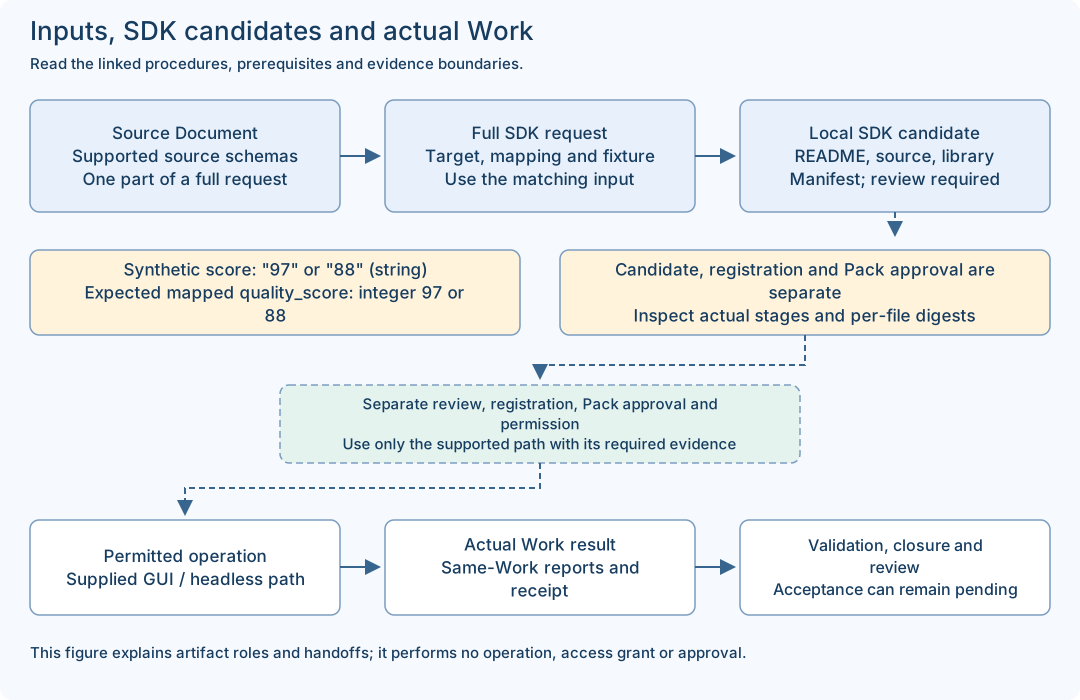
- A complete SDK request includes request_id, correlation_id and draft with definition/source/mapping/fixture. The source-only status Document is one component, not that complete request.
- Fixture / actual observation
- A fixture supplies synthetic values for a declared local exercise. Its declared fields do not prove a real provider call, current connectivity or a customer result.
- SDK candidate / Pack candidate
- The SDK candidate has README.md, adapter.rs, libadapter.rlib and manifest.json. A Builder Pack candidate is a separate product-returned candidate with its own validation/approval path. Neither automatically becomes an approved Pack.
- Worksheet / receipt / acceptance
- A worksheet records a human note. A receipt is a product execution record. PASSED validation and automation completion can coexist with human acceptance pending; record each field at its actual scope.
- Online / Offline
- These are setup choices. Offline product development requires the exact declared dependency set and native tools; an offline manual ZIP only supports document reading.
Match each input to the right output
The status.read source-only example and the read_quality SDK exercise are different examples. Use a matching complete request; do not pass the status source file directly as the quality SDK request. Expected mapping values below are teaching expectations, not a newly captured run.
| File / role | Input | Output / check |
|---|---|---|
status-document.jsonSource-only CUSTOM_API declaration for status.read. Use it inside the complete supplied preparation request. | service: string | Declared service: string and healthy: boolean. This is a schema, not an observed service response. |
read-only-custom-api.json / custom-api-01.jsonThe complete maintained SDK base request; the guide copy is byte-equivalent JSON. | fixture.response.component = "fixture-component"; score = "97" (string) | STRING_TO_INTEGER maps score to expected integer quality_score 97. The documented SDK result is a local candidate. |
custom-api-02.jsonA complete second SDK request changing only the two fixture response values. | component = "my-test-component"; score = "88" (string) | Expected mapped component is "my-test-component" and quality_score is integer 88. Inspect actual manifest/stages; identical mapping source is possible. |
custom-api-score-number.jsonIntentional negative input, not a successful base example. | fixture.response.score = 88 (JSON number) against a declared string schema | Keep the actual typed failure result. Do not convert the example into a claimed successful candidate. |
Worksheet / SDK artifacts / Work reportsThree different artifact classes: human notes, local compiled candidate, actual Work/report/receipt records. | Use the matching tool and current target; never submit a worksheet or previous result as the next full request. | Bind outputs to the actual input, version, candidate or Work identity. File presence and exit 0 alone are insufficient. |