
VibePackr Enterprise · Part.7
Part.7 · PackrGUI and headless operation
Client and AI agent setup reference
For initial setup start with Part.1. The client guide covers OS-specific installation and local manuals; Skill.html displays all common Skills, MCP instructions and planning worksheets. For a later legacy/runtime addition or interruption, continue in Part.8.
Part.1 · Agent setup · Client guide · Skills / MCP / TOML · Part.8 · Recovery and expansion
Guide connections, workflow and input/output map
First-use checkpoint and return points
- Start here
- Connect only after receiving the release-compatible client, expected installation identity and enrollment/authentication instructions. W2 queries an already returned Work ID.
- Have ready
- The client checklist is not a connection profile. packrctl recipes need that actual client and query authority; GUI-only users follow the supplied Work-detail procedure.
- Expected exercise result
- Confirm matching installation/authentication first. For any executed Work, reconcile that same ID’s result, validation and receipt. A bound model or opened window is insufficient.
Exercise and next steps
Open the relevant failure case
- Case C: connection/authentication
- Case F: runtime not bound
- Case G: model/resources
- Case I: no matching receipt
How to read numbers and file names
Part.1–8 identifies the current tool manuals. W1–W4 and codes such as GUI-01 identify exercises inside a Part. Use Case 1–5 is a separate retained procedure sequence, not the Part numbering. Case A–J and codes such as SDK-1 or IH-1 identify troubleshooting scenarios. Older filenames and pN section IDs remain valid bookmarks; read the page heading for the current Part number.
Exercise files: check the role before saving
Distinguish source-only JSON, complete requests and intentional errors. TXT files are human worksheets, not profiles, API inputs or GAPE manifests. If a file opens in the browser, save it with the correct extension and UTF-8.
Before starting: file roles, paths and shell
Save the exercise files at the beginning of this manual into a fresh workspace and check their roles. TXT worksheets are human notes, not client profiles, API requests or GAPE manifests. Distinguish source-only JSON, complete requests and intentional type-error examples too.
Use bash for macOS/Linux and PowerShell for Windows. Do not copy prompts. Replace /absolute/path, C:\absolute\path and bracketed values with actual supplied values first; retain quotes. Commands using variables need the setup shell. In a new shell restore paths only, without overwriting old outputs/logs. Long code and tables scroll horizontally.
Company connection/enrollment, approval, supported Packs, published targets and approved manifests require actual supplied material at their relevant steps. Do not invent IDs, screen names or addresses. Read each W section's success and failure/return criteria, then perform one step at a time.
W1 · GUI-01: collect connection material before opening the app
The supplied client-checklist.txt is a human worksheet, not an importable profile. Open a copy in a text editor and fill it from actual administrator-supplied material. General users do not need VM administrator login or another user's certificate.
| Field | Input | Confirmation |
|---|---|---|
| App path/version | Actual OS client and version | Distinguish older apps with the same name |
| Endpoint/TLS server name | Both administrator-supplied values | Distinguish similarly named servers |
| Customer/installation/release | Expected real references | Compare after connection |
| Device enrollment | Method and current device status | Selecting a file is not completed enrollment |
| Role/permitted operations | Actual product display | Separate connection from Work authority |
- Open the app using the supplied instructions. A portable Windows client retains its EXE and bundled runtime/resources together.
- Select supplied material using the release's connection/profile procedure. Do not use this worksheet or an illustrative address.
- Inspect readiness, authentication, customer/installation/release and role separately, then fill the worksheet.
- When they match, inspect permitted operations only. Check that the observation is current.
Illustrative human output, not product JSON: App opened=confirmed / Server authentication=unconfirmed / Work=not executed. Record only this much if only a window opened; change authentication only when actually established.
On failure: for launch failures first record OS/CPU, bundled files and the warning. For timeout check readiness/address/network; for login refusal inspect authentication/enrollment. Stop on identity mismatch. After correction, recheck the original failed stage.
W2 · GUI-02: query the same execution after receiving its Work ID
For first execution use the detailed first Work guide below to check the supplied operation, plan, approval and current authority. CLI recipes apply only when that OS's packrctl and query authority are actually supplied. GUI-only users use the release's Work detail/result procedure for the same ID; use its documented screen names.
- Copy the actual Work ID returned by one submission. Do not invent an example ID.
- For CLI use, replace executable path and ID with actual values. This queries existing Work rather than submitting new Work.
ctl_exe="/absolute/path/packrctl"
work_id="PASTE_ACTUAL_RETURNED_WORK_ID"
test -x "$ctl_exe" || exit 1
"$ctl_exe" work show "$work_id" --json$ctlExe = 'C:\absolute\path\packrctl.exe'
$workId = 'PASTE_ACTUAL_RETURNED_WORK_ID'
if (!(Test-Path -LiteralPath $ctlExe -PathType Leaf)) { throw 'Use the supplied client path' }
& $ctlExe work show $workId --json
if ($LASTEXITCODE -ne 0) { throw 'Query failed; preserve the error' }- Check matching Work/installation, start/execution, result validation, final state and receipt. Record any separate human-acceptance state.
- A result file or screen does not turn failure, rollback or pending validation into success.
| Observation | Next action | Return criterion |
|---|---|---|
| No returned Work ID | Reconcile acceptance of the original request through support | Original request state established |
| ID exists; result delayed | Query the same ID without resubmitting | Actual state of that ID established |
| Result exists; receipt missing | Use case I at its last confirmed stage | Matching receipt/validation established |
Reading example: Query available / validation pending / receipt unconfirmed is incomplete. These are explanatory worksheet values, not replacement product states.
W3 · GUI-03: distinguish before and after a model change
Previous model reference: [actual product reference]
Expected new reference: [actual administrator-approved reference]
New observation time: [actual value or unconfirmed]
Validation: [original product state/reason]
Current binding: [new / previous / unconfirmed reference]
Affected Work: [actual returned ID or not executed]- Preserve previous state and running Work. Receiving model files does not change the recorded current binding.
- Read observation, validation and binding separately; check the new model reference at the same installation.
- Prepare a separately authorized Work only after binding within current approved scope is established.
- Distinguish an independent model response from invocation/receipt tied to one Work.
On failure: use F for missing observation and G for files, memory, disk or weights. Do not copy old state or match an alias to label a new binding. Resume when the product returns validated binding for the new observation.
W4 · GUI-04: finish separate GUI and headless checklists
| Record | GUI | Headless |
|---|---|---|
| Supplied executable/path | Actual value | Actual value or not supplied in this release |
| Customer/installation/release | Product display | Actual route result |
| Authentication/role | Actual state | Actual state; GUI success is insufficient |
| Query same existing Work | Returned ID/state/receipt | Matching ID result when supported |
When GUI works but headless refuses, its owner checks that route's profile, role and authentication preparation. Do not copy GUI keys. Without supplied headless commands/profile, record GUI checked / headless preparation material required rather than inventing commands. This comparison finishes with independently recorded outcomes for both routes.
More exercises and checklists
Reading sequence
Check inputs → choose a task → use the detailed first exercise/commands below → inspect results → modify/repeat → follow the relevant failure case. Part numbers are not a mandatory installation sequence; choose only needed tools.
Prerequisites and input
Compatible client, administrator connection/enrollment material and ready appliance. Headless requires its own supplied route.
Both online and offline environments remain available. The optional SDK Rust set provisions SDK builds in closed on-premises environments; it is not a product default. Use actual supplied company endpoints, approval and enrollment material where an exercise needs them.
Find an exercise or case
| Exercise | Task |
|---|---|
| GUI-01 | Check the connection before daily work |
| GUI-02 | Run one authorized Work and inspect its result |
| GUI-03 | Check binding after a model change |
| GUI-04 | Compare GUI and automation results |
Exercise GUI-01 · Check the connection before daily work
You reopen yesterday's company VM connection. A saved view may differ from current state, so inspect status before creating a new Work.
Actions:
- Prepare the administrator's profile and expected customer/installation/release references, then open the correct app.
- Compare selected endpoint/TLS name and displayed installation identity. Do not record private key contents.
- Read readiness, authentication, role and current runtime binding separately. Yesterday's screenshot is not today's evidence.
- Inspect currently permitted operations, then move to preparation for the intended Work.
Read the result: Current authentication to the matching installation is established. This check does not establish executed Work.
Failure and next branch: Use C for timeouts, B/J for identity mismatch and D/E for administrator scope. Do not substitute another account.
Retain: App version, observation time/timezone, shareable installation reference, readiness/authentication/role.
Your exercise record: fill in time, version, input reference, actual actions, observed result and next owner. Do not copy expected outcomes into an execution success record.
Exercise GUI-02 · Run one authorized Work and inspect its result
Run one release-supplied test operation. The detailed CREATE_AUDIT_ARTIFACT example applies only to a provisioned, authorized installation and is not a model-query example.
Actions:
- Confirm operation/Pack revision, plan, target installation and current authority. Do not select a Builder candidate as an approved Pack.
- Complete the product's actual approval route and submit once. Retain the returned Work ID and submission time.
- Query start, execution, validation and failure/rollback for that ID. Query rather than resubmit when a response is delayed.
- Match final result and receipt to the same installation/Work. Retain any separate human-acceptance state.
Read the result: Record only the success state, validated result and matching receipt actually observed. Preserve separate pending acceptance.
Failure and next branch: Distinguish unconfirmed submission from an unknown result when no ID exists; use I when an ID exists without a receipt.
Retain: Operation/Pack, plan/approval references, actual Work ID, validation/final state/receipt.
Your exercise record: fill in time, version, input reference, actual actions, observed result and next owner. Do not copy expected outcomes into an execution success record.
Exercise GUI-03 · Check binding after a model change
A model alias was replaced in the same runtime. Seeing the new name does not establish that it is currently eligible for Work.
Actions:
- Preserve previous runtime/model references and binding. Check any running Work first.
- Confirm that the product observed the change and checked supported version/current administrator scope.
- Record detection, validation and binding separately, including time and current installation reference.
- If a separate authorized Work is subsequently run, inspect that Work's model invocation and receipt.
Read the result: Retain new-observation binding and any later Work result separately.
Failure and next branch: Classify discovery under F and resource/weight issues under G. Do not copy old state into a new binding.
Retain: Old/current model references, change time, observation/validation/binding and affected Work.
Your exercise record: fill in time, version, input reference, actual actions, observed result and next owner. Do not copy expected outcomes into an execution success record.
Exercise GUI-04 · Compare GUI and automation results
GUI status works while a headless automation route refuses authentication. The two routes do not share a single success claim.
Actions:
- Check client versions and supplied profiles for both routes at the same installation.
- Use each route's supplied read-only status query and record authentication/role/installation separately.
- If both can query an existing Work, compare its actual ID, final state and receipt. Do not create duplicate comparison Work.
- Send the refused route's minimal message/stage to the administrator while retaining the working route's distinct record.
Read the result: An operational record distinguishing ready and unready routes.
Failure and next branch: Do not copy credentials between routes or bypass refusals with OS administrator privileges. Use C/E.
Retain: Per-route version/authentication/role/installation, same-Work query and original refusal.
Your exercise record: fill in time, version, input reference, actual actions, observed result and next owner. Do not copy expected outcomes into an execution success record.
Repeat, modify and resume after failure
Preserve earlier input/version/validation/results and distinguish a new input or revision. Use fresh output paths for SDK/GAPE; retain product-returned candidate revisions for Builder. Helper commands take the same complete request rather than the preceding result. Query an existing ID first when Work is running or uncertain.
After closing a terminal, restore absolute paths and the selected environment. Recheck affected stages and hand over pending company authority, registration or approval as pending. Support records use minimal messages/shareable references, without bulk private keys, raw prompts, customer responses or full logs.
Detailed commands, inputs and troubleshooting sources
The following detailed guides share the same maintained documentation source. Use their first exercises, complete JSON, OS-specific commands, file inspection and symptom cases. Cross-Part references lead to the appropriate manual.
Full workflow and skip conditions
Use case 3: Verify PackrGUI and headless routes separately
Use case 3: Verify PackrGUI and headless routes separately
Detailed section contents
First connection exercise: separate general users from VM administrators
Goal: connect your client to an already prepared company VM and confirm matching customer/installation identity. This exercise does not automatically execute Work. If no company VM exists, the deployment owner follows installation sections 1–4; general users receive the installation identity, readiness and connection material.
1. Material to obtain from the administrator
Obtain the actual compatible client file, digest/signature status, customer/installation/release references, endpoint and TLS server name, account/device enrollment method, allowed role and enrollment expiry/renewal support route. Receive any per-device profile through the organization's secure channel. Do not paste private keys into documentation or place them in a common installer ZIP. Use automatic enrollment portals only when the release actually provides one.
2. OS-specific preparation and launch location
| OS | Prepare and launch | Confirm before connecting |
|---|---|---|
| macOS | Keep a supplied app in the documented user Applications/Applications location; follow included instructions for an installer | The app opened in Finder matches the received release |
| Windows | Distinguish installed and portable formats; retain the executable with bundled runtime/resource directories | Launch from the package location, without copying only the EXE |
| Linux | Follow the supplied distribution/CPU package instructions; retain its launcher/libraries | Do not substitute arbitrary libraries for another distribution |
If the app cannot open, record an application launch problem, before server connection. Check the exact OS warning, app path/version/CPU and included files. Disabling OS protections or running as administrator is not a general remedy.
3. Connect, enroll and confirm identity
- Open the app and use the release's connection/profile procedure. Compare the supplied endpoint, TLS server name and profile; do not guess a new server.
- Complete the release's supported user/device enrollment. OS login, browser return or selecting a profile does not establish completed enrollment. Report expired or unregistered state to the administrator.
- Compare displayed customer/installation/release identity with the administrator's expected values. Record authentication and server readiness separately. Stop if another organization/installation appears.
- Begin with a status query. If no permitted Work is available, ask the administrator to check the current role/entitlement. General users do not need VM administrator login.
- Only users who need headless operation separately query authentication through that release's CLI/service profile. Do not copy GUI credentials arbitrarily or mark headless complete from GUI success.
Expected result: record the launched client's version/path, matching customer/installation reference and actual authentication state. If user enrollment or operational connection is not yet validated for that candidate, retain it as unconfirmed; do not fill in an assumed successful screen.
If blocked: launch problem → package/OS preparation; timeout/authentication → case C; changed identity → case B; admin enrollment → D/E. Follow the separate first Work use case for actual execution.
Operational goal
A customer connects from a workstation GUI and, if operational automation is required, checks the release-provided headless route separately. Even against the same appliance, the routes can differ in installer, authentication, session, allowed functions, and result evidence.
Example situation
An operator sees the status screen in PackrGUI on a Mac. The team says, “Then headless Work on our Linux server is ready too.” That conclusion is unverified. Each client must directly prove authentication, installation identity, and permitted function.
Route-specific checklist
| Item | PackrGUI | Headless |
|---|---|---|
| Installer | Verify signature and digest for that OS | Verify the release-named CLI or service files |
| Network | Official appliance destination and route | Official destination and policy for this route |
| Authentication | Current session shown in GUI | Current account or service authentication |
| Product identity | Matching customer and installation IDs | Separate check of the same IDs |
| Capability | Functions permitted on screen | Commands and Work scope allowed by release |
| Result | GUI status and record | Direct headless record and receipt |
Carry out the checks
- Compare each platform's exact installer with the release manifest. A successful Mac package does not authorize a Windows package.
- In the GUI, separately confirm service response, completed authentication, customer and installation IDs, and current permitted functions. An open window is not authenticated status.
- If headless is in the release, follow its own official authentication, connection, and scope procedure. Do not copy GUI credentials into it on your own.
- Compare the installation seen by both routes, but do not assume their sessions or permissions are equivalent.
- For actual Work, confirm final state and receipt on the route that performed it. Record each route separately.
Headless read-only check when this release supplies packrctl
After the installation operator supplies the approved local access route, use these commands if packrctl is included with your installation. Run them on the authorized appliance or managed client. They read status and health; they do not authenticate a GUI session or authorize Work.
packrctl status --json > headless-status.json
packrctl health --json > headless-health.json
Read the JSON readiness and reason fields as well as the exit status. UNKNOWN is not READY. If packrctl is absent from the exact delivery inventory, record the headless route as not supplied rather than reusing a development binary.
Failure branch
If one route fails, use the connection and auth case before copying settings from the successful one. A host-identity warning requires an immediate stop under the identity case.
Completion condition
Record each route as verified only after its installer, connection, authentication, installation ID, and intended function have been checked directly.
Check what your release supplies
For each platform, confirm the installer name, signature, supported version, and connection method in the supplied component list. After installation, record the server identity, authenticated session, and matching customer and installation IDs. If a platform installer or headless client is absent from the list, ask your supplier for the supported option before using another package.
Detailed scenario: only the GUI connects
Suppose PackrGUI on a Mac displays the expected installation ID, while a server automation client cannot connect. The GUI account, token lifetime, and network route may differ from those of the service. A GUI screenshot is not headless authentication proof. First verify that the release includes a headless client; if so, record that route's account, endpoint, and refusal separately.
Conversely, a successful headless status query does not prove that a GUI session exists or has the same authority. Record the last proven stage for each route, such as GUI: authenticated, installation matched and headless: network reachable only.
Platform validation worksheet
| Platform and route | Installer and signature | Connection | Authentication and installation ID | Binding | Actual Work and receipt |
|---|---|---|---|---|---|
| macOS GUI | [evidence] | [state] | [state] | [state] | [state] |
| Windows GUI | [evidence] | [state] | [state] | [state] | [state] |
| Linux GUI | [evidence] | [state] | [state] | [state] | [state] |
| Headless | [evidence] | [state] | [state] | [state] | [state] |
Write unverified until a route is exercised. Do not copy success between operating systems or clients.
A concrete operational walkthrough
Suppose the desktop GUI works while scheduled automation is refused. Compare the GUI session and automation service execution location, account, network route and installation scope separately. Use the release service-authentication procedure instead of copying GUI tokens or keys into automation.
Records to reconcile before closing this use case
Retain separate rows for GUI/headless package, version, authentication, installation ID, permitted features and status result. Record an unavailable route as unavailable; bind actual Work receipts to the route used.
Keep the planned procedure, performed actions, observed results and remaining stages separate. This scenario explains the procedure; the documentation update does not execute it in a customer environment.
Use case 2: Automatic rebinding after a local runtime change
Use case 2: Automatic rebinding after a local runtime change
Detailed section contents
Operational goal and prerequisites
Within the already approved installation and runtime scope, a local model alias or observed runtime value changes. Core validates the fresh observation and updates the binding. First capture the current installation identity, administrator scope, supported model, and prior binding state.
Example situation
An operator changes a local model alias. The model server runs, but PackrGUI still shows the prior binding time. “The model responds” does not prove that the new model is bound.
Before and after
| Observation | Before change | What must be rechecked afterward |
|---|---|---|
| Customer and installation IDs | Earlier approved scope | Current identity for the same installation |
| Runtime and model reference | Prior binding | New alias or model reference |
| Observation time | Earlier state time | Fresh observation after the change |
| Validation and binding | Prior status | New Core validation and binding |
| Work | Separate record | Only Work executed after the new binding |
Work through the change
- Record the change and time. Do not delete the old binding or edit internal product storage.
- Use the release wizard's discovery or re-observation route to confirm the new runtime is found.
- Check the approved customer, installation, and runtime scope. For an out-of-scope change, request an administrator decision rather than expecting automatic application.
- Read detected → validated → bound and any refusal reason in order. Do not guess among ambiguous model candidates.
- Confirm the new binding's model reference, installation ID, and time follow the change. Only then record rebinding.
- Run and validate actual Work and its receipt separately. See the missing-receipt case.
Failure branches and support evidence
If nothing is detected, inspect runtime startup and the official connection route. If validation is refused, use the binding case to separate scope, identity, and ambiguity. In support requests, send before/after state and time, installation ID, and product refusal; omit internal storage and customer prompts.
Completion condition
A fresh observation and new Core binding for this change must be recorded under the same installation identity. This does not establish a Work result or macOS and Windows auto-binding validation.
Detailed scenario: only the model alias changed
Assume a local alias changes from model-A to model-B at 10:00. A bound record at 09:40 belongs to the earlier state. Compare the change time with a later discovery time, then confirm Core validated the new model reference under the same installation ID and approved scope. If multiple candidates become visible, do not silently choose one.
If no new binding appears, classify the stage: no detection suggests runtime readiness or connection checks; an out-of-scope observation goes to the approval owner; an ambiguous target needs an explicit model choice. A screen that merely repeats an earlier timestamp does not establish a new binding.
Example change record
| Time | Observation | Supported conclusion |
|---|---|---|
| 09:40 | model-A binding | Earlier state |
| 10:00 | Alias changed | Environment changed |
| 10:03 | model-B detected | Validation and binding still separate |
| 10:05 | New validation and binding for same installation | Post-change binding confirmed |
Times and model names illustrate the procedure, not actual release evidence. Verify subsequent Work through its own record.
A concrete operational walkthrough
During a maintenance window, change one supported model alias or runtime address at a time. Retain supported versions, the binding reference and last state before the change; then compare the fresh observation with the intended value. A successful online check or process restart alone does not establish a new binding.
Records to reconcile before closing this use case
Separate before/after runtime/model references, observation times, validation reason, effective binding and any separately authorized Work. A rollback also requires a newly observed/validated result.
Keep the planned procedure, performed actions, observed results and remaining stages separate. This scenario explains the procedure; the documentation update does not execute it in a customer environment.
Use case 5: Run the first Work and verify result and receipt
Use case 5: Run the first Work and verify result and receipt
Detailed section contents
Operational goal and starting conditions
A customer runs one supported Pack or release-named test operation through the governed product path and confirms final result and receipt for the same installation and Work ID. Service readiness, authenticated connection, administrator scope, and current runtime binding must be checked first.
Example situation
An operator reports, “Qwen is bound, so the first Work is complete.” The reviewer asks, “Are the Work ID, execution approval, model call, result validation, and receipt tied to the same operation?” If no Work was submitted, the supported state is only runtime readiness.
Stage-by-stage questions
| Stage | Question | State to record if absent |
|---|---|---|
| Operation selected | Is the supported Pack or operation, contract, and scope correct? | Target undecided |
| Preconditions | Are environment, authority, and entitlement met? | Pre-execution refusal |
| Approval | Was the exact plan and target approved? | Pending or refused |
| Submit and start | Is there a Work ID and start record for this installation? | Not submitted or not started |
| Model call | If a local model is used, is its call linked to this Work? | Call unproven |
| Result validation | Are result state and validation recorded? | Pending or failed validation |
| Receipt | Is there a final receipt for the same Work ID? | Completion unproven |
Carry out one operation
- Select one approved target and review plan and environment. Do not treat a Builder candidate as an approved Pack.
- Complete the customer's permitted user approval route. Passkey enrollment, browser return, and actual Work approval are separate.
- After submission, capture the product-recorded Work ID and read approval, start, and execution state for that ID in order.
- For local AI, confirm a model call linked to this Work, not just a generally responsive model.
- Bind result validation, failure or rollback status, and final receipt to the same release, installation, and Work ID. Never rewrite failure, stop, or rollback as success.
- If the receipt is missing, start from the last confirmed step in the missing-receipt case. Do not create records manually.
Conditional CLI example for an authorized installation
If your release supplies packrctl and lists CREATE_AUDIT_ARTIFACT as a supported operation, use this example only after that one Work is approved and the appliance reports the required authority and preconditions. Replace the key with an approved unused value. This operation creates a local audit artifact; it does not inspect an attached customer document or demonstrate a Qwen model call.
packrctl work run CREATE_AUDIT_ARTIFACT "create audit artifact" \
  "REPLACE_WITH_ONE_UNUSED_APPROVED_KEY" --json > work-run.json
# Copy the returned result.work.work_id; do not invent a Work ID.
packrctl work show "PASTE_RETURNED_WORK_ID" --json > work-show.json
Inspect the typed result, final state, validation, receipt reference and human-acceptance state in the returned records. A command exit code or a generated JSON file alone is not a success receipt. Do not reissue work run after an uncertain result; reconcile the original request through the product's supported route.
Support request and completion
For support, provide release, installation and Work IDs, shareable Pack or operation name, last confirmed stage, first error, and receipt status. Do not attach prompts, customer data, or raw results to an ordinary ticket. Complete: successful final state, validated result, and receipt for the same authorized Work are confirmed together.
Detailed scenario: model responds, but no Work receipt exists
Suppose an operator sees a local model respond and reports first Work complete. First check for a Work ID. Without it, even product receipt of a Work request is unproven. With an ID, read approval, start, model call, result validation, and final state separately. A general model response cannot substitute for a call bound to this Work.
For example, after changing a local model alias, the GUI may show a new BOUND state while Work readiness remains UNKNOWN. Record the authority, runtime, and Work readiness shown by your installation and any exact reason code. Do not submit Work until the required state is ready; send those values through the release support route if readiness remains unknown. Use the worksheet below for your own first Work.
One-Work evidence worksheet
| Gate | Value to record | If absent |
|---|---|---|
| Submission and identity | [Work ID], [submitted time] | Request receipt unproven |
| Approval and preconditions | [decision], [scope] | Execution authority unproven |
| Execution and model call | [execution state], [bound call] | Inference unproven |
| Result validation | [validation state] | Result unverified |
| Closure and receipt | [final state], [receipt ID] | Completion unproven |
Do not treat a failed, stopped, or rolled-back result as successful merely because a record file exists. Report the first missing gate; exclude raw prompts and output from ordinary support requests.
A concrete operational walkthrough
Plan one approved read operation. Immediately before execution check installation, Pack, input, current authority and plan; retain the actual returned Work ID. If a connection issue delays the result, query that same ID instead of starting duplicate Work to obtain a response.
Records to reconcile before closing this use case
Check that terminal state, postcondition validation, result digest, Work record and receipt refer to one execution. Record failure, rollback, waiting and unconfirmed states separately; a standalone model response does not replace the product receipt.
Keep the planned procedure, performed actions, observed results and remaining stages separate. This scenario explains the procedure; the documentation update does not execute it in a customer environment.
Use cases: from installation to operation
Use cases: from installation to operation
Detailed section contents
Choose by task
| Goal | Owner and prerequisite | Use case | Final evidence to check |
|---|---|---|---|
| Install a new VM and enroll its first administrator | Installer, exact signed image | 1. New installation | New installation identity, service readiness, administrator scope |
| Continue after changing a local model or runtime | Runtime administrator, existing approved scope | 2. Automatic rebinding | New Core binding after the change |
| Use GUI and automation clients | Authentication owner for each route | 3. GUI and headless | Per-route authentication, installation identity, and authority |
| Prepare a Pack candidate in Builder | Builder operator and separate approval owner | 4. Pack candidate | Candidate validation separated from approval |
| Execute and close the first Work | Approved Pack and Work authority | 5. First Work | Final state, validated result, matching receipt |
How to use this collection
Each use case follows situation → prerequisites → steps → failure branches → completion evidence. If several symptoms appear, start at the last proven state. For symptom-specific resolution, use the case index. Include only minimal release, installation, and verbatim error details in support requests; omit customer content and secrets.
Choose a use case by owner and output
Online operation uses approved network/provider routes; closed on-premises operation provisions required installation assets, models and documentation before transfer. This guide fixes neither as the product default. The optional SDK Rust dependency set prepares SDK adapter-build Rust coverage; it does not replace appliance images, model weights, provider credentials or all native OS development tools.
| Symptom or situation | Facts to check separately | Action and result to recheck |
|---|---|---|
| Appliance | Matching release image, service readiness and unique installation identity | Use Case 1 for first install, Case A for readiness, Case J for earlier-state residue. |
| PackrGUI/headless | Per-route platform file, authentication and matching installation ID | Validate each route with Use Case 3; classify connection issues with Case C. |
| Builder/additional Packs | Exact candidate, validation, approval, entitlement and preconditions | Check supported Packs first; use Case 4 for a candidate, Case H for refusal and Use Case 5 for execution. |
Example support handover: release/component/OS, time and timezone, last confirmed stage, first refusal, performed change, current result and next owner. Keep unconfirmed, refused, waiting, failed and completed states distinct. Exclude secrets and customer content.
Local documentation edition. Company connection, approval and enrollment require actual supplied material. Educational scenarios are not customer execution evidence. Apple signing/notarization and customer activation/delivery remain held.
Connect the Guides and Parts 1–8
Choose a purpose in a Guide, then use the relevant Part for exact tool steps. The same sequence, vocabulary and artifact roles apply in both.
Purpose guides
- Common PoC Guide
Choose a question, collect scoped observations and review the result. A retained-reading route needs no new installation.
- Google Reviewer Guide
Bind the exact review delivery and criterion evidence. Cloud access, document coverage and actual Google approval remain separate.
- On-premises Guide
Prepare the exact OS, package, network choice and toolchain. Use the local SDK shortcut only after its prerequisites are supplied.
- Custom Execution Guide
Choose a supported task. Keep source-document preparation, full SDK candidates and actual Work/report inspection as distinct routes.
- Guide links open the public website and require network access; this offline manual and its local examples remain readable without it.
Recommended integration order and shortcuts
- Part.1 · Install and prepare
- Part.2 · Observe structure with GAPE
- Part.3A · Plan with Integration Helper
- Part.4 · Write the source Document and bind the published target Contract
- Part.3B · Check the complete request and identify implementation needs
- Part.5 if needed · SDK candidate, implementation review and separate registration
- Part.6 if needed · Builder Pack candidate and its approval path
- Part.7 · Permitted GUI or headless operation
- Part.8 · Results, troubleshooting and human review
Helper B checks the completed declarations before you decide whether implementation or a new Pack is needed. After an implementation or declaration change, repeat only the affected supported checks and finish the separate implementation/registration/Pack approval path before operation. A generated candidate grants no operating authority.
Select only the route needed for your goal. Retained PoC reading can begin without installation. A supplied local SDK exercise uses Part.1 → Part.5 and does not require a new GAPE scan or appliance account. An existing approved Pack can use Part.1 → Part.7 → Part.8 after its current prerequisites are checked. New integration/Pack authoring follows the full conditional sequence.
Part map and tool responsibilities
| Part | Role and expected boundary |
|---|---|
| Part.1 · Installation and first connection | OS preparation, supplied packages and first connection. Installation is not an executed Work. |
| Part.2 · GAPE observation, comparison and sharing | Revision-bound architecture observation. A worksheet is not the approved GAPE input manifest. |
| Part.3 · Integration Helper operation | A plans before the Document; B checks the completed full request. Each stage reads its typed status/reason. |
| Part.4 · Contract and Document authoring | Author the source Document and mappings; use the supplied target Contract/revision. JSON syntax alone does not establish semantic compatibility. |
| Part.5 · SDK Engine practice and candidates | Generate a local SDK implementation candidate. Reuse an implemented, registered, release-compatible integration when it already meets the need. |
| Part.6 · Builder and Additional Packs | Prepare a Pack candidate when a new Pack is needed. Reuse an existing approved Pack that meets the goal and installation scope. |
| Part.7 · PackrGUI and headless operation | Use the supplied GUI/headless route under its current authority and preconditions. Inspect the returned Work identity and result. |
| Part.8 · Operations, troubleshooting and support | Compare same-Work artifacts, receipt and closure; keep human acceptance pending until actually recorded. |
Shared vocabulary
- Guide / Part
- A Guide is a purpose/role route; a Part is a tool reference. They complement each other and are not two competing numbered workflows.
- Contract / source Document
- The published target Contract defines the supported target and revision. The source Document declares your source shapes. A source declaration does not authorize execution.
- Complete request / source-only file
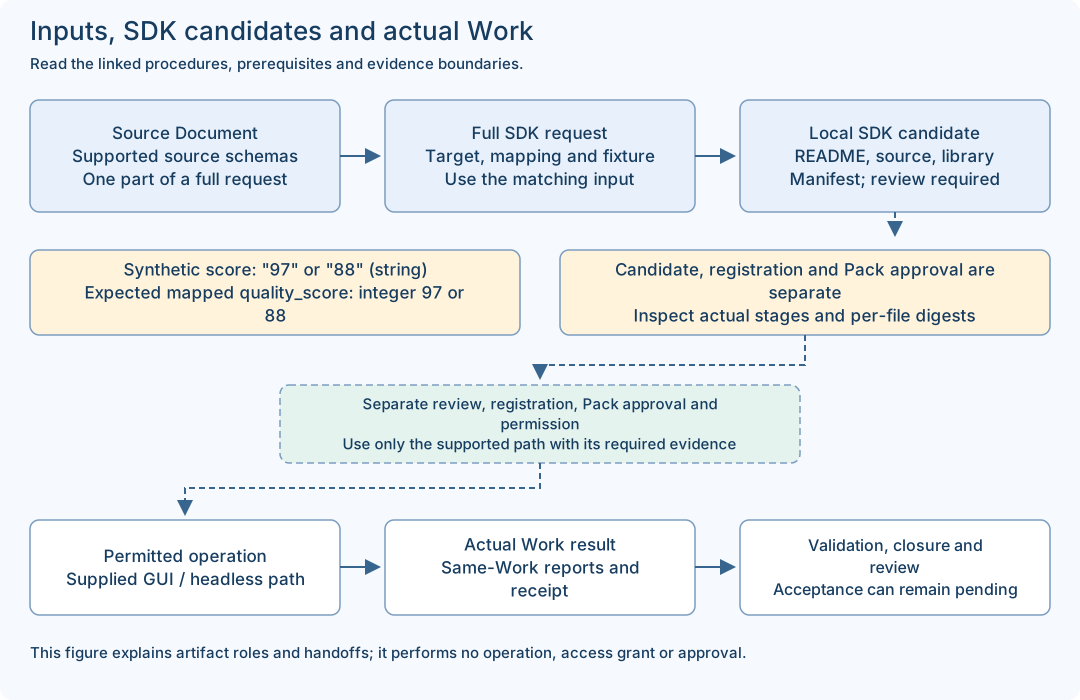
- A complete SDK request includes request_id, correlation_id and draft with definition/source/mapping/fixture. The source-only status Document is one component, not that complete request.
- Fixture / actual observation
- A fixture supplies synthetic values for a declared local exercise. Its declared fields do not prove a real provider call, current connectivity or a customer result.
- SDK candidate / Pack candidate
- The SDK candidate has README.md, adapter.rs, libadapter.rlib and manifest.json. A Builder Pack candidate is a separate product-returned candidate with its own validation/approval path. Neither automatically becomes an approved Pack.
- Worksheet / receipt / acceptance
- A worksheet records a human note. A receipt is a product execution record. PASSED validation and automation completion can coexist with human acceptance pending; record each field at its actual scope.
- Online / Offline
- These are setup choices. Offline product development requires the exact declared dependency set and native tools; an offline manual ZIP only supports document reading.
Match each input to the right output
The status.read source-only example and the read_quality SDK exercise are different examples. Use a matching complete request; do not pass the status source file directly as the quality SDK request. Expected mapping values below are teaching expectations, not a newly captured run.
| File / role | Input | Output / check |
|---|---|---|
status-document.jsonSource-only CUSTOM_API declaration for status.read. Use it inside the complete supplied preparation request. | service: string | Declared service: string and healthy: boolean. This is a schema, not an observed service response. |
read-only-custom-api.json / custom-api-01.jsonThe complete maintained SDK base request; the guide copy is byte-equivalent JSON. | fixture.response.component = "fixture-component"; score = "97" (string) | STRING_TO_INTEGER maps score to expected integer quality_score 97. The documented SDK result is a local candidate. |
custom-api-02.jsonA complete second SDK request changing only the two fixture response values. | component = "my-test-component"; score = "88" (string) | Expected mapped component is "my-test-component" and quality_score is integer 88. Inspect actual manifest/stages; identical mapping source is possible. |
custom-api-score-number.jsonIntentional negative input, not a successful base example. | fixture.response.score = 88 (JSON number) against a declared string schema | Keep the actual typed failure result. Do not convert the example into a claimed successful candidate. |
Worksheet / SDK artifacts / Work reportsThree different artifact classes: human notes, local compiled candidate, actual Work/report/receipt records. | Use the matching tool and current target; never submit a worksheet or previous result as the next full request. | Bind outputs to the actual input, version, candidate or Work identity. File presence and exit 0 alone are insufficient. |