01 · Start with the last observed fact
This guide helps an operator choose the next useful check. Start with the surface, target, version and failed step. Separate a connection failure, an expected permission denial, an unavailable feature and a failed execution before making a change.
- Identify the surface
- Read the current state
- Choose one bounded action
- Check the result again
These are source-derived operating references and diagnostic reasoning examples. R4 added source-derived references. R5 adds explicitly labelled native screen observations and one read-only local health query; no customer end-to-end run was completed. The r232 first-customer administrator gap still blocks dependent actions; diagnostic guidance does not supply an alternative administrator.
Choose the finish line before investigating
Use one sentence: “I need to read the health of the supplied installation”, “I need the result of my submitted Work”, or “I need to verify the last administrator action”. Finish when that specific observation is available and understood. If a required delivery item is missing, finish the diagnostic record with its exact name and recipient; leave the operating task open.
For the examples below, “installation operator” means the customer role responsible for the installed service; “product administrator” means a person with an existing product grant; “delivery contact” means the supplier contact responsible for the version-specific installation handoff. Your organization may assign these roles to the same person. Record actual names in your private operating record.
For the full start-to-finish route and the right owner at each step, use Usage workflows. R6 adds explanatory procedures and an unbound Administration image; it performs no new product execution.
02 · Recognize two observed unavailable states
Actual native capture · 4 October 2026. MacBook, macOS 27.0.1 (Apple silicon), Packr bundle 0.99.0, local R234 launch/render candidate. The GUI source is revision 4ba82ca13946. These are real application windows captured through Computer-use. This candidate is not the frozen r232 appliance or a verified customer desktop delivery. The captured session had no available Control Plane connection. Images are unchanged; click one to inspect its original size.
Case A — Control Plane is not connected
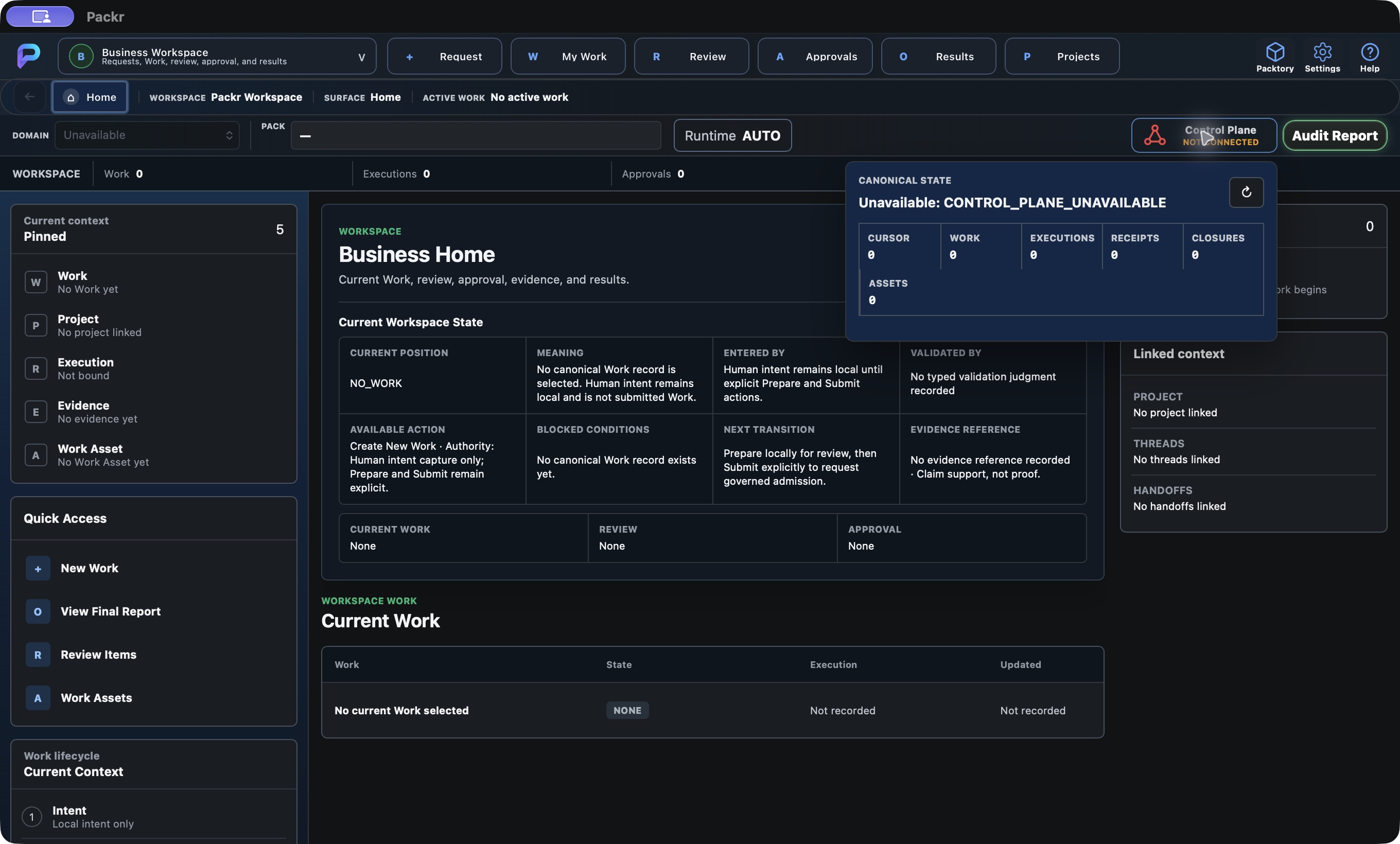
Open Control Plane in the top bar to read this result. Unavailable is the observed state; the cause of the missing connection is not diagnosed by this panel.
Observed: the native status panel reports CONTROL_PLANE_UNAVAILABLE. A separate read-only local CLI health query returned exit 3, error PACKR_OPERATOR_STATUS_UNAVAILABLE and “Connection refused”. This narrows the observation to an unavailable endpoint at that moment; it does not diagnose installation, permissions or service ownership.
Next action: give the installation operator the supplied endpoint reference, version and exact error through the appropriate private channel. Preserve the failed observation. Do not infer successful preparation, retry submission or restart an unknown installation.
Case B — Pack projection is unavailable
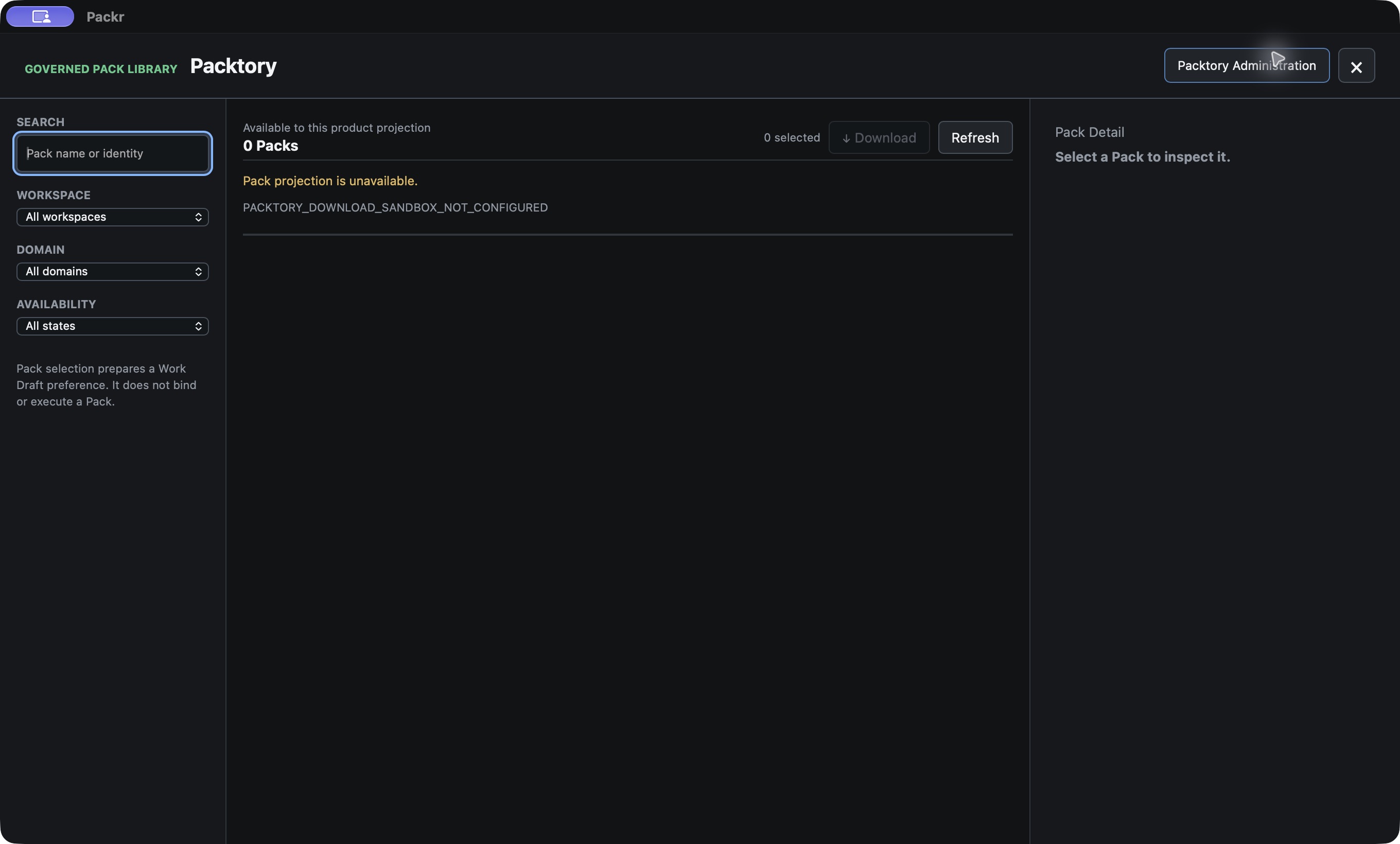
This is the Packtory library, not a captured Administration dialog. The unavailable projection does not establish an empty asset store. Opening Administration was attempted separately, but its resulting view could not be verified.
Observed: the library reports PACKTORY_DOWNLOAD_SANDBOX_NOT_CONFIGURED and Download is disabled. Next action: ask the delivery contact to verify the intended Packtory context. Zero visible items while projection is unavailable do not establish loss of stored data.
These screenshots are current capture observations. The numbered reasoning examples later in this guide retain their separately labelled source-derived or fictional scope.
03 · Choose the right layer
| Observed symptom | Inspect first | Continue with |
|---|---|---|
| VM or SSH cannot be reached | Cloud VM/network/access conditions with the cloud owner. Product commands cannot diagnose a session you cannot reach. | Customer access |
| VM reachable; product result missing or unhealthy | Delivered health tool and the reported service/process/product distinctions. | Health and readiness |
| PackrGUI looks empty or shows the wrong environment | Client mode, endpoint, connection status and refreshed projection. | Desktop connection |
| Work was accepted but no usable result appears | The same Work reference, its execution/validation/evidence state and the actual route used. | Work investigation |
| A management change is denied or uncertain | Grant/session, requested action, expected revision and fresh canonical state. | Administration |
| Packtory tab is blank or action unavailable | Whether the tab uses a local status projection, a management query or a limited action path. | Packtory diagnosis |
| Helper JSON or an AI call fails | Exact parsing/check stage or provider status; preserve the returned reason. | Integration and AI |
Find the right owner with one useful request
| Missing item or failed check | Responsible role | Specific request |
|---|---|---|
| Installed client, version or endpoint is unknown | Delivery contact → installation operator | Provide the delivered client location/version and installation-specific endpoint reference, then identify the operator permitted to query it. |
| Local query reaches the service but access is denied | Product administrator | Review this operator’s binding to the intended installation for the denied operation; supply the corrected supported access path. |
| Remote Admin profile or request input is missing | Delivery contact and product administrator | Provide the supported configuration reference/request artifact for this version and action, with a private credential delivery process. |
| Submitted Work has an uncertain outcome | Installation operator; product support if unresolved | Reconcile the original Work/operation reference and reported effect before deciding whether any new submission is appropriate. |
| Contribution evidence set or exported file location is unknown | Authorized evidence/report owner | Supply the exact scoped evidence references and event-time representation, or the supported artifact retrieval handoff bound to the returned Export ID. |
04 · A running VM is not yet a ready product
Symptom: SSH works, but the planned operation cannot proceed. First use the supplied appliance health procedure. Then inspect the Headless status and health references for the delivered command and connection prerequisites.
- Record whether the tool was available and whether it returned a result. Command-not-found, connection failure and an explicit unhealthy result are different observations.
- Read the reported state and any unavailable or unevaluated fields. Keep the base-health result separate from first-administrator access, entitlement, runtime and storage readiness.
- If a prerequisite remains unestablished, resolve that prerequisite with its owner. Avoid repeated restarts as a general cure.
- After the authorized correction, repeat only the relevant read checks and compare with the earlier observation.
Worked reasoning example: a successful base-health check together with customer_operation_authority=NOT_EVALUATED means the check did not evaluate permission for customer work. Retain both facts and continue to the administrator/readiness checks; do not rename this result “ready to run AI”. This explains the retained health fields, not a new live result.
See Headless operation and the base-health checkpoint.
Case 1 — the command is not available
In the same terminal session, check the installed command location:
command -v packrctlA returned path tells you which command this shell will use; compare it with the delivery record. No path means this shell cannot find it. Ask the installation operator to confirm the supplied executable and environment before continuing. Do not treat that result as a service failure. Completion: the supplied packrctl --help works and its supported commands match the intended delivery.
Case 2 — a health check fails
Run the observations separately:
packrctl status --json
packrctl health --json| Observed branch | Next check / action | Recovery check |
|---|---|---|
| No structured response; transport/status unavailable | Confirm the supplied endpoint and installation, then ask the installation operator to inspect that service. Use the explicit socket form only when the delivery specifies a non-default endpoint. | Repeat the same query against the confirmed endpoint; inspect its returned state. |
| A response explicitly reports non-ready | Read the component and reason. For asset readiness, inspect packrctl packtory status --json and packrctl ets status --json; for product access, use the product administrator. | The affected readiness field and reason change as expected after an authorized correction. |
| Authorization rejection | Keep the exact error and target reference; ask the product administrator to review the operator binding. | The same query works under the corrected authorized identity. |
| Invocation rejected after combining quiet and JSON | Choose either packrctl health --quiet for exit-status automation or packrctl health --json for inspection. | The corrected invocation returns the expected result form. |
| Health ready but one Work is denied | Move to the Work branch below. General readiness does not decide the specific request. | The Work’s own reason and result are explained; a healthy VM alone does not close the incident. |
05 · Desktop connection, empty screens and target mismatch
- Confirm which window you opened: the Work client, VibePackr administration or Packtory Administration. Their connection and query routes differ.
- Read the current client mode and target. In a remote administrative session, compare the displayed organization/appliance/installation with the intended target before making a change.
- Use the documented refresh or query control. A visible menu, saved endpoint or an old projection is not a fresh connection result.
- If connection fails, retain the sanitized error and have the connection owner verify the supplied endpoint and approved profile. Keep certificate and trust validation enabled.
- If the target is wrong or unknown, stop changes, select the supported intended connection and re-check the returned identity.
Completion check: the expected target and fresh state are visible in the correct surface. This verifies the connection/read step only. For screen labels and mode-specific behavior use PackrGUI and VibePackr Admin.
Case 3 — an empty client or a disabled Submit
| What you see | Concrete check | Next action and confirmation |
|---|---|---|
| Wrong organization or installation in the Admin Console | Compare the bound identity after Connect with the delivery record; an old saved profile is insufficient. | Stop changes. Have the profile assignment corrected, reconnect, then Refresh and match the exact target. |
| Prepare Work unavailable | Open Business Workspace → Request; inspect the Work Request text and current stage. | Enter the intended bounded local audit request. Confirm Prepare Work → becomes available. |
| Attachment or selected-Pack error | Check Add Input Materials and Selected Pack; this local preparation route rejects them. | For this bounded audit task, remove those inputs, prepare again and inspect the preserved intent. For a task that needs them, keep it open for a separately supported route. |
| Prepared request changed | Read PREPARED_REQUEST_CHANGED_REPREPARE_REQUIRED. | Use ← Edit request, correct the original text and prepare again. Review the new prepared summary before any authorized submission. |
| Prepared but Submit remains unavailable | Compare current Work, target connection and displayed permission/stage. | Resolve the displayed prerequisite with the appropriate operator. Completion is an enabled supported control plus the correct prepared context, not a forced click. |
06 · Work accepted, denied, incomplete or unexpected
- Keep the returned Work/operation reference. Query that same item before creating another request.
- Read the status and reason fields, then any execution, validation, evidence and receipt records actually returned. Empty, unavailable and pending fields must remain distinct.
- Check the supported operation and input of the route you used. A GUI control can prepare a draft without proving that a selected Pack or attachment is consumed by the execution route.
- For a denial, resolve the stated input or permission condition through its owner. For an uncertain response, perform read-only reconciliation before any resubmission.
- After an authorized next action, inspect the same item and compare the actual outcome with the intended task. A process exit or receipt alone does not establish business acceptance.
Worked reasoning example: a request is submitted and the connection drops before the result appears. Record “response uncertain”, reopen the read view and look for the original reference. Creating a new request immediately could duplicate work; a timeout does not tell you whether the original change occurred.
Use the exact result shape described in Headless or the specific local/remote path in PackrGUI. Do not combine result fields from different routes into an invented success record.
Case 4 — find the submitted item before making another
packrctl work list --limit 10 --json
packrctl work show WORK_ID --json- Use the same installation and local principal as the original submission. Replace
WORK_IDwith the returned identifier, not the intent text or idempotency key. - If the Work is outside the first ten recent entries, increase the list limit within the documented maximum of 100. A missing item still requires scope/identifier reconciliation; it is not permission to recreate it.
- When found, compare
work,reportsandselected_report. Use the Headless result interpretation for that route; retain any missing fields as missing. - If the result is denied, preserve the specific reason and correct only its input/access prerequisite. If it is partial or failed, record the reported effect before recovery. If human acceptance is pending, assign the authorized reviewer.
- If no identifier was received, retain the original key, time and non-confidential task description privately and ask the installation operator to reconcile the original submission. Avoid searching another user's scope or issuing a new key.
Close this investigation when the same Work's current result and remaining action are known. Close the operating task only when its required result, validation and human decision are actually satisfied.
07 · Administrative revision, session and result problems
| Reported condition | Next action | Recovery check |
|---|---|---|
| First product administrator is not established | Follow the customer first-admin dependency. OS root or SSH does not replace the product grant. | Supported issuance and permitted access are established before dependent changes. |
STALE_REVISION | Refresh state, inspect what changed and review the proposed action again. Do not reuse a stale revision. | Any later authorized request uses the newly reviewed current state. |
REMOTE_ADMIN_OPERATION_TIMEOUT_UNCERTAIN | Read current state and audit/operation reference. Do not auto-resubmit. | Resolve whether the original operation took effect before deciding a next action. |
SESSION_INVALID | Stop mutation and use the supported authentication path. | A valid session and its current scope are verified; no stale mutation controls are relied on. |
| A command completes but the service remains unhealthy | Read the returned platform and product observations separately; retain the action result. | The intended service transition and the required product readiness are each checked. |
These tokens describe the inspected administrative paths; use the actual token returned by your version. The Admin guide explains exact surfaces and request prerequisites. No key replacement, role expansion or bootstrap workaround is prescribed here.
Case 5 — a revision changed while you were reviewing
Illustrative sequence: you reviewed appliance state revision 12, but the service now reports appliance state revision 13. The request’s expected revision tracks this appliance state revision, which is separate from the configuration revision. On STALE_REVISION, select Overview → Refresh, compare the current state with the intended change and consult the recorded audit transition. If the recorded action result, audit reference and available current observations establish that the same change was already applied, record that finding instead of issuing it again. A revision number alone cannot establish the value; the general configuration projection withholds values. If still needed, review a request against the newly observed state. Revision numbers here are fictional; do not copy them into a request.
Case 6 — restart timed out
- Keep the pending operation and literal
REMOTE_ADMIN_OPERATION_TIMEOUT_UNCERTAINreason. - Use Backup/Recovery → Reconcile exact request for that pending request. Then refresh the appliance view.
- Compare Active, Process alive and Product ready, and inspect the action result/audit reference. Product authorization alone is not evidence that the host action ran.
- If the process is active but product readiness remains false, run Diagnostics → Run diagnostics and take the Headless health branch. Escalate the affected component, retaining the original operation reference.
Completion: the original action’s effect is reconciled and product readiness is checked. If reconciliation cannot establish the effect, keep “uncertain” and request operator/support review of that exact request; do not schedule another restart.
08 · Packtory: a blank panel is not a storage-loss diagnosis
- Check whether you are reading local Headless Packtory status or the separate Packtory Administration dialog.
- In the dialog, identify the selected tab and its source. A management authority/context query does not itself populate every asset, lifecycle or audit view.
- Compare an unavailable action with the documented surface limit. An unavailable UI action does not establish absence of canonical backup/recovery machinery.
- For a suspected storage problem, retain the exact status, target and last successful observation. Verify the resource/connection with its owner before initialization, deletion or restore.
- For Contribution, inspect preview/export/verification results as the separate flow documented in the Packtory guide. Do not infer that a local export was remotely uploaded.
Completion check: either the intended supported query returns the expected view, or the exact unavailable route is identified without changing storage. Product backup/recovery, fresh-target restore and production object-storage connection have separate authority and proof conditions.
Continue with Packtory Admin. Remote Rescue transport remains disabled; the separate future Rescue-to-Packtory adapter is not the existing local Packtory Administration surface.
Case 7 — Assets is empty while management says AUTHORIZED
| Observation | Interpretation and next observation | Finish line |
|---|---|---|
| Management query authorized; Assets has no visible rows | Refresh the supported Packtory/control-plane observation and check the inventory scope. Management authorization and asset projection are different results. | Either the expected asset identity/revision appears, or the missing/empty projection is identified explicitly. |
| Lifecycle, roles, audit or storage panels stay at their documented placeholder | Compare the panel with the Packtory surface scope. A management refresh cannot populate an unconnected panel. | Record “panel does not supply this observation”; use the supported Assets or Headless observation for the specific question. |
| Contribution preview is empty | Recheck exact period bounds, scope and existing evidence references with the authorized evidence owner. | The result is explained for that scope and period; do not extrapolate zero organizational activity. |
| Export manifest exists but no CSV in Downloads | Read Export ID and verification, then use the artifact-handoff requirements in the Packtory guide. The current frontend does not save it through a browser dialog. | The permitted artifact is obtained and checked, or file retrieval remains explicitly open with the exact Export ID and responsible role. |
Return to the correct task
For search, filters, disabled draft selection or partly denied download, use the library failure table. For Binding required, compare the actual unbound Overview and ask the domain owner for the supported binding. AUTHORIZED and zero counters do not prove a connected inventory. Conditional download/derivative controls in the inspected client use supplied sandbox configurations; do not turn missing setup into a customer repair recipe.
09 · Helper and AI failures have their own next checks
Use the existing specific error references instead of changing unrelated appliance settings.
- Document parsing, required properties, unsupported fields or MCP revision: compare the exact input with the Helper error examples, fix only the stated input mismatch and re-check through the supported path.
- Target Contract or binding: distinguish source-document acceptance from target validation and registration in the Developer Guide.
- AI authentication, permission, model/location, rate limit or timeout: use Agents & AI. Preserve the exact stage and response before changing provider configuration.
- Agent-generated instructions: verify fields and commands against the supplied documentation. An assistant explanation does not establish that the product ran a tool or connected to a provider.
Case 8 — separate input correction from service repair
If Helper identifies a missing required property or unsupported field, keep the same source document, correct that specific declaration and repeat the supported check described in the error examples. Do not change appliance permissions to fix a document-shape error. If parsing succeeds but target binding is not established, retain the accepted input and resolve that binding separately. For provider failures, record the stage and literal status before interpreting it; a model/location or quota problem is not evidence that a Work receipt or administrator grant is missing.
10 · Keep a before/action/after record
Use this worksheet for one operating task. It helps another operator understand what happened without receiving unrestricted logs. A read-only diagnostic task can end with a clear limitation and named next owner; it does not need a successful mutation to be useful.
Blank operator worksheet; no observed product outcome is supplied.
One operating task — documentation worksheet
Goal: [one intended outcome]
Surface / version / target: [confirmed scope]
Mode: [read-only / authorized change]
Prerequisites: [access, readiness and supported inputs]
Before: [state and revision, where reported]
Action: [one supported command or UI operation]
Returned: [status, reason and operation/work reference]
After: [fresh read-only observation]
Expected versus observed: [match / mismatch / uncertain]
Validation and result review: [specific observation]
Next step and owner: [bounded next action]
Do not mark success from process exit, a visible menu, an accepted request or a timeout alone.
For a change, record the current revision if supplied, the intended effect, the returned state and a fresh read after the action. If the result remains uncertain, say so explicitly and preserve the original reference.
A filled record you can compare with your own
The following fictional case closes an input-syntax problem. It does not report a product test. Notice that the original failing invocation and the later observation remain separate.
Fictional teaching example; not a product result, configuration or request envelope.
ILLUSTRATIVE FILLED RECORD — NOT AN EXECUTED PRODUCT TEST
Goal: Read appliance health in a structured form.
Surface / target: Headless; supplied installation alias DEMO-APPLIANCE-A.
Version: Record the actual delivered version before a real run.
Mode: Read-only.
Before: Invoked packrctl health --quiet --json together.
Observed branch: Invocation rejected because quiet and JSON cannot be combined.
Action: Choose packrctl health --json; make no service/configuration change.
Expected correction: The valid invocation returns a structured health result.
Result interpretation: Read readiness and its reason independently of syntax success.
Finish line: Syntax issue resolved when the accepted query returns the intended form.
If still non-ready: Open a separate component-readiness investigation.
Next owner: Operator for the read check; relevant component owner if non-ready.
This record does not claim that a particular installation was ready.
11 · Escalate with a small, usable support report
Send a focused report to the responsible product or cloud owner. The product support address is support@vibepackr.com. Use a subject such as “Headless health check — unexpected result” or “Packtory Administration — query does not populate Assets”. State what you observed, not an assumed root cause.
Documentation worksheet. Replace bracketed prompts with sanitized facts; not a product request or configuration file.
VibePackr support report — documentation worksheet
Surface: [Headless / PackrGUI / VibePackr Admin / Packtory Admin]
Product / client version: [reported version, or unknown]
Time and time zone: [observed time]
Target: [local or remote; use an approved non-secret reference]
Task and expected result: [one sentence]
Last successful step: [step]
Failed step: [exact command shape or screen action; remove private values]
Observed status / reason: [sanitized exact values]
Was a change submitted? [yes / no / uncertain]
Read-only reconciliation after failure: [observed state or not yet checked]
Customer impact: [what is unavailable]
Actions already taken: [facts, no speculation]
Question / requested next step: [one bounded request]
Exclude passwords, tokens, private keys, credential paths, raw logs and customer payloads.
Send extra identifiers or diagnostic packages only through the agreed private channel.
If a supported diagnostic package is requested, follow its preparation and sanitization checks in the Admin guide and the agreed private transfer channel. Package generation, permission to transmit and support entitlement are separate. No response-time promise is made in this guide.
Before closing: retain the agreed next action and owner, or confirm the original intended state through the relevant read check. Do not erase the first failure record when a later check succeeds.
Send the unanswered question, not an assumed diagnosis
When self-service ends at a missing delivery item, name it explicitly. This fictional request concerns the CSV retrieval handoff; it does not request a new feature or include private evidence.
Fictional teaching example; not a product result, configuration or request envelope.
ILLUSTRATIVE SUPPORT REQUEST — NOT A REAL INCIDENT
Subject: Packtory contribution export — artifact retrieval handoff needed
Surface: Packtory Administration / Contribution.
Client version: [enter supplied client version privately]
Target: DEMO-APPLIANCE-A (fictional customer-approved alias).
Task: Obtain the authorized CSV associated with one recorded export.
Last step: Reviewed the export manifest and verification result.
Observed issue: Export CSV did not create a browser download/save dialog.
Interpretation: The manual documents that this frontend does not save the file that way.
Requested next step: Please identify the supported retrieval method and authorized
recipient for this delivered version, tied to the exact Export ID and CSV digest.
Export reference: [provide the actual reference only through the agreed private channel]
Actions taken: No repeated export; no storage or permission changes.
Still open: Artifact retrieval and actual downloaded-file digest comparison.
Excluded: Credentials, evidence payloads, customer names and raw logs.