VibePackr Enterprise · Part.6
Part.6 · Builder and Additional Packs
Guide connections, workflow and input/output map
First-use checkpoint and return points
- Start here
- Check for an existing approved Pack first. For new authoring use the release-supplied exercise Pack/template and the actual Builder connection/role.
- Have ready
- builder-goal-worksheet.txt is a human planning note. It cannot be imported as a candidate; template fields and screen names come from your supplied release.
- Expected exercise result
- Record the exact saved candidate revision and its actual validation. Approval, installation entitlement and Work remain separate. An SDK .rlib is not a Builder import file in this guide.
Exercise and next steps
Open the relevant failure case
How to read numbers and file names
Part.1–8 identifies the current tool manuals. W1–W4 and codes such as GUI-01 identify exercises inside a Part. Use Case 1–5 is a separate retained procedure sequence, not the Part numbering. Case A–J and codes such as SDK-1 or IH-1 identify troubleshooting scenarios. Older filenames and pN section IDs remain valid bookmarks; read the page heading for the current Part number.
Exercise files: check the role before saving
Distinguish source-only JSON, complete requests and intentional errors. TXT files are human worksheets, not profiles, API inputs or GAPE manifests. If a file opens in the browser, save it with the correct extension and UTF-8.
Before starting: file roles, paths and shell
Save the exercise files at the beginning of this manual into a fresh workspace and check their roles. TXT worksheets are human notes, not client profiles, API requests or GAPE manifests. Distinguish source-only JSON, complete requests and intentional type-error examples too.
Use bash for macOS/Linux and PowerShell for Windows. Do not copy prompts. Replace /absolute/path, C:\absolute\path and bracketed values with actual supplied values first; retain quotes. Commands using variables need the setup shell. In a new shell restore paths only, without overwriting old outputs/logs. Long code and tables scroll horizontally.
Company connection/enrollment, approval, supported Packs, published targets and approved manifests require actual supplied material at their relevant steps. Do not invent IDs, screen names or addresses. Read each W section's success and failure/return criteria, then perform one step at a time.
W1 · BLD-01: separate a human goal from product input
Open a fresh copy of builder-goal-worksheet.txt. It is not Builder API/import input. Actual candidate preparation requires a supplied exercise Pack/template.
| Example human note | Product check |
|---|---|
| One reviewable weekly-inspection candidate | Actual supplied Pack/operation reference |
| Only supplied synthetic inputs | Template format, required fields and types |
| No customer-service changes | Selected operation/plan/data boundary |
| Candidate and validation output | Returned candidate ID/revision/validation |
| Inspect declared recovery after failure | That Pack's supported recovery disposition |
- Check connection, role and customer/installation, then select the supplied exercise candidate or Pack.
- Preserve originals and populate supported template fields in their actual format. Do not upload this worksheet itself.
- Save a new candidate and record the returned ID/revision. The output is a candidate reference, not a Work receipt.
- Validate that revision and record exact state/reason/fields requiring correction.
Reading example: Candidate saved / validation pending / approval not requested / Work not executed. Do not mark validation passed before receiving its actual result. Without a supplied template, hand over at goal written / supplied input required.
W2 · BLD-02: record before/after when editing one input
Original candidate: [actual ID/revision]
Field to change: [actual supplied template field]
Before/after: [nonsensitive value or shareable reference]
Impact: [type, required, target, data boundary]
New candidate: [returned revision/digest]
New validation: [actual result/reason]
Approval target: [confirm it is this exact new candidate]
Preserve the prior candidate/results. After saving a new revision, match the validation and approval request's ID/revision/digest. An older PASS on screen is insufficient. Correct the reported declaration; do not edit Core policy/configuration. Resume on actual validation of the new candidate.
W3 · BLD-03: hand over preparation, approval and entitlement separately
| Handover field | Illustrative value | Next owner/action |
|---|---|---|
| Candidate validation | PASS only after actual confirmation | Send exact candidate/validation for approval |
| Approval | Pending | Confirm the candidate/purpose through the approval route |
| Installation entitlement | Unconfirmed | Entitlement owner checks customer/installation scope |
| Work | Not executed | Follow Part.7 after gates and preconditions |
Returning from a browser changes the approval field only when the product confirms actual approval. Stop for an entitlement targeting another installation. Do not label preparation as approval or copy a candidate into a server folder. Export only through a supplied release feature.
W4 · BLD-04: choose the next action after an Additional Pack failure
Retain update files separately and check inventory/digest/compatibility/installation entitlement. Packs have individual apply/recovery procedures; a generic copy command is not installation.
| Actual observation | Action | Check before applying again |
|---|---|---|
| Validation/precondition refusal; execution not started | Preserve reason/plan; hand to input or entitlement owner | Refused gate actually resolved |
| Execution failed; rollback running | Query recovery for the same Work | Recovery/postconditions established |
| Partial files; recovery unconfirmed | Preserve results and stop further application | Owner reconciles current state |
| Validated recovery complete | Recheck new plan/current authority | New approval/preconditions established |
Bind old/new Pack references, application Work and failure/recovery/postconditions in one record. Deletion or manual success marking is not recovery. Do not apply again from an unconfirmed state.
More exercises and checklists
Reading sequence
Check inputs → choose a task → use the detailed first exercise/commands below → inspect results → modify/repeat → follow the relevant failure case. Part numbers are not a mandatory installation sequence; choose only needed tools.
Prerequisites and input
Supplied Builder, authenticated role/installation, supported Pack/Contract and exercise input.
Both online and offline environments remain available. The optional SDK Rust set provisions SDK builds in closed on-premises environments; it is not a product default. Use actual supplied company endpoints, approval and enrollment material where an exercise needs them.
Find an exercise or case
| Exercise | Task |
|---|---|
| BLD-01 | Prepare the first read-only candidate |
| BLD-02 | Revise a candidate and bind the review target |
| BLD-03 | Hand over approval, entitlement and Work separately |
| BLD-04 | Update an Additional Pack and recover after failure |
Exercise BLD-01 · Prepare the first read-only candidate
Prepare a supplied weekly-inspection exercise with team inputs. Use supplied synthetic data rather than changing an operational service.
Actions:
- Confirm Builder connection/role and original Pack/candidate revision.
- Write a human note covering goal, I/O, data boundary, preconditions and rollback.
- Populate supported template fields, save a new candidate and retain its actual ID/revision.
- Validate that exact revision and retain structural/semantic results and pending approval/entitlement.
Read the result: Completion is validated candidate preparation and handover; execution is separate.
Failure and next branch: Without a supplied template, stop at the goal note. Correct refused fields from the product reason and use H.
Retain: Original reference, candidate revision/digest, goal, validation and next owner.
Your exercise record: fill in time, version, input reference, actual actions, observed result and next owner. Do not copy expected outcomes into an execution success record.
Exercise BLD-02 · Revise a candidate and bind the review target
You change one input field after validation. Previous validation/approval cannot be assumed to cover the modified candidate.
Actions:
- Preserve the old candidate/revision/validation and state the change purpose.
- Save a new revision through supported editing and compare changed declarations.
- Validate the new revision and bind its reference/digest to the review request.
- Confirm that the reviewer's target and operator's intended target are identical.
Read the result: The new candidate's validation and exact review target are established; old records remain.
Failure and next branch: Do not mark the current candidate passed from an older revision's PASS.
Retain: Before/after revision/digest, change description, new validation and approval target.
Your exercise record: fill in time, version, input reference, actual actions, observed result and next owner. Do not copy expected outcomes into an execution success record.
Exercise BLD-03 · Hand over approval, entitlement and Work separately
Candidate validation passed while approval is pending. Another team wants to use it at a real installation.
Actions:
- Hand the candidate ID/revision/digest and validation to the approval owner.
- Check the product's approval for that candidate/purpose; browser return is insufficient.
- The operator separately checks current customer/installation entitlement and preconditions.
- Only when satisfied, continue with Part.7's authorized Work procedure and inspect the matching receipt.
Read the result: A handover showing the actual state of preparation, approval, entitlement and execution.
Failure and next branch: Retain pending/refused states. Another account or copied candidate folder cannot replace approval.
Retain: Candidate/approval-purpose references, installation scope, current entitlement, Work/receipt presence.
Your exercise record: fill in time, version, input reference, actual actions, observed result and next owner. Do not copy expected outcomes into an execution success record.
Exercise BLD-04 · Update an Additional Pack and recover after failure
Plan to replace an existing Pack with a new revision. Receiving files is separate from installation-specific registration/execution.
Actions:
- Check inventory/digest, compatible installation and entitlement; preserve the current version.
- Read that Pack's declared update/recovery procedure and pre/postconditions.
- Apply only through an authorized product route and inspect Work/change/validation state.
- On failure, verify the supported recovery outcome before a new plan. Partial files are not completion.
Read the result: Retain validated new-version application or an explicit failure/recovery state.
Failure and next branch: Stop reapplication when recovery is unconfirmed. Do not close through manual state edits or deletion.
Retain: Old/new Pack identity, approved plan, Work, postconditions/recovery and next owner.
Your exercise record: fill in time, version, input reference, actual actions, observed result and next owner. Do not copy expected outcomes into an execution success record.
Repeat, modify and resume after failure
Preserve earlier input/version/validation/results and distinguish a new input or revision. Use fresh output paths for SDK/GAPE; retain product-returned candidate revisions for Builder. Helper commands take the same complete request rather than the preceding result. Query an existing ID first when Work is running or uncertain.
After closing a terminal, restore absolute paths and the selected environment. Recheck affected stages and hand over pending company authority, registration or approval as pending. Support records use minimal messages/shareable references, without bulk private keys, raw prompts, customer responses or full logs.
Detailed commands, inputs and troubleshooting sources
The following detailed guides share the same maintained documentation source. Use their first exercises, complete JSON, OS-specific commands, file inspection and symptom cases. Cross-Part references lead to the appropriate manual.
Full workflow and skip conditions
Builder: prepare a Pack candidate after setup
Builder: prepare a Pack candidate after setup
Detailed section contents
First candidate exercise: input through handover
Goal: prepare the release's supplied read-only exercise Pack/candidate as a new revision and inspect validation. Do not modify an operational Pack or choose a service-changing Work for the first exercise. If no exercise input is supplied, write the goal below and request a compatible example from support.
- Open the OS-specific app using its install instructions. Confirm connected customer/installation/release and Builder role. Stop if only an app window is open without connection.
- Open the supplied exercise candidate or supported Pack using the release's selection/import procedure. Use version-specific screen names. Record candidate ID, original revision and input.
- Write this human goal note, not JSON/API input:
Purpose: one synthetic inspection result / Input: supplied synthetic data / Output: review result / Changes: no customer service changes / Failure: inspect declared recovery state. Populate supported product fields in the provided template's format. - Save a new candidate and record the actual returned ID/revision. Run its validation and inspect that revision's result, reasons and missing fields. Saving and validation are separate checks.
- For a refusal, correct only the reported declaration and validate the new revision. On success, hand over the candidate reference, validation, purpose and pending approval/entitlement. File creation is not a reason to execute Work.
Expected output: the product's candidate reference and validation record. Do not expect SDK adapter.rs or a GAPE snapshot. For product-managed candidates use the release's export procedure rather than finding and copying arbitrary state files.
Next exercise: follow first Work only after approval, current entitlement and preconditions are established. If validation passed while approval is pending, record candidate preparation/handover complete, Work not executed. Continue with BLD cases and case H below.
Before opening Builder
- Confirm the appliance release and Builder platform package are compatible, signed, and included in the delivery inventory. A Mac package does not establish Windows or Linux installability.
- Confirm appliance readiness, authenticated Builder role, customer and installation identity, and a validated runtime binding if the candidate needs it. A local socket refusal or an open Builder window is not an authenticated server connection.
- Identify the existing Pack or capability you intend to extend. If an approved Pack already meets the need, use its supported path instead of creating a duplicate.
Prepare and validate
- Write the intended outcome, target environment, allowed inputs, data boundary, preconditions, and rollback disposition. For example: “Create one audit artifact for this installation; read only the declared source; record a receipt; do not change a customer service.”
- Select only a Contract and capability supplied for the release. Do not invent a capability identifier because an input document is syntactically valid.
- Create the candidate in Builder, then run the product's candidate validation. Record candidate ID, revision, validation status, exact reason, and the rule that was checked. Fix a reported declaration defect in the candidate and validate again; do not alter Core policy files.
- Submit the validated candidate through the release's approval route. Confirm formal Pack approval and customer-installation entitlement separately. A passkey can identify a person for a particular approval only when the release's enrollment and server verification path is available; opening Safari and returning to the app proves neither enrollment nor approval.
- Before Work, read the plan, target, current authority and preconditions. Execute through the governed product route only after those checks pass, then match the final result to its receipt.
Worked example: validation passes, Work is refused
Here is an illustrative operator record, not a Builder API payload or an observed receipt. Enter actual values from the installed release and keep the refusal separate from validation:
Release: [signed release ID]
Installation: [customer-approved reference]
Candidate: [Builder candidate ID and revision]
Validation: PASS (structure only)
Approval: PENDING
Entitlement: NOT_CHECKED
Work: NOT_STARTED
Next owner: Pack approval owner
The candidate declares an audit artifact and structural validation returns PASS. Work submission returns “approval pending.” Record candidate validated / execution not authorized. The next action belongs to the approval owner; repeating submission, using a different account, or copying the candidate into a Pack directory cannot change that state. If approval exists but entitlement is missing, the entitlement owner must resolve the exact customer and installation scope.
Worked example: browser returns without an approval
The passkey page opens and returns to Builder, but Core does not show a verified approval for the same session, plan, and candidate. Keep the Work in a denied or pending state. Check the displayed correlation ID and the release-defined credential enrollment status; do not paste passkey responses into a support ticket.
Completion evidence
Candidate preparation ends with a validated candidate and a recorded handover. Approved Pack use requires separate approval, entitlement, current preconditions, actual Work, validated result, and matching receipt. See the candidate refusal case and first Work guide.
A practical operational use case
Suppose a team needs a weekly inspection artifact with a different input shape. First check whether the supported input of an existing approved Pack already covers it. If a new candidate is needed, retain the original Pack reference, changed declaration, candidate revision and validation result. The approver reviews that exact candidate digest; the operator separately checks the current installation entitlement and preconditions.
Symptom-specific checks and return to operation
| Symptom or situation | Facts to check separately | Action and result to recheck |
|---|---|---|
| An old validation result remains after editing | Compare current candidate revision/digest with the validation subject | Validate the edited candidate and bind the new result to the approval request. |
| Approval exists but execution is refused | Approval purpose, candidate, installation scope and current entitlement | Retain the current refusal; have its scope owner resolve it, then recheck the plan. |
| Files remain after a failed mutation | Recorded mutation/rollback state and validation result | Preserve the state and follow the release recovery procedure; deleting outputs does not establish success. |
Minimum handover to the next owner
Handover: original Pack reference, candidate ID/revision/digest, intended change, supported platform, validation, approval, entitlement, preconditions, rollback disposition and next owner. If no Work ran, record candidate preparation only.
Read the tool-specific troubleshooting examples
These teaching examples use documented input, command and authority boundaries. Read them alongside actual product states/reasons; do not treat illustrative outcomes as execution history. Distinguish checks shared by online/offline environments from checks specific to the optional dependency route.
Worked scenario BLD-1: The app returns from browser confirmation without an approval record
Situation: A user returns from a passkey page and assumes approval. The product has no verified approval for the same candidate, plan and session.
Read these observations separately.
- Browser return: confirms navigation only.
- Credential enrollment: separate from a particular operation’s approval.
- Candidate/plan: must match the approval subject.
Check and action sequence:
- Compare returned correlation references and current candidate/plan in product state.
- Check that the release supplies the enrollment/server approval verification route.
- Do not start Work before the authority owner confirms current state.
Condition for resuming: After product confirmation of exact-subject approval, separately check entitlement/preconditions.
If still unresolved: Do not fill missing approval with raw passkey responses or another account’s credentials.
Worked scenario BLD-2: A failed run leaves partial artifacts and a rollback state
Situation: A candidate/approved Pack operation fails but leaves some files. Before treating presence as success or deleting files and retrying, inspect product failure/rollback state.
Read these observations separately.
- File presence: may indicate partial activity only.
- Work state: check failure, rollback and postcondition validation separately.
- Authority: do not assume it automatically covers a new execution.
Check and action sequence:
- Retain Work/plan/candidate identity and last validation result.
- Have the owner check the Pack’s supported recovery procedure and rollback result.
- After current state is established, evaluate new plan/authority/preconditions through the supported route.
Condition for resuming: Record validated recovery separately from any later authorized execution.
If still unresolved: Do not hide failure by deleting original results, marking manual success or using another execution route.
Use case 4: Prepare a Builder candidate for Pack approval
Use case 4: Prepare a Builder candidate for Pack approval
Detailed section contents
Operational goal
A customer prepares and validates a needed function as a Pack candidate, then hands it to the authorized approval and entitlement owners. Check first whether an existing Pack solves the need. Creating a new candidate does not open an execution path.
Example conversation
A Builder user says, “Validation shows passed, so I will run it now.” The administrator replies, “That is candidate validation. We still need Pack approval, entitlement for this installation, contract scope, and preconditions separately.”
States and owners
| State | Meaning | Checking owner |
|---|---|---|
| Candidate authored | Pack draft exists | Builder user |
| Candidate validated | Declarations and structure checked | Product validation path |
| Approved | Pack accepted for official use | Approval authority |
| Entitled | This customer and installation may use it | Entitlement owner |
| Pre-execution check | Contract, scope, and preconditions met | Product and Work approver |
| Work and receipt | Actual result of authorized operation | Product execution record |
Work through the sequence
- Confirm this release supplies Builder and verify Builder installer version and signature.
- Define requirements inside supported scope and specify the candidate's contract, data boundary, and preconditions. Do not present out-of-scope behavior as supported.
- Inspect Builder validation and defects, then revise the candidate. Record only the exact scope of validation.
- Submit candidate ID, version, requested capability, and validation result to the approval owner. Do not send full source or customer data outside the necessary approval path.
- Confirm approval and entitlement separately for this customer installation in product status. If passkey enrollment is required, use the release-defined supervised administrator route; browser return alone is not approval.
- For actual Work, separately review the plan, approval, and preconditions, then verify execution with a receipt.
When refused
Use the validation, approval, entitlement, and precondition branches in the Builder candidate case. Do not copy the candidate into a deployment directory or run a refused command under another account.
Completion condition
Preparation is complete only when candidate validation and formal approval and entitlement are each confirmed. This does not mean Work succeeded.
Detailed scenario: candidate validated, execution refused
Suppose Builder reports that a candidate passed structural validation, but Work submission is refused. This is not automatically a product defect. Structure and contract validation, approval owner decision, installation entitlement, and execution-time preconditions are distinct gates. Classify the first stopped gate from the product's actual state.
For example, candidate validation PASS with approval pending means candidate prepared, no execution authority. Even an approved Pack cannot run for a mismatched customer or installation scope or failed precondition. Do not edit candidate files or policy storage to force a permitted state.
Approval handover worksheet
| Field | Value to transfer |
|---|---|
| Candidate identity | [candidate ID], [created time], [validation state] |
| Contract scope | [allowed capability], [target environment], [preconditions] |
| Approval state | [decision owner], [decision], [decision time] |
| Execution qualification | [customer and installation ID], [entitlement state] |
Brackets are fields for actual product records. Do not copy validation PASS into the approval field.
A concrete operational walkthrough
For example, adapt an inspection Pack input to a new target. Check existing Pack coverage first, then create only the needed candidate as a new revision. If the candidate changes after review, do not treat the previous approval as covering the new bytes.
Records to reconcile before closing this use case
Record candidate generation/validation, approval, installation entitlement, preconditions and Work receipt as separate states. Include unexecuted stages and the next authority owner.
Keep the planned procedure, performed actions, observed results and remaining stages separate. This scenario explains the procedure; the documentation update does not execute it in a customer environment.
Local documentation edition. Company connection, approval and enrollment require actual supplied material. Educational scenarios are not customer execution evidence. Apple signing/notarization and customer activation/delivery remain held.
Connect the Guides and Parts 1–8
Choose a purpose in a Guide, then use the relevant Part for exact tool steps. The same sequence, vocabulary and artifact roles apply in both.
Purpose guides
- Common PoC Guide
Choose a question, collect scoped observations and review the result. A retained-reading route needs no new installation.
- Google Reviewer Guide
Bind the exact review delivery and criterion evidence. Cloud access, document coverage and actual Google approval remain separate.
- On-premises Guide
Prepare the exact OS, package, network choice and toolchain. Use the local SDK shortcut only after its prerequisites are supplied.
- Custom Execution Guide
Choose a supported task. Keep source-document preparation, full SDK candidates and actual Work/report inspection as distinct routes.
- Guide links open the public website and require network access; this offline manual and its local examples remain readable without it.
Recommended integration order and shortcuts
- Part.1 · Install and prepare
- Part.2 · Observe structure with GAPE
- Part.3A · Plan with Integration Helper
- Part.4 · Write the source Document and bind the published target Contract
- Part.3B · Check the complete request and identify implementation needs
- Part.5 if needed · SDK candidate, implementation review and separate registration
- Part.6 if needed · Builder Pack candidate and its approval path
- Part.7 · Permitted GUI or headless operation
- Part.8 · Results, troubleshooting and human review
Helper B checks the completed declarations before you decide whether implementation or a new Pack is needed. After an implementation or declaration change, repeat only the affected supported checks and finish the separate implementation/registration/Pack approval path before operation. A generated candidate grants no operating authority.
Select only the route needed for your goal. Retained PoC reading can begin without installation. A supplied local SDK exercise uses Part.1 → Part.5 and does not require a new GAPE scan or appliance account. An existing approved Pack can use Part.1 → Part.7 → Part.8 after its current prerequisites are checked. New integration/Pack authoring follows the full conditional sequence.
Part map and tool responsibilities
| Part | Role and expected boundary |
|---|---|
| Part.1 · Installation and first connection | OS preparation, supplied packages and first connection. Installation is not an executed Work. |
| Part.2 · GAPE observation, comparison and sharing | Revision-bound architecture observation. A worksheet is not the approved GAPE input manifest. |
| Part.3 · Integration Helper operation | A plans before the Document; B checks the completed full request. Each stage reads its typed status/reason. |
| Part.4 · Contract and Document authoring | Author the source Document and mappings; use the supplied target Contract/revision. JSON syntax alone does not establish semantic compatibility. |
| Part.5 · SDK Engine practice and candidates | Generate a local SDK implementation candidate. Reuse an implemented, registered, release-compatible integration when it already meets the need. |
| Part.6 · Builder and Additional Packs | Prepare a Pack candidate when a new Pack is needed. Reuse an existing approved Pack that meets the goal and installation scope. |
| Part.7 · PackrGUI and headless operation | Use the supplied GUI/headless route under its current authority and preconditions. Inspect the returned Work identity and result. |
| Part.8 · Operations, troubleshooting and support | Compare same-Work artifacts, receipt and closure; keep human acceptance pending until actually recorded. |
Shared vocabulary
- Guide / Part
- A Guide is a purpose/role route; a Part is a tool reference. They complement each other and are not two competing numbered workflows.
- Contract / source Document
- The published target Contract defines the supported target and revision. The source Document declares your source shapes. A source declaration does not authorize execution.
- Complete request / source-only file
- A complete SDK request includes request_id, correlation_id and draft with definition/source/mapping/fixture. The source-only status Document is one component, not that complete request.
- Fixture / actual observation
- A fixture supplies synthetic values for a declared local exercise. Its declared fields do not prove a real provider call, current connectivity or a customer result.
- SDK candidate / Pack candidate
- The SDK candidate has README.md, adapter.rs, libadapter.rlib and manifest.json. A Builder Pack candidate is a separate product-returned candidate with its own validation/approval path. Neither automatically becomes an approved Pack.
- Worksheet / receipt / acceptance
- A worksheet records a human note. A receipt is a product execution record. PASSED validation and automation completion can coexist with human acceptance pending; record each field at its actual scope.
- Online / Offline
- These are setup choices. Offline product development requires the exact declared dependency set and native tools; an offline manual ZIP only supports document reading.
Match each input to the right output
The status.read source-only example and the read_quality SDK exercise are different examples. Use a matching complete request; do not pass the status source file directly as the quality SDK request. Expected mapping values below are teaching expectations, not a newly captured run.
| File / role | Input | Output / check |
|---|---|---|
status-document.jsonSource-only CUSTOM_API declaration for status.read. Use it inside the complete supplied preparation request. | service: string | Declared service: string and healthy: boolean. This is a schema, not an observed service response. |
read-only-custom-api.json / custom-api-01.jsonThe complete maintained SDK base request; the guide copy is byte-equivalent JSON. | fixture.response.component = "fixture-component"; score = "97" (string) | STRING_TO_INTEGER maps score to expected integer quality_score 97. The documented SDK result is a local candidate. |
custom-api-02.jsonA complete second SDK request changing only the two fixture response values. | component = "my-test-component"; score = "88" (string) | Expected mapped component is "my-test-component" and quality_score is integer 88. Inspect actual manifest/stages; identical mapping source is possible. |
custom-api-score-number.jsonIntentional negative input, not a successful base example. | fixture.response.score = 88 (JSON number) against a declared string schema | Keep the actual typed failure result. Do not convert the example into a claimed successful candidate. |
Worksheet / SDK artifacts / Work reportsThree different artifact classes: human notes, local compiled candidate, actual Work/report/receipt records. | Use the matching tool and current target; never submit a worksheet or previous result as the next full request. | Bind outputs to the actual input, version, candidate or Work identity. File presence and exit 0 alone are insufficient. |
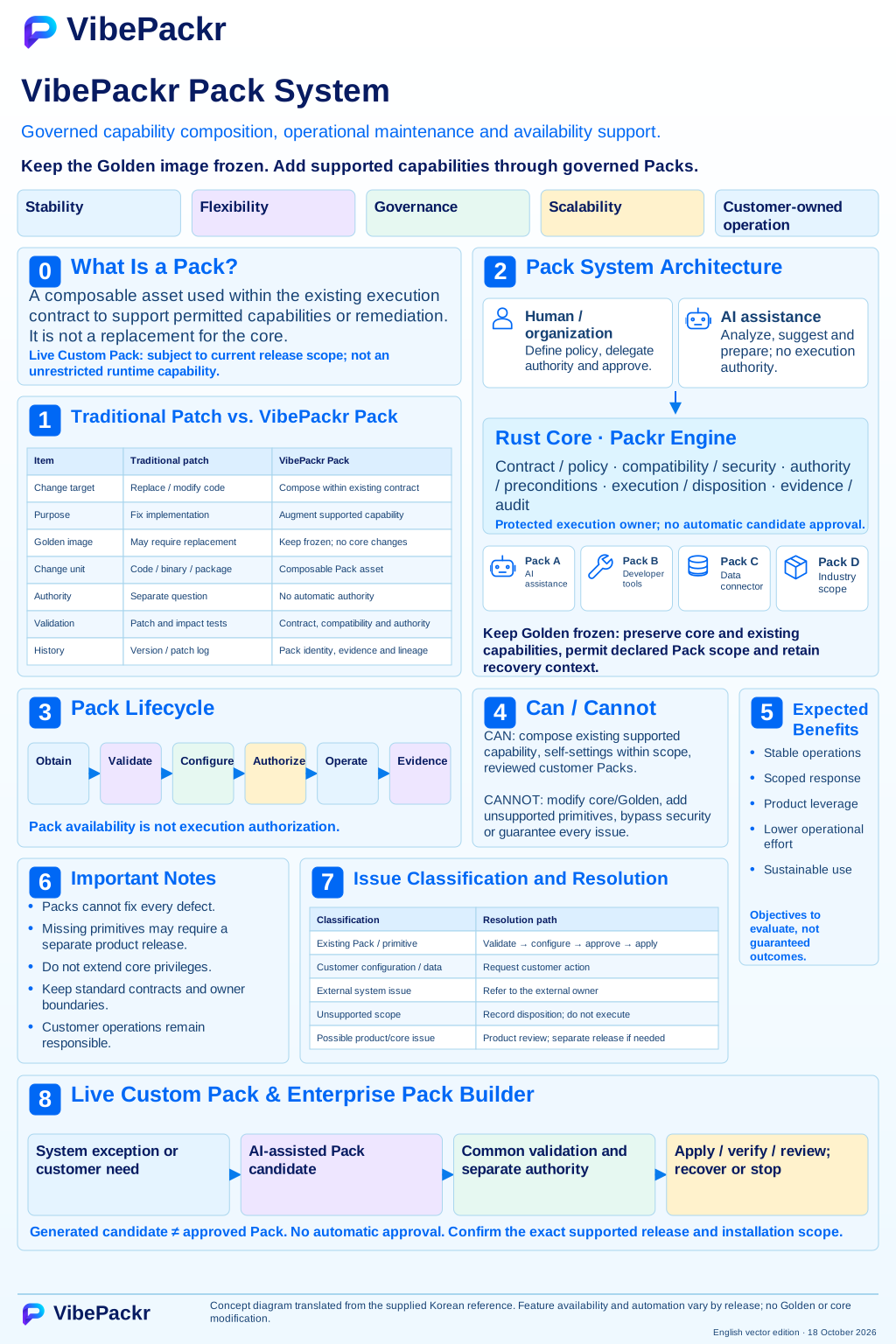
Pack system concept · English SVG edition
User-provided concept figure, dated 8 October 2026, v1.5. Customer-operated Packs stay within declared contracts and permissions; Builder prepares candidates that still require validation and approval. Pack types and self-adaptation labels are illustrative and release-specific, not a current executable feature inventory. The displayed edition is an English SVG with current documentation updates; the earlier raster original remains preserved.