By the end, you will have a private plan, one source-linked observation record and a reviewer conclusion. This route reads an existing local R234 example and sends no product request. If you intend to operate an existing installation, use the separate operational route after its handoff is complete.
Before you start
A browser or extracted offline manuals, a UTF-8 text editor, a new private record folder, and a reader/reviewer role. Product installation, a Google account and an AI provider key are not needed for this reading route.
For a later live operation, separately obtain the exact release, installed client/service, local endpoint, supported operation, permission, unused approved key, report access and cleanup owner. Do not replace an unknown with a copied historical value.
Choose Online or Offline for your actual environment. Online uses approved network access. Offline is an optional closed on-premises setup requiring the matching product, compiler/native toolchain and declared dependencies before transfer. A documentation download does not contain those packages.
Download the blank worksheet and save a private working copy in a new folder such as guide-practice-01. Open JSON in a UTF-8 text editor, preserve quotation marks and null for unobserved fields, and save as .json rather than .json.txt. These worksheets are notes, not product requests. Never submit them to the SDK or Helper.
Follow the steps in order
1 · Choose one question and keep the scope small
Do this: Download poc-plan.blank.json. Set route to retained-reading and write: Can I trace one recorded Work to its JSON/PDF reports and acceptance state? State what would answer that question; leave live environment and actual execution fields null.
Check this result: A saved plan identifies a reading question, reviewer role and limits. It does not ask whether your customer deployment or AI quality is proven.
If it does not match: If the question requires your own data, costs or provider behavior, record it as a separate future PoC and obtain its supported setup first.
2 · Open the six-step retained reader
Do this: Open the recorded Work reader linked below. Read steps 1–3 before the successful submission. Note health exit 1, READY liveness, UNKNOWN readiness/runtime, the rejected intent and the empty scoped Work lists. Do not copy commands into a terminal on this reading route.
Check this result: Your note separates baseline observations, a failed preparation attempt and actual execution. Session metadata persisted, so the failed attempt is not described as zero-change.
If it does not match: If a field is not in the excerpt, keep it unobserved. Do not reconstruct a missing result or treat UNKNOWN as permission.
3 · Trace the same Work through submission and report
Do this: In steps 4–5, compare the recorded Work ID across submission, list/show and selected report. Record execution_count 1, validation_results PASSED and the final result string. Copy the source URL into your observation field.
Check this result: The observation is tied to one historical Work and LOCAL R234. The repeated ID is a reading reference, not an ID or key for your next operation.
If it does not match: If identifiers differ, keep the comparison unresolved and inspect the selected Work/revision. Do not combine two reports into a completed record.
4 · Read report hashes and human acceptance separately
Do this: Read step 6 and the report fields in step 5. The historical JSON/PDF file hashes were reported as matching; human_acceptance remained null. In your note, cite that historical file check instead of claiming you recomputed unavailable raw files.
Check this result: Your record says AUTOMATION_COMPLETED_HUMAN_ACCEPTANCE_PENDING and identifies the remaining human decision. A process exit of 0 does not close acceptance.
If it does not match: For your own report files, use the same-Work and digest procedure in Part.8. If a file is missing or unreadable, keep that check incomplete.
5 · Compare with the completed reading example
Do this: Open poc-reading.example.json. Compare its question, source reference, report subset and illustrative reviewer conclusion with your note. Add what you learned and the evidence that supports it; do not copy a prefilled pass into an unobserved operational field.
Check this result: A reader can explain what succeeded, what failed earlier, what remains pending and which environment the facts describe.
If it does not match: If you cannot explain a value, return to its cited step rather than guessing. Use the detailed 11-step guide for the broader evaluation plan.
6 · Close the reading and hand off a proposed operation
Do this: Record reading complete, operation not evaluated, chosen retention location and next owner for missing delivery/admin/provider prerequisites. For a live trial, follow the Common PoC handoff and baseline steps below; submit only once when supported and authorized.
Check this result: A complete reading record and explicit next action exist without changing product acceptance or provisioning resources.
If it does not match: For a timed-out or uncertain operational submission, reconcile the original Work/key before considering another attempt. A new folder does not make a duplicate submission safe.
Retained report subset · copied from the public reading record
This is a historical output excerpt, not an expected response for your installation. The completed example adds a human reading decision without changing these product fields.
Retained cases cite already-public observations for their stated release and environment. Procedure examples describe how to respond; they are not additional observed incidents. No product runs were performed to write this guide.
Rejected intent before Work creation
Retained observed case
Symptom: PACKR_OPERATOR_STATUS_UNAVAILABLE included SEMANTIC_INTENT_TYPE_UNRESOLVED. The earlier intent omitted the required audit term.
What the evidence means: This retained preparation error did not create the scoped Work/admission/execution/report rows, but session metadata persisted. It is not an outage diagnosis or a promise that every failed request changes nothing.
Actions
In a reading record, cite steps 2 and 3 and mark preparation rejected.
For a separately authorized supported operation, use the exact documented operation and semantic intent; do not copy the failed sentence or retry an uncertain submission.
Completion or resume check: A later observed Work/result is needed to claim execution. The successful historical pair was CREATE_AUDIT_ARTIFACT / create audit artifact.
Symptom: The local R234 health command exited 1 while service_state was RUNNING and liveness READY.
What the evidence means: Readiness and runtime were UNKNOWN with separate reason codes. Service presence and operating authorization are different observations.
Actions
Capture exit code and component JSON separately.
Keep the blocked prerequisite and owner explicit; the historical lab approval is not permission for another target.
Completion or resume check: Resume a proposed operation only under the supplied supported readiness and admission procedure for that target.
Symptom: validation_results PASSED coexisted with AWAITING_HUMAN_ACCEPTANCE and human_acceptance null.
What the evidence means: The observed result completed automation and left human acceptance pending. A manual reading conclusion is not the product acceptance event.
Actions
Record the final_result and closure together.
Name the reviewer and follow the supported acceptance procedure if one is supplied; preserve pending state otherwise.
Completion or resume check: Only the actual returned acceptance record may close that product state; no worksheet edit can do so.
Symptom: Example symptom: JSON refers to one Work/revision while the selected PDF came from another saved result.
What the evidence means: This is a troubleshooting procedure, not an additional observed incident. JSON file hash, PDF hash and report identifier are different comparison targets.
Actions
Preserve both files; reselect the same Work and report revision.
Compare each file with its corresponding supplied digest and open both files for readability.
Completion or resume check: Close the check only after identity, digest and readability agree; never rewrite a manifest to force a match.
Keep the plan, source-linked observations, reviewer conclusion and unresolved handoff. Reading completion answers the chosen question; it does not prove a new installation, customer AI quality, billing or human acceptance.
Helper B checks the completed declarations before you decide whether implementation or a new Pack is needed. After an implementation or declaration change, repeat only the affected supported checks and finish the separate implementation/registration/Pack approval path before operation. A generated candidate grants no operating authority.
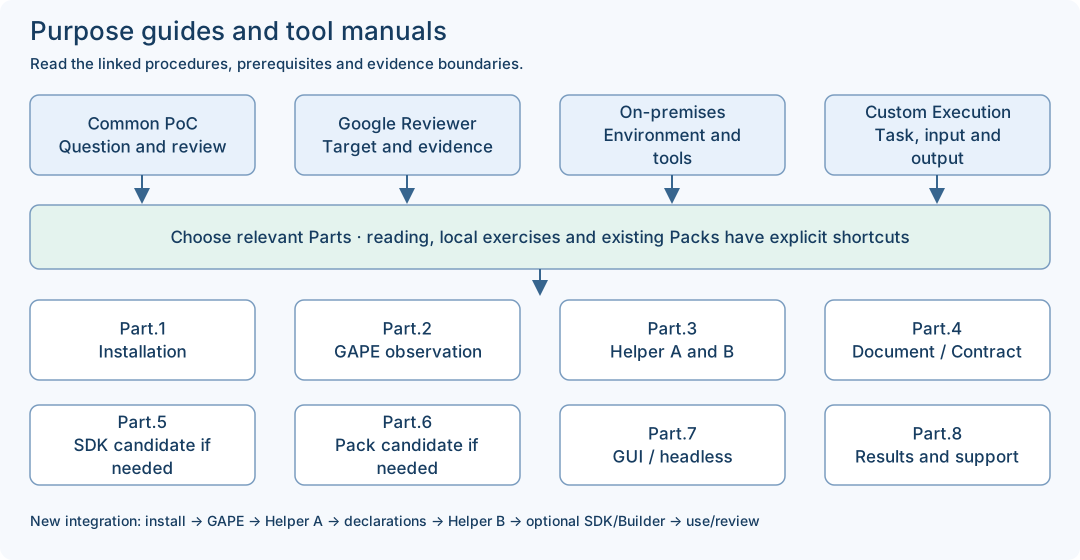
Select only the route needed for your goal. Retained PoC reading can begin without installation. A supplied local SDK exercise uses Part.1 → Part.5 and does not require a new GAPE scan or appliance account. An existing approved Pack can use Part.1 → Part.7 → Part.8 after its current prerequisites are checked. New integration/Pack authoring follows the full conditional sequence.
Compare same-Work artifacts, receipt and closure; keep human acceptance pending until actually recorded.
Shared vocabulary
Guide / Part
A Guide is a purpose/role route; a Part is a tool reference. They complement each other and are not two competing numbered workflows.
Contract / source Document
The published target Contract defines the supported target and revision. The source Document declares your source shapes. A source declaration does not authorize execution.
Complete request / source-only file
A complete SDK request includes request_id, correlation_id and draft with definition/source/mapping/fixture. The source-only status Document is one component, not that complete request.
Fixture / actual observation
A fixture supplies synthetic values for a declared local exercise. Its declared fields do not prove a real provider call, current connectivity or a customer result.
SDK candidate / Pack candidate
The SDK candidate has README.md, adapter.rs, libadapter.rlib and manifest.json. A Builder Pack candidate is a separate product-returned candidate with its own validation/approval path. Neither automatically becomes an approved Pack.
Worksheet / receipt / acceptance
A worksheet records a human note. A receipt is a product execution record. PASSED validation and automation completion can coexist with human acceptance pending; record each field at its actual scope.
Online / Offline
These are setup choices. Offline product development requires the exact declared dependency set and native tools; an offline manual ZIP only supports document reading.
Match each input to the right output
The status.read source-only example and the read_quality SDK exercise are different examples. Use a matching complete request; do not pass the status source file directly as the quality SDK request. Expected mapping values below are teaching expectations, not a newly captured run.
Expected mapped component is "my-test-component" and quality_score is integer 88. Inspect actual manifest/stages; identical mapping source is possible.
Three different artifact classes: human notes, local compiled candidate, actual Work/report/receipt records.
Use the matching tool and current target; never submit a worksheet or previous result as the next full request.
Bind outputs to the actual input, version, candidate or Work identity. File presence and exit 0 alone are insufficient.
Integration roles and operating boundaries
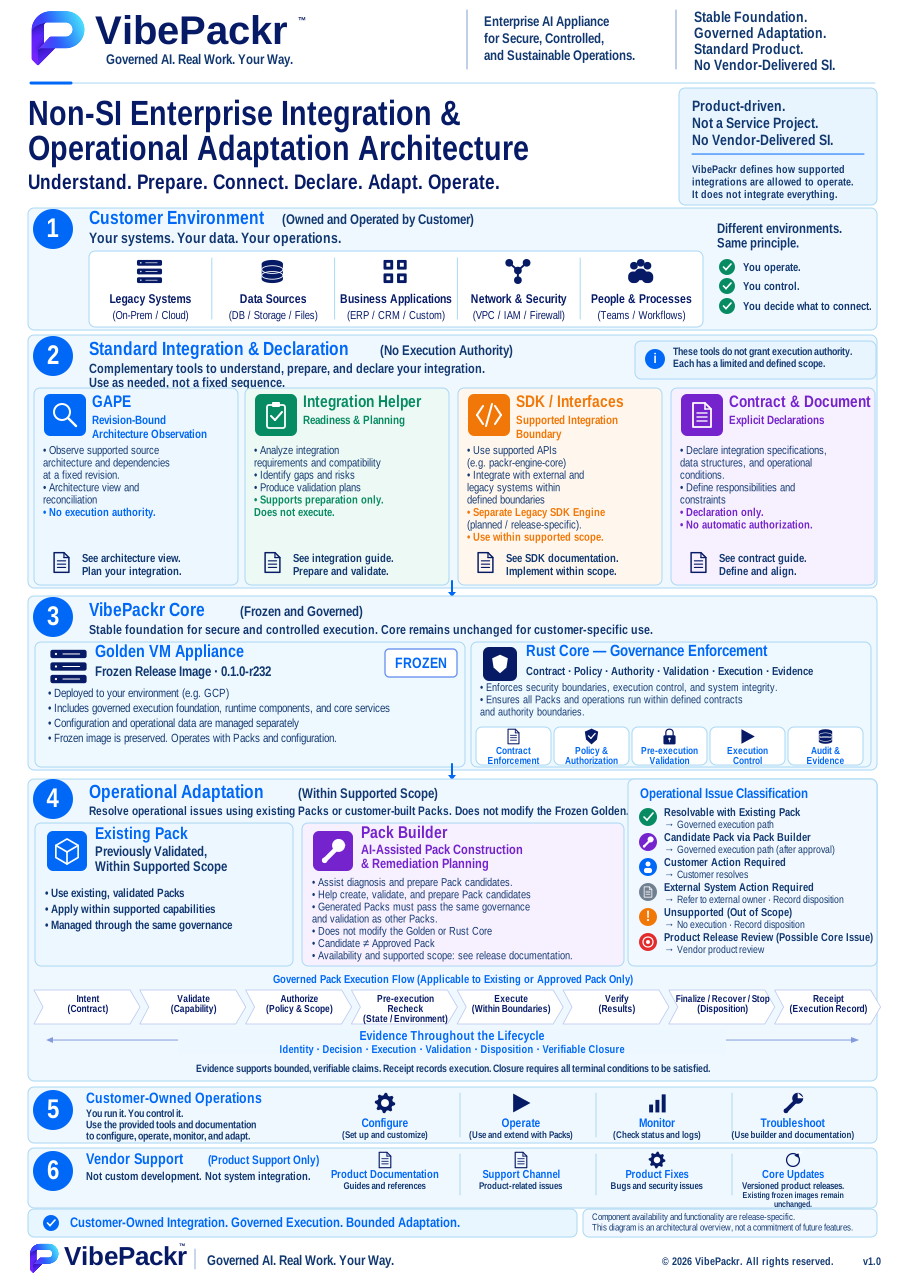
User-provided architecture overview. Tool panels explain complementary roles rather than a mandatory execution order. The original Legacy SDK planned/release-specific wording remains in the image; use Part.5 and the exact supplied package for current SDK availability. This figure grants no authority and is not runtime proof. The displayed edition is an English SVG with current documentation updates; the earlier raster original remains preserved.
Use Parts 1–8 for current installation, tool exercises and troubleshooting. The retained examples and workbooks below keep their original release, purpose and observation limits.
Helper B checks the completed declarations before you decide whether implementation or a new Pack is needed. After an implementation or declaration change, repeat only the affected supported checks and finish the separate implementation/registration/Pack approval path before operation. A generated candidate grants no operating authority.
Select only the route needed for your goal. Retained PoC reading can begin without installation. A supplied local SDK exercise uses Part.1 → Part.5 and does not require a new GAPE scan or appliance account. An existing approved Pack can use Part.1 → Part.7 → Part.8 after its current prerequisites are checked. New integration/Pack authoring follows the full conditional sequence.
Skip SDK authoring only when an implemented, registered integration compatible with the installed release already meets the need. Skip Builder authoring only when an existing approved Pack meets the goal and installation scope. Keep declaration checks, integration validation and result review in either case.
Online and Offline are both supported setup choices
Online uses the network access approved for your installation. Offline is the closed on-premises option: prepare the exact OS/target toolchain and dependency set before transfer. The manual ZIP contains documents and synthetic inputs, not product binaries or Rust toolchains.
Apply the common plan to your evaluation
Record one goal, exact delivery version, chosen network mode, permitted action, expected output and reviewer before execution. A read-through can finish with a completed reading record; an operational PoC also requires a supported installation and actual result evidence.
Example · reuse or create
For an existing approved Pack, confirm compatibility and proceed to validation and operation. For a new integration, complete the Document and published target references, check them with Helper B, then create an SDK candidate only if implementation is needed. Finish the separate review/registration path before any required Builder Pack approval and operation. Generated source or a workbook alone does not register an integration or prove an executed Work.
If an operating prerequisite is missing, keep the planning result and record the missing item, owner and resume condition. Preserve the first failed attempt; do not repeat a timed-out or uncertain submission until its original result is reconciled.
Choose the route your installation and evidence support. Keep the question small enough to judge from one clear result.
Available now as a read-through of the public retained local R234 record.
Read one recorded Work
Question
Can I explain how one supported audit operation is traced to its report and pending human acceptance?
Bring
The six-step recorded-run reader, Blank input, observation and run-record worksheets, The evaluation criteria below
Expected output
A completed reading record with cited product facts, a separate human assessment and an owner handoff for any proposed reproduction.
Scope
No installation is needed to read. The historical operation does not establish customer access, AI quality or a new file/runtime check.
Read the route reference →Conditional: an already authorized operator must confirm the exact matching installation and all operation prerequisites first.
Reproduce the supported local audit operation
Question
On this eligible installation, can one approved CREATE_AUDIT_ARTIFACT Work be followed to readable, matching JSON/PDF reports?
Bring
Supplied client path, local endpoint and exact service release, Operation permission, one unused approved key and private output directory, Exact operation CREATE_AUDIT_ARTIFACT and intent create audit artifact, Approved report access, reviewer and lifecycle/cost owners
Expected output
Your own returned Work/result observations, same-Work comparison, readable file checks and a separate reviewer decision; success is not prefilled.
Scope
This operation creates a structured local audit artifact. It does not analyze an arbitrary business attachment or validate a customer AI/provider setup.
Read the route reference →Planning is available now. Fresh r232 administrator-dependent use stops at C7; customer AI/storage/lifecycle procedures and matching proof remain prerequisites.
Prepare a new-customer AI evaluation
Question
Which supported task, input, quality measure, cost limit and customer setup proof are needed to answer our business question?
Bring
One business question and approved non-confidential sample description, Requested supported task/model/location and expected deliverable, Proposed quality/time/cost criteria with named owners, Exact delivery and missing-procedure request references, or explicit unknowns
Expected output
A scoped evaluation brief, proposed measurable criteria and a missing-prerequisite handoff. Operational observations stay blank until a supported, authorized customer route is proven.
Scope
No runnable AI payload or customer setup is supplied by this audit workbook. Obtain the supported version-specific procedure and validate its result before claiming business value.
The completed example is an illustrative worksheet built around cited historical facts. It is not a new execution or customer result.
STEP 01
Choose one question worth answering
planning
Agree what the evaluation will teach you before spending or submitting.
Bring
Named PoC owner and reviewer
Non-confidential sample and intended use
Follow the sequence
Choose either reading the retained audit example or, if already eligible, reproducing the supported audit operation. CREATE_AUDIT_ARTIFACT creates a structured local audit artifact; it does not audit arbitrary attached documents.
Write acceptance criteria, budget, permitted actions and stop conditions. Separate a desired AI use case from this local audit example.
Assign cloud, AI, data, product access and service-operation responsibilities. One person may fill several responsibilities; each requires its own access.
Use the evaluation workbook to turn each criterion into an observable expectation, a check and an evidence reference. Agree any task-quality, time or cost threshold before execution; there is no default product pass score.
Check the result
A chosen route, exact question, criterion plan, named owners, planned budget and stop conditions. Actual observations remain blank.
If it does not match
Unclear authority, cost owner or sensitive input: resolve with the PoC/data owner before operational work.
Avoid treating a recorded example as a customer installation procedure.
Bring
Delivery version and environment, or an explicit unknown
Follow the sequence
New r232 customer: prepare the plan and request the matching Marketplace/deployment/first-administrator procedures. Stop administrator-dependent use at C7.
Existing authorized installation: obtain the handoff in step 4 and confirm the operation is supported for its exact release.
Read the retained local R234 example now even if operational prerequisites are missing. No account, endpoint or provider is needed to read it.
Check the result
A recorded route choice: planning, retained-run reading, or conditional existing-operator reproduction.
If it does not match
Do not infer product authority from SSH, Cloud IAM, OS root, purchase or a running VM.
Keep for the handoff
Chosen route, release, missing procedure and responsible contact
Recognize the action, outcome and limits of the retained example.
Bring
Bundled Headless guide and six-step recorded-run reader
Follow the sequence
Open headless-worked-run-en.html; then read the tutorial sections of the Headless reference. This is selected actual output, not a live terminal.
Follow the successful wording create audit artifact through submission, list, show, report and file checks. Read the earlier rejected wording only as history; do not execute it as a test.
Notice the health exit 1/UNKNOWN observations and separately approved admission in that specific lab. That history is not permission to ignore your own missing readiness requirement.
Check the result
The recorded report has execution_count 1, validation_results PASSED, final_result AUTOMATION_COMPLETED_HUMAN_ACCEPTANCE_PENDING and closure.human_acceptance null.
The service was stopped after collection. Conversational approval did not change the product’s observed AWAITING_HUMAN_ACCEPTANCE state.
If it does not match
Do not copy the recorded Work ID, endpoint or digests into a new execution.
This R234 local record is neither r232 customer proof nor a production AI result.
Keep for the handoff
Notes separating observed result, pending human acceptance and applicability to your installation
Make an eligible reproduction concrete without inventing setup commands.
Bring
Matching installed client/service release
Authorized local account and private writable working directory
Follow the sequence
Ask delivery for the installed packrctl location and exact service release. Ask the service operator for its absolute local socket and running-state confirmation.
Ask the product administrator to confirm CREATE_AUDIT_ARTIFACT permission; ask the Work owner for one unused approved key and a reviewer.
Confirm access to returned report files or an approved copy procedure. A local socket is not a remote connection; a desktop terminal does not automatically reach the appliance.
For a separate AI PoC, obtain supported model/location, identity/access, billing limit and storage/retention procedure. This audit example does not validate those connections or incur demonstrated AI usage.
List each missing handoff item in the issue sheet with its owner, required evidence and resume condition. Planning and recorded reading can continue independently.
Check the result
Every required handoff item has an owner and a verifiable value for the intended installation.
If it does not match
Missing startup/admin/AI/storage procedure: request it; do not create keys, grants, sandbox state or replacement binaries.
The separately repaired Admin demonstration candidate is not an existing Golden-operational complement or customer bootstrap.
Keep for the handoff
Version, target, approved scope and non-secret handoff confirmation; keep private endpoint/account details local
Record actual status and component reasons before submission.
Bring
Completed handoff
Fresh private output directory
Follow the sequence
In the supplied local client environment, replace both absolute path placeholders, then use the baseline block. Keep the same shell/account/socket for following steps.
Read status.json and health.json locally. Record both printed status_exit and health_exit values, plus each relevant state/reason. The snippet captures each exit immediately after its command. A zero exit does not grant Work authority.
If requirements are unknown or non-ready, ask the component owner to resolve applicability before submitting; do not repeat the lab’s exception by assumption.
Create one intentional Work and keep its returned identity.
Bring
All operation-specific prerequisites resolved
Unused approved key
Follow the sequence
Replace the key placeholder and keep the supported intent exactly as shown. Execute the submit block only for the separately authorized reproduction; reading this package does not submit anything.
Open work-run.json locally. Save result.work.work_id with your key and exit code.
The convenience command prepares and executes and writes records. Do not treat it as a read-only probe or generic AI prompt runner.
Operator reference · copy does not execute
Shell
WORK_KEY="REPLACE_WITH_ONE_UNUSED_APPROVED_KEY"
"$PACKRCTL" --socket "$SOCKET" work run CREATE_AUDIT_ARTIFACT "create audit artifact" "$WORK_KEY" --json > work-run.json
RUN_EXIT=$?
printf '%s\n' "$RUN_EXIT"
Check the result
A response whose Work identity and outcome can be inspected; do not pre-fill success.
If it does not match
Timeout, missing ID, DENIED, STOP_WITH_FINDING, FAILED or PARTIAL: preserve the result and reconcile before further action.
execution_retry_allowed false forbids automatic retry. Re-running the helper is not exact prepared-envelope replay.
Keep for the handoff
Original key/request context, time, exit and exact returned Work ID
Prevent a second execution from being mistaken for recovery.
Bring
Exact returned result.work.work_id
Follow the sequence
Paste your own Work ID in the query block; keep the original account and socket.
Compare works[].work_id in list with work.work_id, reports[].work_id and selected_report.canonical_report.work_id in show.
If absent from the last 10, show the saved ID directly or use the documented list limit up to 100. An empty scoped list is not proof of no Work anywhere.
If submission returned no ID, preserve request context and ask support to reconcile the original installation/principal before another submission.
Operator reference · copy does not execute
Shell
WORK_ID="PASTE_EXACT_result.work.work_id_FROM_work-run.json"
"$PACKRCTL" --socket "$SOCKET" work list --limit 10 --json > work-list.json
"$PACKRCTL" --socket "$SOCKET" work show "$WORK_ID" --json > work-show.json
Check the result
All inspected records refer to one saved Work; ambiguity is recorded rather than replaced by a new Work.
If it does not match
Identity mismatch, denied show or missing selected report: stop completion claims. Do not switch accounts to bypass a denial.
Keep for the handoff
Work ID, chosen report revision and sanitized reconciliation result
Separate automated completion from human acceptance.
Bring
Same-Work show response
Follow the sequence
Read selected_report.canonical_report: work_id, execution_count, final_result, validation_results, receipt and closure. Retain actual values, not the example’s expected values.
Read closure.disposition, closure.human_acceptance_required and closure.human_acceptance. Read replayed and execution_retry_allowed in the returned result.
PASSED is validation, not human acceptance. A replayed result is not a new execution. Missing receipt/closure needs support reconciliation.
Use the criterion observation sheet to distinguish the expected value from the literal value observed. Mark an unperformed check as not run; give a reason for non-applicability. These are human worksheet labels, not product status.
Check the result
An accurate outcome statement; the retained example is automation completed with human acceptance pending.
If it does not match
Do not call FAILED/PARTIAL unchanged state or call a process exit product success.
Review readable artifacts for the exact Work and revision.
Bring
selected_report.json_path and selected_report.pdf_path
Authorized local viewer or operator-supplied approved copies
Follow the sequence
Use your returned paths, never a guessed report directory. Confirm files exist, are readable and match the selected Work/revision.
On macOS the shared checksum block uses shasum; otherwise use the file verifier supplied for your platform. Compare JSON bytes to selected_report.projection.json_file_sha256 and PDF bytes to selected_report.projection.pdf_sha256, removing its sha256: prefix for comparison.
Keep report_sha256 distinct from file hashes. It is the report digest, not the checksum of the saved JSON or PDF.
Open the PDF in an authorized viewer and compare Work, execution count and validation with JSON. A server path is not proof of delivery to your computer.
Operator reference · copy does not execute
Shell
REPORT_JSON="PASTE_EXACT_selected_report.json_path"
REPORT_PDF="PASTE_EXACT_selected_report.pdf_path"
shasum -a 256 "$REPORT_JSON" "$REPORT_PDF"
Check the result
Matched, readable JSON/PDF for one report revision. No separate underlying output artifact is promised by this step.
If it does not match
Missing/unreadable file or digest mismatch: retain the reference and ask the service operator/support; do not silently regenerate or substitute another report.
Keep for the handoff
Report revision, comparison result and minimal approved references; raw reports stay private
Answer the original PoC question without changing product acceptance by implication.
Bring
Plan criteria
Retained-run notes or actual eligible reproduction results
Follow the sequence
The named reviewer compares the result with the agreed goal, permitted input, cost and retention boundaries. For the audit example, judge the structured artifact/report trace, not arbitrary content quality.
Record the human’s review separately from the product’s latest closure state. This guide supplies no product acceptance command.
If no provider was called or billing evidence was not collected, record not measured/not applicable with the reason; do not invent a cost or runtime result.
Complete the criterion-by-criterion evaluation and the final human review: what was learned, what remains blocked, which owner acts next and what evidence would change the decision. Do not reduce unresolved required criteria to an average score.
Check the result
A signed-off or unresolved human evaluation record and the separately observed product acceptance state.
If it does not match
A conversation approval or completed checklist must not overwrite AWAITING_HUMAN_ACCEPTANCE in reporting.
Keep for the handoff
Reviewer, date, criteria result, open issues and product state
Completed criterion observations and final human review, or an explicitly unresolved disposition
Preserve required results and leave resources in an agreed state.
Bring
Exact resources used
Data owner retention choices
Operator’s supported stop/retirement procedure
Follow the sequence
Reading-only route: retain your worksheet; there is no product process to stop.
Operational route: ask the service operator to stop only an exercise-owned service when authorized by its supplied procedure. A closed GUI does not prove service shutdown.
Have cloud/data owners review VM, disks, objects, backups and continuing charges separately. This guide provides no deletion or credential-revocation command.
Send support the version, failed stage, expected/observed result, time, literal sanitized reason and minimal Work/report reference. Request a private channel before extra identifiers.
Complete one closeout row for each used resource. Record before/after state, retained data, owner, retention review date, remaining charges and evidence. Compare actual cost over a named billing period with the agreed budget; unknown or delayed billing remains unmeasured.
Check the result
A completed closeout or an explicitly open item for each resource and cost line, plus a named owner and resume condition for every unresolved issue.
If it does not match
Unknown ownership or retention effect: stop deletion/restarts and ask the responsible owner. Never reuse test teardown as customer cleanup proof.
Can I start if health exits 1 as in the recorded run?
No general permission follows from that history. The lab had separate approval and normal admission evaluated that operation. Resolve your own required readiness and authority before submission.
Is this an executable Pack I can import into Packtory?
No. This is a documentation package. It is not a registered payload, installed Pack, authority grant or product execution.
Can the audit command analyze my uploaded business document?
This registered operation creates a structured local audit artifact. It does not inspect arbitrary attached content.
What if the command times out?
Keep the key/request context and reconcile the original Work under the same installation/account. Do not submit a replacement or add an automatic retry.
Does the repaired Admin example unblock Golden r232?
No. It used a separately repaired task-local candidate and disposable target. It is not a Golden change, customer bootstrap or inherited production capability.
What do I send support?
Version, stage, expected and observed behavior, time and sanitized reason; minimal Work/report reference when appropriate. No credentials, raw reports, private paths, full logs or customer payloads.
Scope of this edition
Documentation review edition; blank worksheets and the illustrative reading example do not execute or register a Pack.
Golden r232 remains immutable. New-customer C7 and full customer AI/storage/lifecycle procedures are not completed here.
Local R234 recorded Work is bounded evidence; this package creates no new runtime or production evidence.
Repaired Admin candidate complements the reference material, not the operational capabilities of existing Golden installations.
Commands follow the active Headless reference. R1 adds immediate status exit capture to the baseline snippet; retained historical outputs and the original R0 archive are unchanged. No historical rejected input is offered as a runnable test.
Raw JSON/PDF, execution responses, credentials and internal support exports are not public attachments.
Human review and product acceptance are separate; unknown values remain unknown.
BOUNDED ENTERPRISE EVALUATION · NEXT STEP
Evaluate one governed workflow in your environment.
Bring one candidate AI workflow, target execution boundary, and approval requirement. Compare our recorded local R234 run, follow the structured PoC evaluation sequence, or review the 18 October 2026 English and Korean technical whitepapers.
Contact boundary notice: Clicking “Request an Evaluation” opens your local email client addressed to support@vibepackr.com with a structured inquiry template; sending an email does not automatically register a support case or provision an appliance. Please do not include credentials, personal data, or confidential logs.