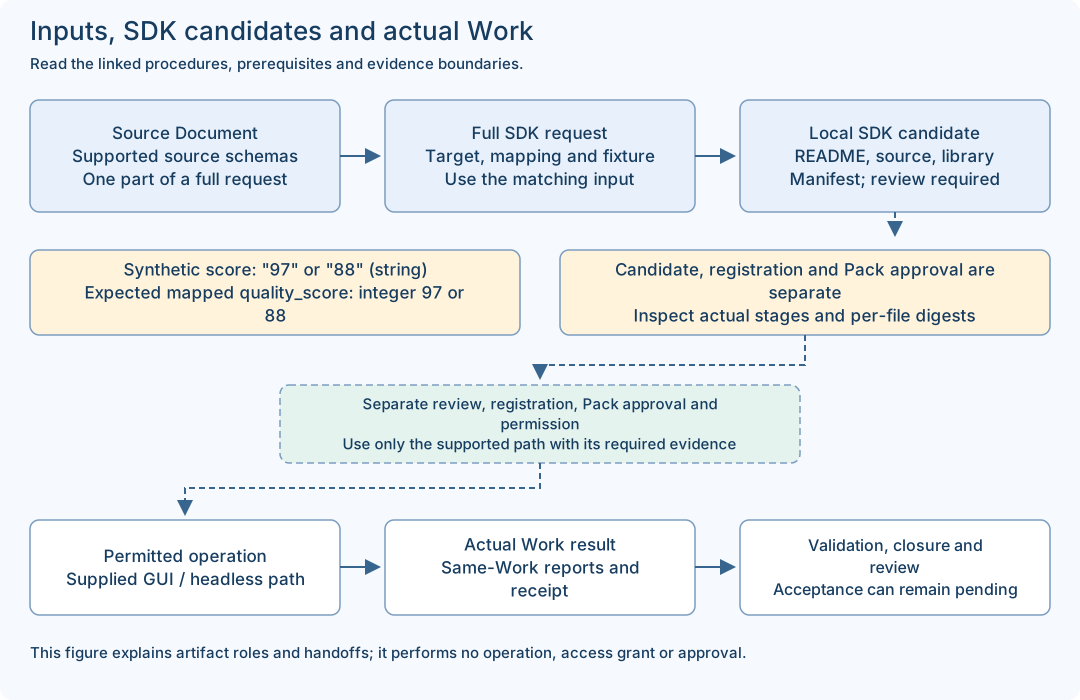
Use the installed SDK to analyze the complete synthetic input, generate custom-01, change only component and score in custom-02, and inspect the four candidate files. This is a local synthetic exercise, not a call to a real customer API, integration registration or execution approval.
Before you start
- Complete Part.1 installation and Part.5 toolchain setup first. Obtain the two complete JSON downloads below, a UTF-8 text editor and a fresh private practice folder. Do not use the deliberately numeric-score negative fixture as the successful base input.
- Select Online run or the prepared Offline run-offline route. For Offline, the target-matching dependency verification and native tools must already be complete. Use the actual installed paths from Part.1, not a browser download folder or a path guessed from an example.
Choose Online or Offline for your actual environment. Online uses approved network access. Offline is an optional closed on-premises setup requiring the matching product, compiler/native toolchain and declared dependencies before transfer. A documentation download does not contain those packages.
Download the blank worksheet and save a private working copy in a new folder such as guide-practice-01. Open JSON in a UTF-8 text editor, preserve quotation marks and null for unobserved fields, and save as .json rather than .json.txt. These worksheets are notes, not product requests. Never submit them to the SDK or Helper.
Follow the steps in order
1 · Create a fresh practice folder and save complete inputs
Do this: Create a new private folder guide-custom-01 with inputs and runs subfolders. Download custom-api-01.json and custom-api-02.json into inputs, keeping those exact filenames. If the folder already exists, choose another fresh name and update the path variables; preserve the old folder.
Check this result: Both complete input files exist. Each contains request_id, correlation_id and draft with definition/source/mapping/fixture; an isolated response snippet is not a full SDK input.
If it does not match: If the browser adds .txt or a duplicate suffix, correct the saved filename without overwriting prior work. A worksheet with record_kind is a note and must not be submitted.
2 · Read the schemas and analyze the first input
Do this: Open custom-api-01.json. The declared source output score is string and fixture response is "97"; mapping STRING_TO_INTEGER targets quality_score. Use the analyze command below with the installed SDK. Keep its exit code and actual returned status/reasons.
Check this result: The complete input is accepted by its documented analysis checks. Schema declaration and fixture sample are distinguished from a real provider response.
If it does not match: A numeric 97, missing draft or unsupported field is a different input. Preserve the error, correct only the documented mismatch in a copy and analyze that copy before candidate generation.
3 · Generate custom-01 once using the chosen mode
Do this: For Online, use run with inputs/custom-api-01.json and the unused runs/custom-01 directory. For Offline, use the matching run-offline command with the verified dependencies and any documented macOS CLT selection. Use one route for this candidate, then inspect the complete returned result.
Check this result: The new directory has README.md, adapter.rs, libadapter.rlib and manifest.json with the documented stage/file checks. A nonzero exit or failed postcheck is not a completed candidate.
If it does not match: Stop on failure and preserve custom-01 and the original result. Do not immediately switch command modes or reuse that output directory to hide the failed attempt.
4 · Change only the two response values for custom-02
Do this: Compare the supplied second input with the first: draft.fixture.response.component becomes "my-test-component" and score becomes "88". Both remain strings. You can make this edit in a fresh copy yourself or use the supplied complete second file. Keep the schemas, mapping and target identifiers unchanged for this exercise.
Check this result: The complete second JSON differs only in those two values. Reusing the example request/correlation identifiers is limited to this documented local SDK exercise, not live Helper or Work submission.
If it does not match: If you change score to the JSON number 88 or replace the full file with the displayed response fragment, stop and restore the complete string-typed input.
5 · Analyze and generate into a second unused output
Do this: Analyze custom-api-02.json, then use the same selected command mode and native options with runs/custom-02. Do not overwrite custom-01. Open both manifests and source files after all required checks complete.
Check this result: There are two separate candidate folders, each bound to its own input and stage results. The mapping can remain identical even when fixture values change.
If it does not match: If analysis or generation fails, keep the second result separate and use the exact error cases below. Do not copy successful files from custom-01 to manufacture a complete custom-02.
6 · Compare outputs and record the candidate boundary
Do this: Read README.md, adapter.rs and manifest.json in each folder. Compare input digest, stage results and files individually. The documented manifest status is CUSTOMER_REVIEW_CANDIDATE with authority_granted false. A changed fixture can alter manifest observations while adapter.rs stays identical.
Check this result: The observation note names both input/output paths, each source/library digest, actual manifest result and next integration reviewer. No runtime registration or real API connectivity is claimed.
If it does not match: Different libraries require exact toolchain/input comparison, not manual manifest editing. To change generated code reproducibly, change supported input declarations/mapping and create a fresh candidate.
Editable records, inputs and output examples
Input change · response fragment, not a complete SDK request
This fragment locates the two editable values. Use the complete downloadable input when running the SDK. The base response is component "fixture-component" with score "97".
{
  "draft": {
    "fixture": {
      "response": {
        "component": "my-test-component",
        "score": "88"
      }
    }
  }
}
macOS / Linux · create fresh private folders
Use only your OS block. After successful creation, use the download links to save both complete JSON files into the inputs folder shown here. Then continue in the same terminal. The commands are examples for the reader; no directory is created by this web page.
# macOS / Linux: run this folder-creation block first
PRACTICE="$HOME/guide-custom-01"
(
  umask 077
  mkdir "$PRACTICE" && mkdir "$PRACTICE/inputs" "$PRACTICE/runs"
)
# Stop if mkdir reports that the folder exists.
Windows PowerShell · create fresh folders
Use only your OS block. After successful creation, use the download links to save both complete JSON files into the inputs folder shown here. Then continue in the same terminal. The commands are examples for the reader; no directory is created by this web page.
$Practice = Join-Path $env:USERPROFILE 'guide-custom-01'
if (Test-Path -LiteralPath $Practice) { throw 'Choose a fresh practice folder' }
New-Item -ItemType Directory -Path $Practice -ErrorAction Stop | Out-Null
New-Item -ItemType Directory -Path (Join-Path $Practice 'inputs'),(Join-Path $Practice 'runs') -ErrorAction Stop | Out-Null
macOS / Linux · path setup, analyze and Online generation
Execute one line at a time in the same terminal, inspect the exit code immediately with echo $? and read the returned checks before continuing. Set the real installed path. For Offline use the alternative below instead of these run lines.
SDK_EXE="$HOME/VibePackr-SDK-install-01/sdk/bin/packr-sdk-engine"
PRACTICE="$HOME/guide-custom-01"
# First create this fresh private folder and save the two complete inputs.
# Run each line only after the previous command and result checks succeed.
"$SDK_EXE" analyze "$PRACTICE/inputs/custom-api-01.json" unused
"$SDK_EXE" run "$PRACTICE/inputs/custom-api-01.json" "$PRACTICE/runs/custom-01"
"$SDK_EXE" analyze "$PRACTICE/inputs/custom-api-02.json" unused
"$SDK_EXE" run "$PRACTICE/inputs/custom-api-02.json" "$PRACTICE/runs/custom-02"
Windows PowerShell · analyze and Online generation
Create the fresh directories and save inputs first. Keep all output checks in addition to the process return code. Do not paste a macOS shell variable assignment into PowerShell.
$SdkExe = Join-Path $env:USERPROFILE 'VibePackr-SDK-install-01\sdk\bin\packr-sdk-engine.exe'
$Practice = Join-Path $env:USERPROFILE 'guide-custom-01'
& $SdkExe analyze (Join-Path $Practice 'inputs\custom-api-01.json') unused
if ($LASTEXITCODE -ne 0) { throw 'Stop and preserve analysis error' }
& $SdkExe run (Join-Path $Practice 'inputs\custom-api-01.json') (Join-Path $Practice 'runs\custom-01')
if ($LASTEXITCODE -ne 0) { throw 'Stop and preserve candidate error' }
# Continue only after inspecting all required first-candidate checks.
& $SdkExe analyze (Join-Path $Practice 'inputs\custom-api-02.json') unused
if ($LASTEXITCODE -ne 0) { throw 'Stop and preserve second analysis error' }
& $SdkExe run (Join-Path $Practice 'inputs\custom-api-02.json') (Join-Path $Practice 'runs\custom-02')
if ($LASTEXITCODE -ne 0) { throw 'Stop and preserve second candidate error' }
macOS / Linux · Offline alternative
Use instead of the Online run lines, after exact target/dependency verification. When macOS CLT selection applies, append --macos-developer-selection COMMAND_LINE_TOOLS to the run-offline command before executing it. Keep the same selected option for candidate 02; do not run two alternatives into the same output folder.
# macOS / Linux: use instead of run, after dependency verification
SDK_DEPS="$HOME/VibePackr-SDK-install-01/dependencies"
"$SDK_EXE" run-offline "$PRACTICE/inputs/custom-api-01.json" "$PRACTICE/runs/custom-01" "$SDK_DEPS"
# Repeat only after success, using input 02 and output custom-02.
# macOS CLT selection, if applicable, adds:
# --macos-developer-selection COMMAND_LINE_TOOLS
Windows PowerShell · Offline alternative
Run analysis first for each input. Use the real verified dependency path. These lines replace the Online run lines; they do not follow them into the same candidate directories.
$SdkDeps = Join-Path $env:USERPROFILE 'VibePackr-SDK-install-01\dependencies'
& $SdkExe run-offline (Join-Path $Practice 'inputs\custom-api-01.json') (Join-Path $Practice 'runs\custom-01') $SdkDeps
if ($LASTEXITCODE -ne 0) { throw 'Stop and preserve first offline candidate error' }
# Continue only after all first-candidate checks pass.
& $SdkExe run-offline (Join-Path $Practice 'inputs\custom-api-02.json') (Join-Path $Practice 'runs\custom-02') $SdkDeps
if ($LASTEXITCODE -ne 0) { throw 'Stop and preserve second offline candidate error' }
Expected output layout · inspect your own actual result
The tree is a documented expected layout, not a captured run. Open the text files in your editor; the .rlib is a binary library, not an application to double-click. Use the OS file-digest commands in Part.5.
runs/
  custom-01/
    README.md
    adapter.rs
    libadapter.rlib
    manifest.json
  custom-02/
    README.md
    adapter.rs
    libadapter.rlib
    manifest.json
Troubleshooting with evidence and next actions
Retained cases cite already-public observations for their stated release and environment. Procedure examples describe how to respond; they are not additional observed incidents. No product runs were performed to write this guide.
DISCOVER passed but NORMALIZE was denied
Retained observed case
Symptom: The retained local status example returned DISCOVER/PASSED/DISCOVERED, then NORMALIZE/DENIED/CONTRACT_INCOMPATIBLE with lifecycle_stage null.
What the evidence means: The intentionally unbound target was not made compatible by discovery. Process exit 0 can accompany a semantic denial, so status/reason must be read.
Verbatim public result object
{
  "operation": "NORMALIZE",
  "request_id": "example-status-discover-001",
  "status": "DENIED",
  "reason": "CONTRACT_INCOMPATIBLE",
  "lifecycle_stage": null
}
Actions
- Keep both original result excerpts and the source document.
- Obtain the exact supported target contract and adapter revision from the supplier; a new invented target name does not fix the boundary.
Completion or resume check: A complete matching request/package and a separately observed successful normalization are needed before the dependent registration step.
Read the source and its original scope
Required property is not declared
Retained observed case
Symptom: Adding uptime to output_schema.required without defining its property produced DENIED / SCHEMA_INCOMPATIBLE in the retained negative example.
What the evidence means: The required list and declared primitive properties must agree; a prose explanation does not define a machine-readable field.
Verbatim public result object
{
  "operation": "DISCOVER",
  "request_id": "example-status-discover-001",
  "status": "DENIED",
  "reason": "SCHEMA_INCOMPATIBLE",
  "lifecycle_stage": null
}
Actions
- Compare each required name with properties, including spelling and case.
- In a source copy, declare the genuinely required supported primitive property or remove an unintended required entry.
Completion or resume check: Recheck the corrected complete source through the supplied supported preparation procedure; do not invent a full R2 envelope from an excerpt.
Read the source and its original scope
Unsupported metadata field is rejected
Retained observed case
Symptom: Adding description to the protocol document produced DENIED / INVALID_REQUEST with request_id UNAVAILABLE in the retained parsing example.
What the evidence means: Human-readable notes and the supported machine schema are separate. A generally familiar JSON field is not automatically permitted here.
Verbatim public result object
{
  "operation": "DISCOVER",
  "request_id": "UNAVAILABLE",
  "status": "DENIED",
  "reason": "INVALID_REQUEST",
  "lifecycle_stage": null
}
Actions
- Preserve the parser result and compare against the complete documented source example.
- Move explanatory prose to the guide/brief and remove unsupported machine-input fields in a copy.
Completion or resume check: The supported source shape is checked without changing the contract or accepting unknown fields silently.
Read the source and its original scope
Unsupported MCP revision is denied
Retained observed case
Symptom: The retained negative example using MCP revision 2099-01-01 returned DENIED / PROTOCOL_REVISION_MISMATCH.
What the evidence means: The transcript revision must match the supported negotiated protocol. Relabeling a different transcript does not establish compatibility.
Verbatim public result object
{
  "operation": "DISCOVER",
  "request_id": "example-mcp-discover-001",
  "status": "DENIED",
  "reason": "PROTOCOL_REVISION_MISMATCH",
  "lifecycle_stage": null
}
Actions
- Keep the original transcript and exact revision error.
- Use a transcript actually captured for the supported revision under its supplied procedure; do not replace only the version string.
Completion or resume check: Compatibility is established by the supported complete input and actual preparation result, not by removing the denial field.
Read the source and its original scope
score is a number, or the full input was replaced with a fragment
Procedure example · not a newly observed incident
Symptom: Example: score is 88 instead of "88", or only the displayed response object is passed as the SDK input.
What the evidence means: The documented source score schema is string; STRING_TO_INTEGER is the explicit mapping. The SDK also needs the full request/draft structure, not only a response.
Actions
- Compare with the complete custom-api-02.json and restore the two quoted response strings.
- Keep all other fields intact for this exercise and analyze a new input copy before generating a fresh output.
Completion or resume check: The complete supported input passes its analysis and all candidate checks; no worksheet or manually edited manifest substitutes for it.
Read the source and its original scope