
Agent compromise alone
does not grant authority.
An AI agent can reason, plan and propose an action. Permission to carry it out remains a separate decision. For supported Work routed through VibePackr, applicable authority, policy and scope govern execution.
Capability is not authority. Authorized execution still requires review.
AI / Agent Compromise and Execution Authority
Follow the distinction from threat and capability to governance, execution and review. The full image opens separately for closer inspection; the explanation below is readable at any screen size.
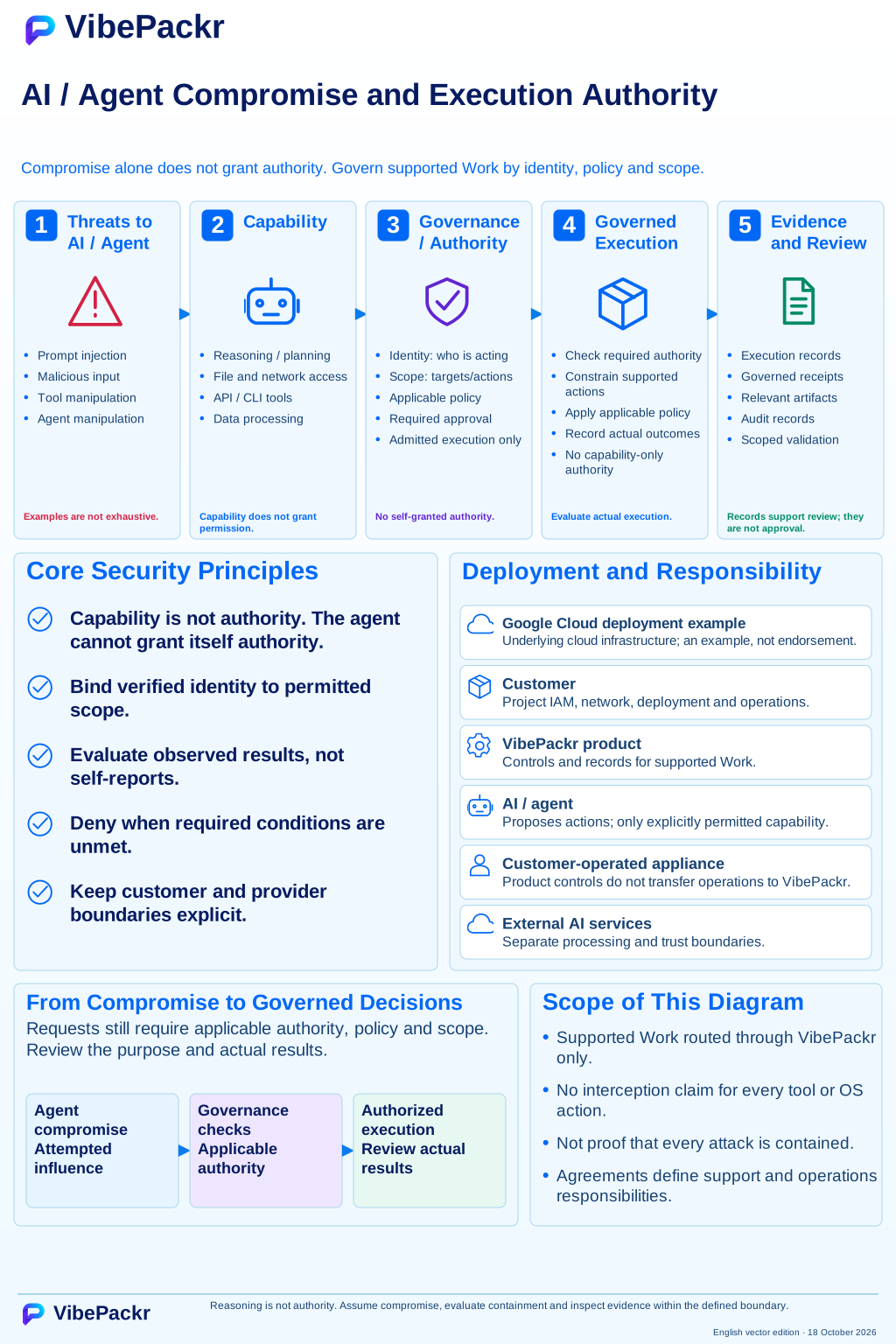
Five stages. Distinct decisions.
- 01
Threats to AI / Agent
Prompt injection, malicious input, tool manipulation and agent manipulation can attempt to influence an agent. These are threat examples, not an exhaustive list or a claim of tested protection against each attack.
- 02
Capability
Reasoning, planning, file and network access, API / CLI tools and data processing describe what an agent may be capable of doing. Capability does not grant permission to perform a particular operation.
- 03
Governance / Authority
Establish who is acting, the permitted targets and actions, applicable policy constraints and approval where required. The agent does not grant itself authority. Required conditions must be met before supported Work is admitted for execution.
- 04
Governed Execution
VibePackr checks authority, applies policy, limits supported actions and records outcomes for Work routed through its supported paths. It denies execution when required conditions are unmet. Protect actions outside those paths with the relevant platform and operating-system controls.
- 05
Evidence and Review
Review execution records, technical receipts, artifacts and audit records against the intended purpose. An authorized reviewer decides business acceptance after checking the results and evidence; an agent cannot make that decision for the organization.
Customer-operated appliance.
Explicit product and provider boundaries.
This diagram uses Google Cloud to explain deployment roles. Provider names identify examples, not partnerships. Confirm supported platforms and deployment prerequisites in the applicable release documentation.
Customer
Owns project IAM, network configuration, deployment and operations in the illustrated environment. Product controls do not transfer customer operations to VibePackr.
VibePackr product
Provides execution controls and records for supported Work. Confirm the selected release, supported path and applicable agreements for an evaluation.
Cloud infrastructure
Google Cloud supplies the underlying cloud infrastructure in this example. Customer configuration and operational responsibilities remain separate.
AI / Agent and external AI
The agent proposes actions and uses explicitly permitted capabilities. Selected external AI services retain their own processing boundaries.
Apply this boundary to one governed workflow.
Select one enterprise AI workflow, identify the required authority and policy conditions, and review the evidence needed before acceptance. Use the 11-step PoC guide or contact our architecture team to scope a bounded evaluation.
Contact boundary notice: Clicking “Request an Evaluation” opens your local email client addressed to support@vibepackr.com; it does not automatically create a support ticket or provision an environment. Please exclude credentials, personal data, and confidential logs.