
SDK Engine: extension without extra authority
Use the SDK Engine to create local adapter candidates when your integration needs custom authoring. Follow Part.5 for inputs, generated files and toolchain setup. Full Enterprise integration requires separate implementation and validation; existing supported Work paths can operate without new SDK authoring.
Technical Whitepaper · EN and KR Editions · 18 October 2026 · Figure 20
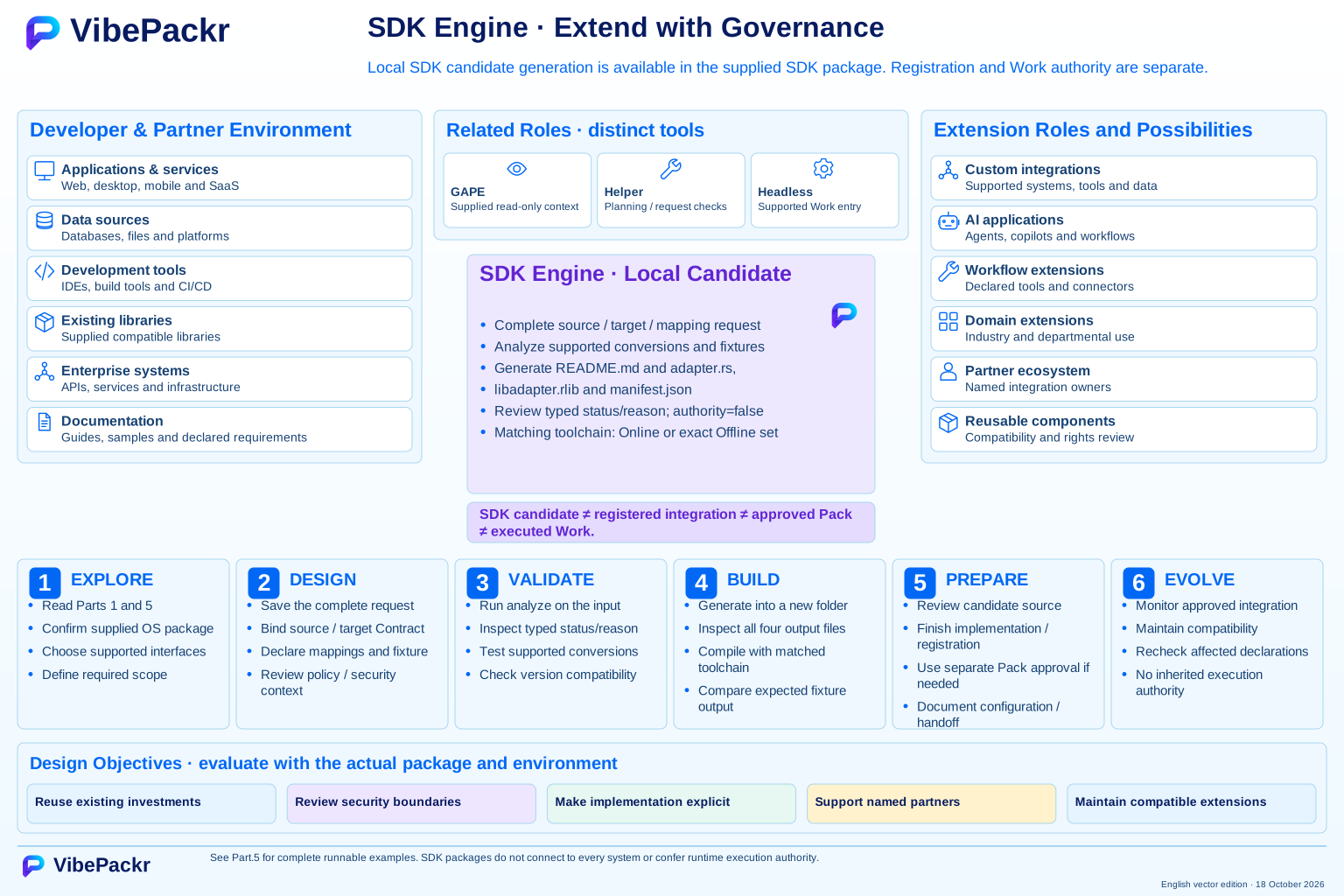
Open the full-resolution image to zoom; use your browser’s Back button to return. The complete plate is preserved; the explanation below remains readable without zooming.
Read the guide
A reading guide to the figure and its scope, not a claim of current implementation for every depicted concept.
Developer and partner environment
The diagram begins with applications, data, development tools, existing libraries, enterprise systems and documentation. These are possible integration inputs rather than a supported-language or connector matrix.
Implementation, integration and dependency
Generate local SDK adapter candidates using Part.5. The supported Rust integration API is a separate surface. Complete implementation review, registration and connection validation before using a candidate with other tools. Full Enterprise integration and desktop embedding require separately supported implementation; SDK authoring is optional for existing supported Work paths.
Enablement layer
Libraries and interfaces, patterns, testing utilities, examples, version compatibility and reusable components are distinct concerns. The reference architecture does not announce that every item is packaged or released.
Extension categories
Custom integrations, applications, workflow extensions, domain extensions, partner solutions and reusable modules describe potential uses. Extension capability never transfers execution authority.
Discover · develop · validate
Review declared interfaces and documentation, identify the use case, then implement and test within supported requirements. Compatibility needs evidence, not just successful compilation.
Integrate · prepare · evolve
Connect through declared interfaces, document configuration, verify the compatibility matrix and prepare a governed handoff. Later changes require compatibility and scope review again.
About this reference
Figure 20 is provided as a current English SVG and included in both the English and Korean technical whitepapers dated 18 October 2026. Open the SVG to zoom, or use the PDF figure index to find the full plate.
Use this reference to understand architecture, responsibilities and planned capabilities. Use the applicable release documentation for deployment, and assign certification, legal and business acceptance decisions to your authorized reviewers.
Apply this boundary to one governed workflow.
Select one enterprise AI workflow, identify the required authority and policy conditions, and review the evidence needed before acceptance. Use the 11-step PoC guide or contact our architecture team to agree on the scope of your evaluation.
Contact boundary notice: Clicking “Request an Evaluation” opens your local email client addressed to support@vibepackr.com; it does not automatically create a support ticket or provision an environment. Please exclude credentials, personal data, and confidential logs.