After the PoC, connect VibePackr to the workbench your team already uses. This subsection separates client integration from the main installation and Work walkthrough. Follow CALF as the example, then adapt the MCP, Adapter and SDK interfaces to your application.
Local by defaultSingle-agent compatiblePreserved recordsEvidence before adoption
01 / The route
One connection, clear responsibilities.
CALF · a lightweight AI harness and workbench
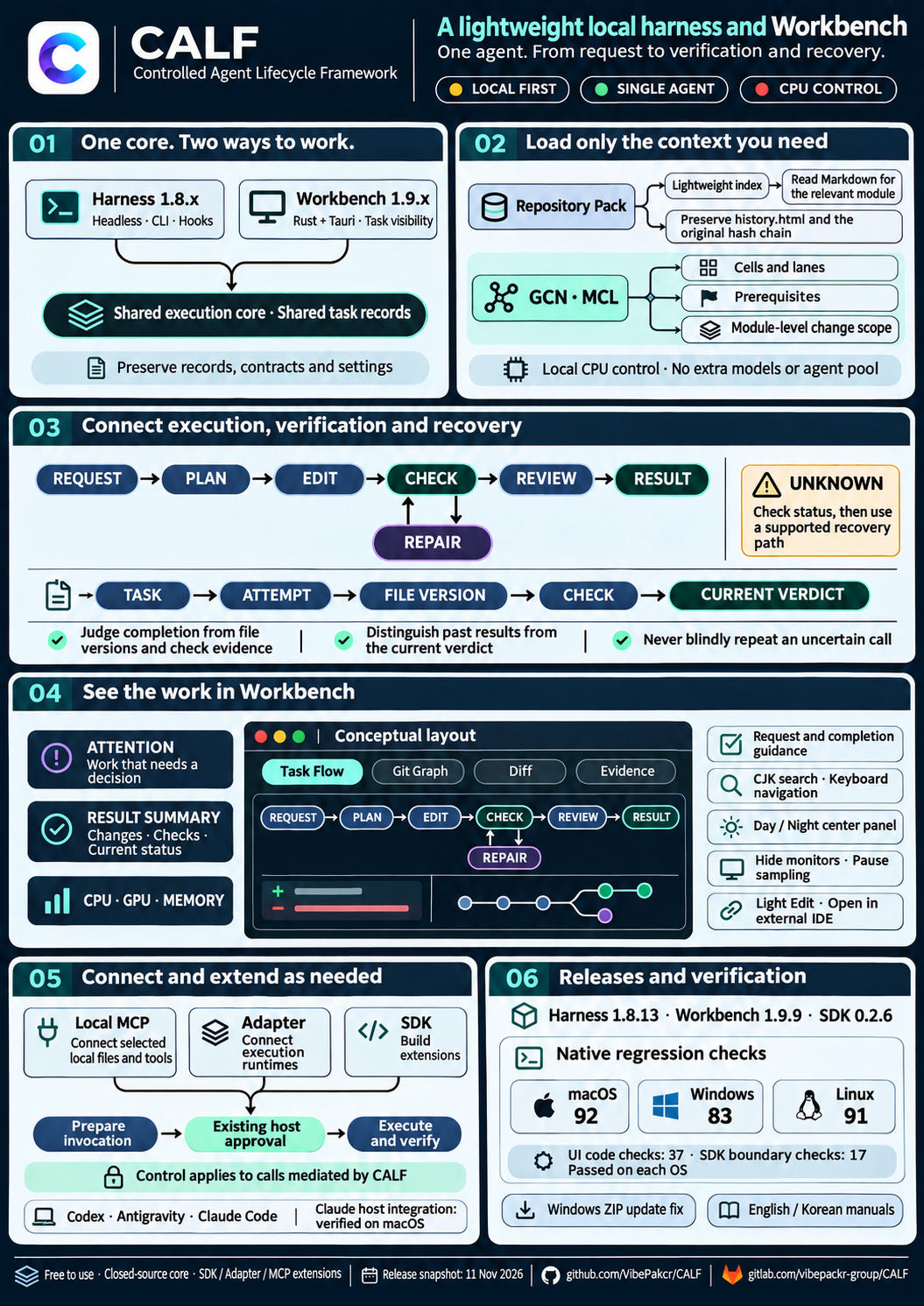
CALF (Controlled Agent Lifecycle Framework) is a lightweight local AI harness with a Rust execution core and a Tauri workbench. It connects work conditions, permission boundaries, execution, verification, recovery and retained records. Completion is checked against execution records and required checks; previous results and failed attempts are preserved for review and recovery.
Its documented CLI, SDK and MCP interfaces connect agent hosts such as Codex, Antigravity and Claude without binding CALF to one AI model. The design goal is to reuse established tools and procedures for repetitive work, reduce unnecessary model calls, context loading and rework, and let AI focus on new decisions.
Current reference client · 11 November 2026: Harness 1.8.13, Workbench 1.9.9 and SDK 0.2.6. The headless harness and Workbench use the same core and records; opening the UI does not create another execution engine.
Codex and Antigravity connect through native hooks. Claude CLI and the desktop app’s local Code mode use the macOS adapter; that host connection is separate from Windows/Linux core qualification. Each host retains its account, model and approval policy.
Context within scope
GCN/MCL use local CPU control for cells, lanes, prerequisites and module change scopes. The optional Repository Pack retrieves a lightweight index and relevant module Markdown while preserving history.html and its original hash chain.
Current Workbench controls
Attention, result summaries and request guidance help users find the next decision. Task Flow, Git Graph, Diff and Evidence show execution and changes. CJK search, keyboard navigation, a Day/Night center and folding monitors keep the view manageable.
Current evidence, retained history
Separate recorded completion from the current verdict. Matching file versions and required checks determine acceptance; UNKNOWN and VIOLATED never count as completion. Light Edit and external-editor links support small changes through the existing check workflow.
MCP calls within the contract
The optional Tool MCP path evaluates contracts, tool choice, call arguments and results. Its qualified profile covers reviewed local stdio reads, host-admitted new candidates and originally configured local recovery. Control applies only to calls mediated by CALF.
Read the current downloads, host guides and Tool MCP scope before connecting an extension. No extra model, resident service, GPU control computation or multi-agent scheduler is required.
The PoC package installs on your own compatible VM in AWS, Azure, GCP or on-premises; no cloud marketplace listing or subscription is required. The current server target is Debian 13 amd64/x86_64 with systemd. Your team provides the required installation privileges, storage and network access. Google sign-in to the download portal does not require GCP hosting. This describes the deployment model, not a qualification of every cloud configuration.
PoC subsection: Customer Workbench Integration. The main PoC establishes installation, a first Work and its results. This section addresses the next question: how can your existing workbench connect requests and execution evidence to VibePackr? Keeping integration details here lets the main PoC stay focused while teams that need the connection can follow a concrete example. Start with the preparation handoff.
Keep the customer’s workbench. Use native VibePackr operations for integration analysis and product work, and CALF for local execution records and file validation. CALF is the worked example; the same boundaries apply to another customer application.
This exercise runs two linked stages: native analysis, then a local report task. It does not require an AI agent. A real product Work follows the separate product Work handoff after the report exercise.
Interface
What it does here
VibePackr Local MCP
The native packr-agent-mcp stdio server exposes its registered product tools. The reference Adapter is its client.
CALF Work MCP
calf work-mcp RECORDS lets an MCP host inspect CALF work; --control explicitly enables work actions.
CALF Local Sources MCP
calf local-mcp ROOT reads chosen local files. It is not the VibePackr tool connection.
SDK + runtime Adapter
The SDK calls the existing core. A registered runtime Adapter produces file candidates; the core runs the required checks.
02 / Preparation
What you need before you start.
Start here after the PoC common installation and workspace setup. The setup owner hands over the following installation-specific values once; operators then follow download, connection and verification below. Keep these values in the private PoC handoff, not in the public guide.
PoC handoff item
Ready when
Native package identity
Record the supplied VibePackr release/build ID, OS/architecture, trusted delivery source and catalog digest. Use its matching MCP_SETUP.md.
Private connection
The generated descriptor, reviewed registration and verified executable/descriptor hashes refer to that same package and workspace.
Registered exercise input
The intended input ID, format and file hash are registered; the setup owner identifies which analysis is allowed.
Local exercise location
Python 3.10+, a new private exercise folder and one CALF records home are selected. Existing records, contracts and settings retain their original locations.
Customer / operator
Download CALF Workbench and SDK. Choose a private exercise folder and a records home. Python 3.10+ is required for this example; no AI subscription or local model is needed.
VibePackr setup owner
Supply the matching native MCP executable/catalog, reviewed registration, generated descriptor, verified digests and an allowed input ID. A CALF download alone does not include these installation-specific files.
This companion supplies the reference connection Adapter and report-binding example. It is a reference integration, not a built-in “Connect VibePackr” button in CALF 1.9.9. Existing AI/MCP host settings are never replaced by these examples.
Folder plan · 폴더 구성
integration-lab/
  VibePackr-Workbench-Examples/   # extracted companion
  CALF-SDK-0.2.6/                # separately downloaded SDK
  private/connection.json       # your verified native descriptor pins
  capture-01/                   # created by capture_analysis.py
  binding-01/                   # created by bind_report.py prepare
  records/                      # shared CALF records for this exercise
Create the integration-lab and private folders first using your file manager; choose a location accessible only to your user. The example creates capture/binding output folders and refuses to overwrite existing ones.
For the first exercise use a new records folder. To show existing work later, select its exact existing home. Preserve history.html, contracts, settings and retained runtimes; do not copy or edit private state files to connect an application.
03 / Install CALF
Download, verify, open.
Install CALF with your AI assistant
The instructions below use the current published client and SDK. Verify exact release files and keep previous versions, records, contracts and settings. Historical native-connection proof is dated separately under References.
CALF installation · AI handoff
Read https://www.vibepackr.com/poc/workbench/install.md.
Prepare the CALF client for this PoC reference lab on my actual OS: Workbench 1.9.9 (or Harness 1.8.13) and SDK 0.2.6.
Preserve existing records, contracts, settings and runtimes. Verify downloads, native version/help and SDK import in new folders.
Report actual paths/results and missing prerequisites. Keep host settings, model calls and existing task execution outside this first installation.
Compare the downloaded archive’s SHA-256 with the exact filename in the official manifest. Keep the original archive.
Extract the complete Workbench and SDK into separate versioned folders. The example commands below use placeholders: replace every absolute path before running.
macOS · shell
shasum -a 256 CALF-Workbench-1.9.9-macos-arm64.zip
shasum -a 256 CALF-SDK-0.2.6.zip
unzip CALF-Workbench-1.9.9-macos-arm64.zip
unzip CALF-SDK-0.2.6.zip
# Set actual absolute paths after extraction:
CALF="/absolute/CALF-Workbench-1.9.9-macos-arm64/CALF Workbench.app/Contents/MacOS/calf"
SDK="/absolute/CALF-SDK-0.2.6"
EXAMPLES="/absolute/VibePackr-Workbench-Examples"
LAB="/absolute/integration-lab"
export CALF_WORK_HOME="$LAB/records"
"$CALF" --version
# Start from this terminal so this window receives the same records home:
"/absolute/CALF-Workbench-1.9.9-macos-arm64/CALF Workbench.app/Contents/MacOS/calf-terminal"
sha256sum CALF-Workbench-1.9.9-linux-x86_64.tar.gz
sha256sum CALF-SDK-0.2.6.zip
tar -xzf CALF-Workbench-1.9.9-linux-x86_64.tar.gz
unzip CALF-SDK-0.2.6.zip
# Set actual absolute paths after extraction:
CALF="/absolute/CALF-Workbench-1.9.9-linux-x86_64/calf"
SDK="/absolute/CALF-SDK-0.2.6"
EXAMPLES="/absolute/VibePackr-Workbench-Examples"
LAB="/absolute/integration-lab"
export CALF_WORK_HOME="$LAB/records"
"$CALF" --version
"/absolute/CALF-Workbench-1.9.9-linux-x86_64/calf-terminal"
Open a second terminal with the same variables for the following commands. Close only the exercise window when changing its records home. CALF is free to use with a closed core; extensions use the documented SDK/Adapter/MCP boundary. The macOS package is ad-hoc signed, not notarized; Windows has no publisher signature. Follow your OS’s normal trust workflow for the verified package.
04 / Local MCP + Adapter
Connect the native VibePackr endpoint.
Download and extract the examples below. The connection Adapter uses Python’s standard library, launches one native stdio child on demand, discovers the actual tools, and closes it after use. It does not open an HTTP port or install a daemon.
Ask the setup owner for the generated mcp-server.json, its verified SHA-256 and the matching packr-agent-mcp SHA-256. Keep the referenced registration/catalog in their private locations.
Copy connection.example.json to private/connection.json and fill the three values below. A locally computed hash helps compare bytes; it does not establish publisher trust by itself.
Run setup status once. Inspect the returned native envelope and discovered catalog before proceeding.
A native setup response proves this local route is working. product_result.status: null, product_evidence: false and execution_authority: NONE are valid observations. They do not mean the appliance is ready or a Work has completed.
For the setup owner: creating a new registration
Use the matching VibePackr package’s manuals/agent-integration/MCP_SETUP.md. Prepare a private packr.agent-mcp.setup-request.v1 request with a fresh output directory, GENERIC_STDIO_DESCRIPTOR, exact catalog digest, workspace identity/root and approved input IDs/hashes/formats. Run packr-agent-mcp register /absolute/private/setup-request.json. Preserve the generated registration, descriptor and setup receipt.
For local analysis, control-plane and owner sockets may be null. Appliance operations require the real supported channels and runtime binding. Do not create a new catalog just to bypass an identity mismatch. If the native package or published target contract is missing, obtain it before this step.
05 / First connected task
Run one registered analysis.
Use the allowed input ID supplied by the setup owner. This example calls vibepackr.sdk.analyze for a complete registered integration request. It does not send an arbitrary local path, prompt or token. The companion saves the original envelope, call identity and connection observation as UTF-8 files.
Whether the native return was observed; not a business-success verdict.
product_result.payload.native_return
Ok or Err for the analysis. Preserve reason and null fields.
reconciliation
Distinguishes a new observation, a retained cached result and an uncertain operation.
product_evidence
false in this adapter envelope. Do not turn it into a product receipt.
If the output directory exists, the script stops before calling the server. If a call times out, inspect intent.json/error.json and reconcile the same operation reference. A new output directory or reference is not permission to repeat an uncertain native action.
06 / CALF contract + runtime Adapter
Bind the result to a checked file version.
The next step is a separate CALF report task. Its input is the captured native response. The runtime Adapter creates native.json and report.json without contacting VibePackr again. Seven native checks bind the original bytes, exact report fields, successful analysis and absence of an appliance Work/approval claim.
Verification scope: use the capture produced through your trusted native connection. CALF freezes that input and validates its report; it does not independently authenticate an arbitrary imported JSON file as a genuine native response. SATISFIED here means the report contract passed, not that customer business work completed.
Keep the printed work ID and manifest digest. bind_report.py ... inspect --work WORK_ID validates current record and file identities; it does not rerun the full check suite. bind_report.py ... adopt --work WORK_ID --digest MANIFEST_DIGEST performs explicit adoption. The omitted common arguments are the same SDK/core/records values above. See recovery commands for a complete inspection command.
07 / Screen walkthrough
See the same work in Workbench.
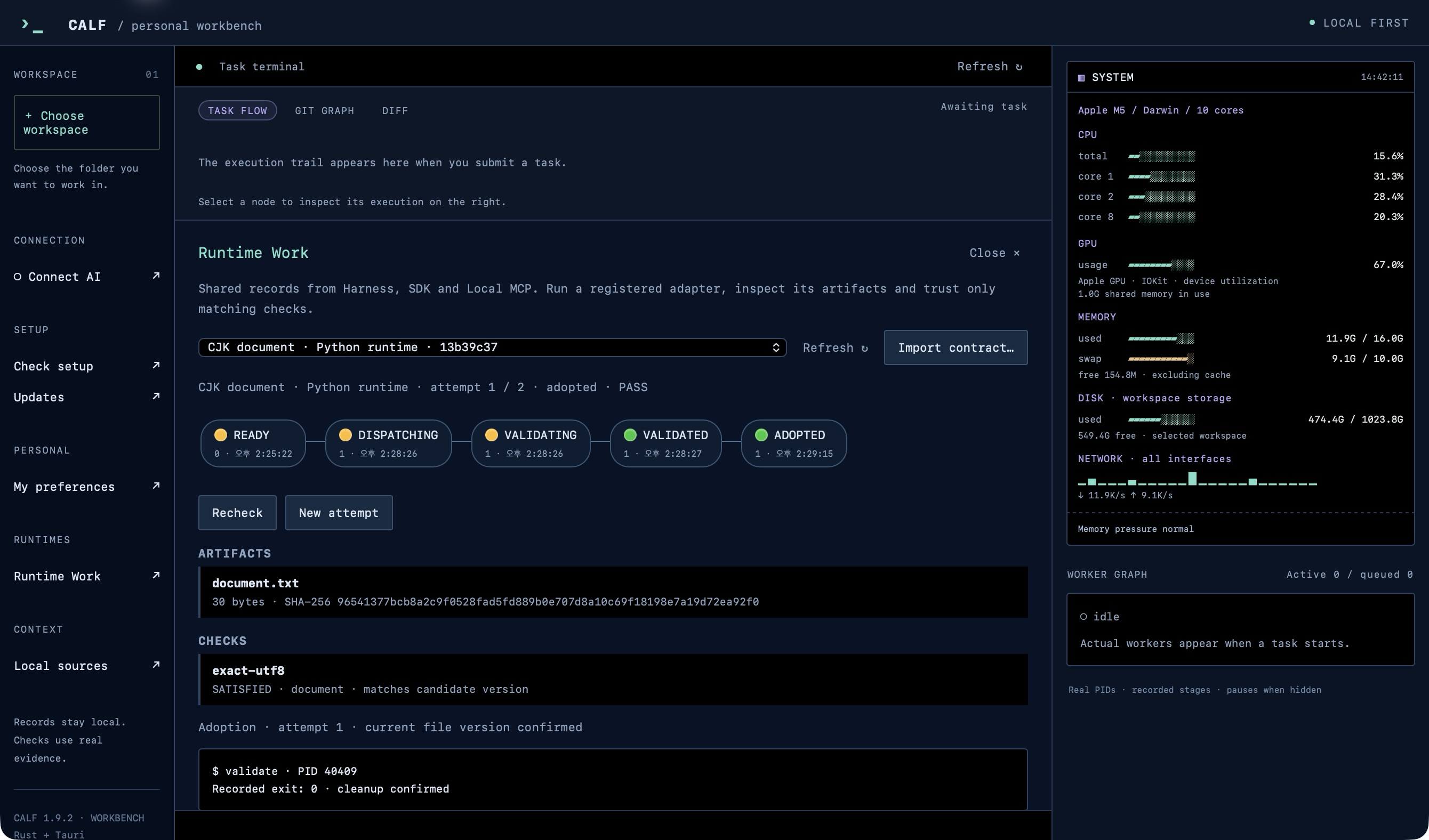
Open Workbench with the same CALF_WORK_HOME used by the SDK. Choose Runtime Work.
For a prepared-only task, choose Import contract… → binding-01/work-spec.json → Add work, then run the offered action. If the SDK already ran it, choose Refresh and the existing work instead.
Inspect stages, both artifacts, seven checks and Evidence JSON. Verify the report scope and exact digest before Adopt checked version.
Reopen the same records home to inspect retained evidence. The task ID and adopted digest should remain the same.
Current CALF overview · A4
Public capability overview for the 11 November release. The terminal drawing is a conceptual layout, not a capture of this integration exercise. Open the original image to read the full-size text.
Open the full-size English infographicEarlier actual Runtime Work screen · 1.9.2Actual Workbench 1.9.2 release capture: a Python CJK document task, shown to locate Runtime Work controls. This is not a screenshot of the VibePackr analysis exercise.
After adoption, inspect adoptedValid as well as the current outcome. The adopted object preserves historical selection even if later file changes make it invalid.
This workflow uses additive work-v1 records. Legacy hook history and advanced calf run state are not automatically imported into the Runtime Work list. A missing work often means a different records home; do not migrate files by hand.
08 / Optional work MCP
Let an MCP-capable host inspect CALF.
The generated binding-01/work-mcp.json is a launch descriptor. Merge it as a named entry through your host’s supported MCP settings. It is not an entire settings file and the SDK does not install it automatically. CALF Workbench 1.9.9 does not offer arbitrary external MCP-server registration.
On Windows, use the absolute calf.exe path and escaped backslashes in JSON. Keep one selected records home. Add "--control" to args only when the host is authorized to submit/step/cancel/retry/recheck/adopt. Adapter registration remains local API/SDK only.
The reference client requests 2025-06-18 and checks negotiation. Use exact discovered wire names, e.g. vibepackr_sdk_analyze, not guessed capabilities.
MCP transport does not grant OS access, runtime binding or product approval. The host owns its permissions. Calls are serial; cancel during a blocking CALF MCP call requires a separate native API/SDK process.
09 / SDK recipes
Bind your own customer workbench.
A workbench with MCP support can use the native descriptors. A workbench with a local process/API extension can use the SDK. Keep one agent and one shared records home; no extra agent scheduler, vector database or resident model is needed. The thin integration owns presentation and IDs, while each native product retains its own decisions.
Python · inspect before adoption
Python · SDK 0.2.6
import json
from pathlib import Path
from calf_sdk import CalfClient

# Run with the extracted CALF-SDK-0.2.6 on Python's module path.
client = CalfClient("/absolute/calf", "/absolute/records", timeout=35)
spec = json.loads(Path("work-spec.json").read_text(encoding="utf-8"))
accepted = client.work("submit", spec=spec)  # frozen; not executed
client.work("step", work=accepted["work"])
result = client.work("inspect", work=accepted["work"])
if result.get("verified") is True and result.get("outcome") == "SATISFIED":
    digest = result["manifest"]["digest"]
    print("Ready for explicit adoption:", accepted["work"], digest)
# After the user's explicit adoption action:
# client.work("adopt", work=accepted["work"], digest=digest)
Node.js · read the same record
JavaScript · ESM · no npm dependencies
import {CalfClient} from './CALF-SDK-0.2.6/node/index.mjs';
const client = new CalfClient('/absolute/calf', '/absolute/records');
const result = await client.work('inspect', {work: 'work-<actual ID>'});
console.log(JSON.stringify({
  verified: result.verified,
  outcome: result.outcome,
  manifest: result.manifest,
  adopted: result.adopted,
  adoptedValid: result.adoptedValid
}, null, 2));
// A transport exception has unknown effects; do not auto-retry a mutation.
VibePackr connection binding
Python · native MCP reference Adapter
from calf_vibepackr import Connection

with Connection.from_config("/absolute/private/connection.json") as native:
    result = native.call("vibepackr.sdk.analyze", "analysis:stable-001",
                         {"input_id": "registered-input"})
    # Keep these separate in your application:
    transport = result["transport_status"]
    product = result["product_result"]
    reconciliation = result["reconciliation"]
    # Persist the complete result, including null and false values.
    # No automatic retry and no manufactured PASS/receipt.
Customer UI action
Binding
Connect / refresh capabilities
Native descriptor → negotiated MCP initialization → actual tools/list.
Analyze registered input
Stable operation reference + registered input ID → original VibePackr result.
Run / inspect local report
CALF SDK submit/step/inspect or opted-in Work MCP; same records home.
Show evidence / adopt
Verified current manifest and check receipts → explicit exact-digest adoption.
Resume after interruption
Inspect the original work and operation IDs; reconcile before a new attempt.
To support another runtime, implement calf.runtime.v1 in a registered argv-based Adapter. It receives one request-file path and emits one bounded JSON result. Independent checks define acceptance. The supplied SDK examples include Python, Node and loopback HTTP; asynchronous runtimes must query the original request ID after uncertain submission.
10 / Operational handoff
From a checked report to real product Work.
The exercise ends with a checked analysis report. To execute a real VibePackr Work, the setup owner must supply the supported installation connection, registered runtime and exact contract/approval path. An SDK-generated mapping candidate or CALF-adopted report does not supply those prerequisites.
Discover the actual VibePackr catalog. Updated packages may expose manual Work phases; older packages do not gain tools from this guide.
Use the installed package’s BOOTSTRAP.md and Work guide for supported input formats, runtime binding and authorized phase progression. Retain each native reason and next action.
Link the customer request, CALF work/attempt, VibePackr operation and original product Work reference. Keep product receipts separate from CALF check receipts.
Complete only when that native Work’s validation, recovery state and required approval/receipt are confirmed. Preserve unknown, pending and refused states.
The reference integration does not implement an approval tool, an owner-channel bypass or remote credential management. A local report can be SATISFIED while product Work remains unstarted. That is an accurate state, not a failed connection.
11 / Troubleshooting
If the next step is blocked.
Observation
Next action
Pin/catalog mismatch
Use the matching verified native package/descriptor; obtain a fresh reviewed registration for an update.
INPUT_NOT_REGISTERED / INPUT_DIGEST_DRIFT
Ask the setup owner to register the intended file/version. Preserve the old input/registration.
CONTROL_PLANE_NOT_CONFIGURED
Local analysis may work; appliance queries need the real approved local channel.
Timeout / EOF / reconciliation required
Keep the original operation reference. Query/reconcile its state; do not delete the journal or force resubmission.
Native Err but process exit 0
Read product reason. Transport completed; the product rejected the operation. The CALF report check must not pass.
Runtime Work list is empty
Confirm the exact records home, version and task type; Refresh. Do not copy journal files.
CALF UNKNOWN / stale evidence
Inspect current inputs, Adapter identity, candidate hashes and required checks. Recheck only after the cause is understood.
MCP host shows zero tools
Inspect protocol negotiation and tools/list. “Enabled” alone is not a live connection.
1. After an interrupted native analysis
First read the existing capture files. These commands only display local JSON and do not call VibePackr. Run the second command only if error.json exists; its absence does not establish success. Keep the same terminal variables from installation.
macOS · shell
python3 -m json.tool "$LAB/capture-01/intent.json"
# Only if error.json exists:
python3 -m json.tool "$LAB/capture-01/error.json"
Windows · PowerShell
py -3 -m json.tool "$Lab\capture-01\intent.json"
# Only if error.json exists:
py -3 -m json.tool "$Lab\capture-01\error.json"
Linux · shell
python3 -m json.tool "$LAB/capture-01/intent.json"
# Only if error.json exists:
python3 -m json.tool "$LAB/capture-01/error.json"
Retained native state
Recovery decision
Matching reservation and result
The setup owner can retrieve the retained result through the installed package’s supported path. An identical call returns ADAPTER_LOCAL_CACHED_RESULT_NOT_NEW_PRODUCT_EXECUTION; retain that cached origin.
Reservation exists, result missing
RECONCILIATION_REQUIRED_NO_REINVOKE: stop resubmission and resolve the original operation with the setup owner. Do not delete its journal.
Reservation absent or identity changed
Repeating the call is not a read-only query: it may execute anew or return OPERATION_IDENTITY_CONFLICT. Establish the original outcome and the permitted next action before any new attempt.
There is no generic reconciliation command in this companion. Supply the original operation ID, tool, input ID and retained error to the setup owner. For real product Work, use only the query supported by its installed catalog and original product reference. A new capture folder is a place to preserve a confirmed result, not a reason to retry.
2. After CALF submitted the report task
Find the existing work ID in the accepted.work field of the first line of run-01.jsonl, or in Workbench Runtime Work using the same records home. Replace WORK_ID below. If the run file is missing or partial, inspect the existing list first; do not delete it to rerun submission.
Inspection checks current record/file identity without running the report Adapter again. Keep an active or busy task unresolved until its current state is known. If evidence is stale, resolve the changed input, Adapter or candidate, then use the existing task’s supported Recheck action; do not substitute an old successful receipt. Only adopt when the current result is verified and SATISFIED with the exact current digest. This report contract allows one attempt; it does not authorize an unlimited retry loop.
12 / Reference
Versions, evidence and companion files.
Checked on 11 November 2026 on macOS ARM64 with released Harness 1.8.13 and SDK 0.2.6: the report Adapter passed seven checks for a synthetic captured-analysis envelope, rejected an Err fixture, adopted an exact digest and exposed the same record through Python, Node and read-only Work MCP. A changed candidate returned UNKNOWN and adoptedValid=false while preserving adoption history. This compatibility check made no fresh native VibePackr analysis or AI/provider call and completed no customer appliance Work.
Original native connection qualification · 6 November
Recorded on 6 November 2026 with CALF 1.8.7, Workbench 1.9.2 and SDK 0.2.1: actual native VibePackr MCP analysis, captured result, report Adapter execution, seven checks, exact-digest adoption and read-only Work MCP. A native Err was rejected; candidate changes produced UNKNOWN and adoptedValid=false while retaining adoption history. This used a new synthetic input and isolated development catalog, not a live customer appliance Work.
The current CALF core and SDK releases have separate macOS ARM64, Windows x64 and Linux x64 qualification. That does not qualify the VibePackr reference binding on all three OSes. This guide provides platform-specific commands; use a matching native VibePackr package and verify the actual customer installation.
Native VibePackr references used: supplied MCP_SETUP.md, BOOTSTRAP.md and the existing CALF local Adapter contract. This PoC subsection documents the optional customer-workbench integration path. No live customer data, private connection files or proprietary core source is included.
The original example archive remains available for reproducing the dated reference. Use the current versioned companion for this walkthrough; do not merge it into an existing example folder.Original ZIP
CALF Harness 1.8.13 · Workbench 1.9.9 · SDK 0.2.6 Guide revision 3 · 2026-11-11 Example ZIP SHA-256: 9cbb333f459ac06804997b1276b469b270106a4b280291896471681be33a8b77